


Hardware components | ||||||
 |
| × | 1 | |||
_ztBMuBhMHo.jpg?auto=compress%2Cformat&w=48&h=48&fit=fill&bg=ffffff) |
| × | 1 | |||
 |
| × | 1 | |||
 |
| × | 5 | |||
Software apps and online services | ||||||
 |
| |||||
| ||||||
 |
| |||||
I live in Agra. In my locality, the people get their milk every evening when the milk van arrives. The van drops off barrels of milk for the entire locality and collects the empty barrels later in the evening. The volunteers responsible for milk distribution collect these barrels and inform the residents to collect the milk.
This information is given to the residents by ringing a gong/bell at the milk distribution point. But the problem is that the sound of the gong/ bell is audible upto a radius of 50 meters or so. Therefore, many people don't get the information which leads to delay in distribution. Many a times, people are not able to get their milk because they couldn't receive the information in time.
This system attempts to eliminate this problem by sending a notification to the residents via Telegram when the gong/ bell is rung.
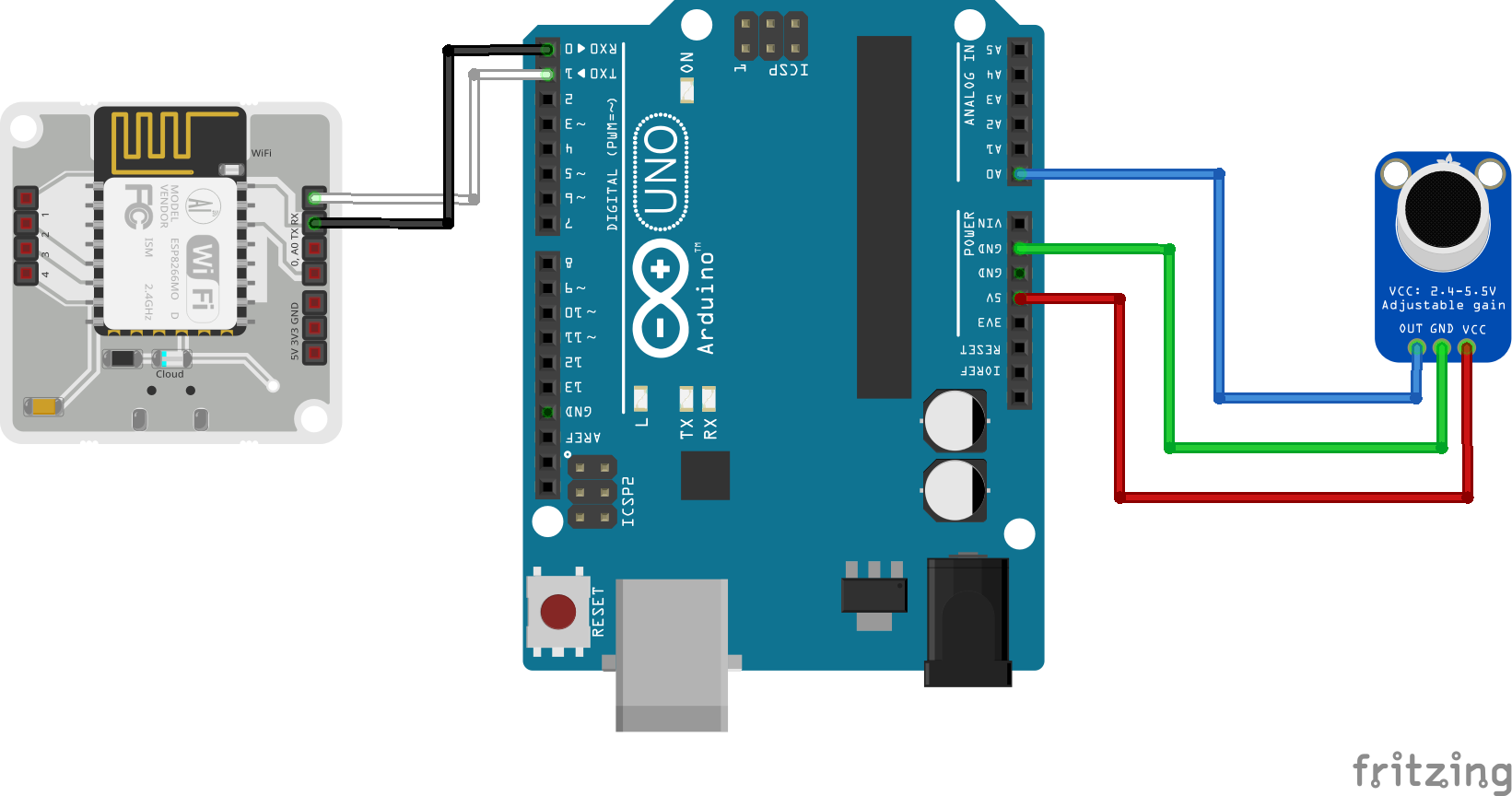
DemonstrationHere, I am using a small plate to simulate the ringing of the gong.Hardware SetupAn Adafruit MAX4466 Electret microphone has been used to pick up sound of the ringing of the bell. This mic has been interfaced with the BOLT Wifi Module using an Arduino Uno as shown in the following Fritzing diagram.
Download Telegram from the Play Store and sign up using your phone number. Now, follow the following steps to set up your telegram channel.
Bots are third-party applications that run inside Telegram. Users can interact with bots by sending them messages, commands and requests. Telegram allows us to create a new bot with the help of a bot called as "BotFather". It is a single bot to create and manage other bots. Follow the following steps to setup the bot.
After the bot has been set up, add the bot the channel you created and make it an admin.
Create a python file named 'conf.py' on your VPS and enter the following information:
bolt_api_key = "XXXX"                   # This is your Bolt Cloud API Key.
device_id = "XXXX"   # This is the device ID and will be similar to BOLTXXXX.
telegram_chat_id = "@XXXX" # This is the channel ID of the Telegram channel.
telegram_bot_id = "botXXXX"     # This is the bot ID of the  Telegram Bot.
frame_size = 10                 # Number of data points being considered
mul_factor = 3 # Multiplication constant for Z-Score AnalysisThis code reads noise values from the mic and sends it to the Bolt Wifi Module via serial communication.
int data;
void setup() {
// put your setup code here, to run once:
pinMode(A0,INPUT);
Serial.begin(9600);
}
void loop() {
// put your main code here, to run repeatedly:
data= analogRead(A0);
Serial.println(String(data));
delay(5000);The code can be basically divided into three major parts. They are,
- Reading values from the Bolt device
- Comparing the sensor value with the threshold. (The threshold value has been determined by using Z-Score Analysis)
- Sending a message via Telegram if the threshold has been breached.
The above steps are put in a while loop so that it reads the sensor value every 10 seconds and sends the alert if required.
The entire code has been provided in the 'Code' section of this tutorial.
ConclusionThis system can be adopted for many use cases such as flood detection, temperature monitoring, irrigation systems, emergency notification etc. All you need to do is to swap out the sensor with a suitable one and write a suitable message to be conveyed to the public.


Comments