




Hardware components | ||||||
 |
| × | 1 | |||
Software apps and online services | ||||||
 |
| |||||
Hand tools and fabrication machines | ||||||
| ||||||
 |
| |||||
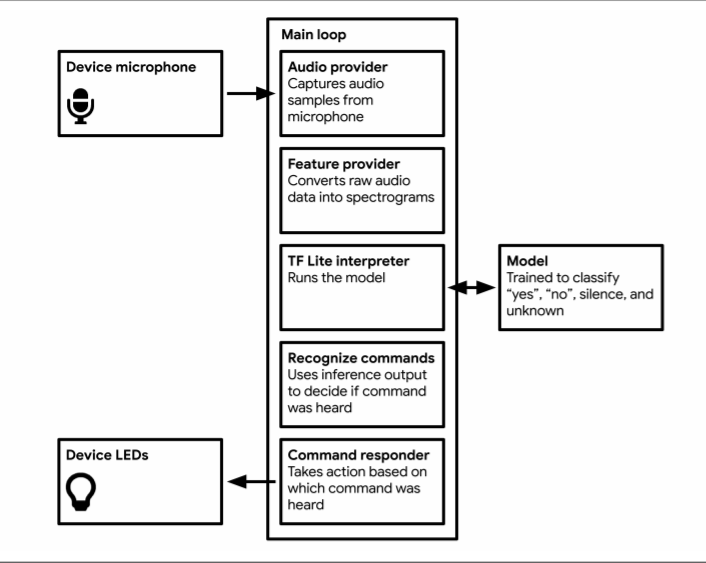
As the popularity of digital assistants, such as Google Assistant, Apple's Siri, and Amazon Alexa, is increasing enormously in recent years, we decide to do a small word-recognition based on Chapter 7 of TinyML: Wake word detection: Building an application.
This is an application listening to its surroundings with a microphone, and it would respond with a green light when hearing 'yes' and a red light when hearing 'no'.
Application architecture
1. Takes audio data as input
2. pre-process the audio to extract features which are suitable to feed into the classifier
3. Runs inference on the processed audio
4. Post-processes the model to output and parse the output to make sense of it
5. Uses the resulting information to do things

/* Copyright 2018 The TensorFlow Authors. All Rights Reserved.
Licensed under the Apache License, Version 2.0 (the "License");
you may not use this file except in compliance with the License.
You may obtain a copy of the License at
http://www.apache.org/licenses/LICENSE-2.0
Unless required by applicable law or agreed to in writing, software
distributed under the License is distributed on an "AS IS" BASIS,
WITHOUT WARRANTIES OR CONDITIONS OF ANY KIND, either express or implied.
See the License for the specific language governing permissions and
limitations under the License.
==============================================================================*/
#include "tensorflow/lite/micro/examples/micro_speech/main_functions.h"
#include "tensorflow/lite/micro/examples/micro_speech/audio_provider.h"
#include "tensorflow/lite/micro/examples/micro_speech/command_responder.h"
#include "tensorflow/lite/micro/examples/micro_speech/feature_provider.h"
#include "tensorflow/lite/micro/examples/micro_speech/micro_features/micro_model_settings.h"
#include "tensorflow/lite/micro/examples/micro_speech/micro_features/tiny_conv_micro_features_model_data.h"
#include "tensorflow/lite/micro/examples/micro_speech/recognize_commands.h"
#include "tensorflow/lite/micro/kernels/micro_ops.h"
#include "tensorflow/lite/micro/micro_error_reporter.h"
#include "tensorflow/lite/micro/micro_interpreter.h"
#include "tensorflow/lite/micro/micro_mutable_op_resolver.h"
#include "tensorflow/lite/schema/schema_generated.h"
#include "tensorflow/lite/version.h"
// Globals, used for compatibility with Arduino-style sketches.
namespace {
tflite::ErrorReporter* error_reporter = nullptr;
const tflite::Model* model = nullptr;
tflite::MicroInterpreter* interpreter = nullptr;
TfLiteTensor* model_input = nullptr;
FeatureProvider* feature_provider = nullptr;
RecognizeCommands* recognizer = nullptr;
int32_t previous_time = 0;
// Create an area of memory to use for input, output, and intermediate arrays.
// The size of this will depend on the model you're using, and may need to be
// determined by experimentation.
constexpr int kTensorArenaSize = 10 * 1024;
uint8_t tensor_arena[kTensorArenaSize];
} // namespace
// The name of this function is important for Arduino compatibility.
void setup() {
// Set up logging. Google style is to avoid globals or statics because of
// lifetime uncertainty, but since this has a trivial destructor it's okay.
// NOLINTNEXTLINE(runtime-global-variables)
static tflite::MicroErrorReporter micro_error_reporter;
error_reporter = µ_error_reporter;
// Map the model into a usable data structure. This doesn't involve any
// copying or parsing, it's a very lightweight operation.
model = tflite::GetModel(g_tiny_conv_micro_features_model_data);
if (model->version() != TFLITE_SCHEMA_VERSION) {
error_reporter->Report(
"Model provided is schema version %d not equal "
"to supported version %d.",
model->version(), TFLITE_SCHEMA_VERSION);
return;
}
// Pull in only the operation implementations we need.
// This relies on a complete list of all the ops needed by this graph.
// An easier approach is to just use the AllOpsResolver, but this will
// incur some penalty in code space for op implementations that are not
// needed by this graph.
//
// tflite::ops::micro::AllOpsResolver resolver;
// NOLINTNEXTLINE(runtime-global-variables)
static tflite::MicroMutableOpResolver micro_mutable_op_resolver;
micro_mutable_op_resolver.AddBuiltin(
tflite::BuiltinOperator_DEPTHWISE_CONV_2D,
tflite::ops::micro::Register_DEPTHWISE_CONV_2D());
micro_mutable_op_resolver.AddBuiltin(
tflite::BuiltinOperator_FULLY_CONNECTED,
tflite::ops::micro::Register_FULLY_CONNECTED());
micro_mutable_op_resolver.AddBuiltin(tflite::BuiltinOperator_SOFTMAX,
tflite::ops::micro::Register_SOFTMAX());
// Build an interpreter to run the model with.
static tflite::MicroInterpreter static_interpreter(
model, micro_mutable_op_resolver, tensor_arena, kTensorArenaSize,
error_reporter);
interpreter = &static_interpreter;
// Allocate memory from the tensor_arena for the model's tensors.
TfLiteStatus allocate_status = interpreter->AllocateTensors();
if (allocate_status != kTfLiteOk) {
error_reporter->Report("AllocateTensors() failed");
return;
}
// Get information about the memory area to use for the model's input.
model_input = interpreter->input(0);
if ((model_input->dims->size != 4) || (model_input->dims->data[0] != 1) ||
(model_input->dims->data[1] != kFeatureSliceCount) ||
(model_input->dims->data[2] != kFeatureSliceSize) ||
(model_input->type != kTfLiteUInt8)) {
error_reporter->Report("Bad input tensor parameters in model");
return;
}
// Prepare to access the audio spectrograms from a microphone or other source
// that will provide the inputs to the neural network.
// NOLINTNEXTLINE(runtime-global-variables)
static FeatureProvider static_feature_provider(kFeatureElementCount,
model_input->data.uint8);
feature_provider = &static_feature_provider;
static RecognizeCommands static_recognizer(error_reporter);
recognizer = &static_recognizer;
previous_time = 0;
}
// The name of this function is important for Arduino compatibility.
void loop() {
// Fetch the spectrogram for the current time.
const int32_t current_time = LatestAudioTimestamp();
int how_many_new_slices = 0;
TfLiteStatus feature_status = feature_provider->PopulateFeatureData(
error_reporter, previous_time, current_time, &how_many_new_slices);
if (feature_status != kTfLiteOk) {
error_reporter->Report("Feature generation failed");
return;
}
previous_time = current_time;
// If no new audio samples have been received since last time, don't bother
// running the network model.
if (how_many_new_slices == 0) {
return;
}
// Run the model on the spectrogram input and make sure it succeeds.
TfLiteStatus invoke_status = interpreter->Invoke();
if (invoke_status != kTfLiteOk) {
error_reporter->Report("Invoke failed");
return;
}
// Obtain a pointer to the output tensor
TfLiteTensor* output = interpreter->output(0);
// Determine whether a command was recognized based on the output of inference
const char* found_command = nullptr;
uint8_t score = 0;
bool is_new_command = false;
TfLiteStatus process_status = recognizer->ProcessLatestResults(
output, current_time, &found_command, &score, &is_new_command);
if (process_status != kTfLiteOk) {
error_reporter->Report("RecognizeCommands::ProcessLatestResults() failed");
return;
}
// Do something based on the recognized command. The default implementation
// just prints to the error console, but you should replace this with your
// own function for a real application.
RespondToCommand(error_reporter, current_time, found_command, score,
is_new_command);
}


Comments