



Hardware components | ||||||
 |
| × | 1 | |||
 |
| × | 1 | |||
 |
| × | 2 | |||
 |
| × | 1 | |||
Software apps and online services | ||||||
 |
| |||||
Sometimes you just overslept and you realize that you are late for your work. So at that time you realize that there should be an alarm that can wake you up everyday. And here is the easiest way for creating an alarm using Buzzer.
Then just using a Bolt device and a buzzer which is in Bolt Iot kit and an online service called Integromat, you can make one for yourself.
The system works by setting up a scenario on the Integromat service which activates the buzzer connected to your Bolt device activating the alarm at a set time everyday.
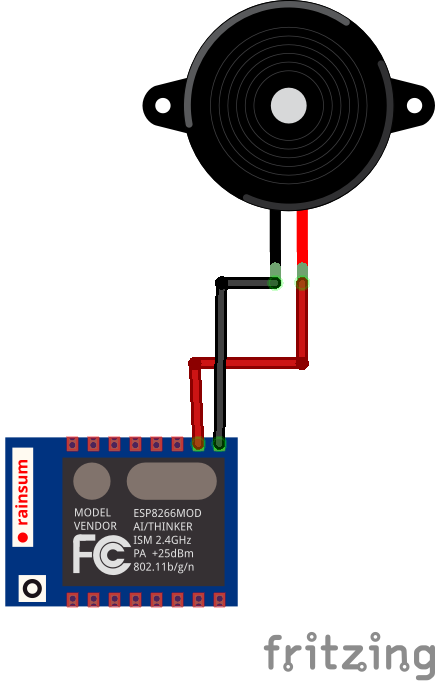
ConnectionsBolt Device --> Buzzer
GND <--> -ve Pin (Shorter one)
Pin 1 <--> +ve Pin (Longer one)
Step1:Collectthecomponentsfrom Iot Bolt kit
• Register your Bolt device to the Bolt cloud.
• Create an account on Integromat.
Step 2 : Connection of the components
• Connect the +ve end of the Buzzer to pin 1 of the Bolt.
• Connect the -ve end of the Buzzer to the GND pin of the Bolt.
• Power on the Bolt device using a micro USB cable.
Step 3 : Creation of alarm
• Log in to the Integromat account.
• Click on create a new scenario.
• Search and select bolt iot.
• Enter your API key by clicking on the Add button.
• You can find your API key on your Bolt Cloud dashboard.
• Enter the Device ID and select pin 1 so that the Buzzer will be connected to this pin.
• Select the state as HIGH as we want the Buzzer to turn on.
• We want the buzzer to ring for at least few seconds i.e for 5 seconds. So we need to add a delay before switching off the Buzzer again.
• Click on the tools option and select sleep.
• I will set it for 5 seconds of high intensity buzzer so that alarm can wake me up on time.
•Click on adding a new module and select Bolt IoT again. Now, in this we are going to switch off the Buzzer by setting a low to the Buzzer.
• Enter the same Bolt ID and Pin, but at this time, set the state as LOW.
•We have set up the scenario to ring the buzzer. Now, we will give it context in the form of the time to ring.
• Click on the little clock icon on the initial Bolt module. Select the time that you want the alarm to ring and click on OK.
• That’s it, you have successfully set up your alarm. Don't forget to save.
•To test if the buzzer actually works, click on the "Run Once" button. The buzzer should ring for 5 seconds and then it will switch off on its on.
• We are finally done.
Conclusion
It is the most simplest way to set up the alarm using buzzer and Bolt Iot which can further be used in bigger projects.


Comments