




Hardware components | ||||||
 |
| × | 1 | |||
| × | 1 | ||||
| × | 1 | ||||
| × | 1 | ||||
Software apps and online services | ||||||
| ||||||
https://www.donluc.com/?p=4099
https://edu.dfrobot.com/makelog-314851.html
#DonLucElectronics #DonLuc #UNIHIKER #AmbientLight #Display #IoT #Project #Debian #Python #Thonny #Programming #Electronics #Microcontrollers #Consultant
This Gravity: Analog ambient light sensor can assist you in detecting light density and provide an analog voltage signal to the controller as feedback. Additionally, you have the ability to trigger other components within your project by setting voltage thresholds. To facilitate easier usage of the ambient light sensor, this product is designed with a universal Gravity interface that can be plugged in without requiring soldering. Two screw holes allow you to fasten it to any desired location. Making messy DuPont wires and complex connections a thing of the past and enabling you to focus your energy on your creative designs.
DL2408Mk071 x UNIHIKER
1 x Gravity: Analog Ambient Light Sensor
1 x USB Battery Pack
1 x USB 3.1 Cable A to C
UNIHIKERADC - 21
VIN - +5V
GND - GND
DL2408Mk07pDL2408Mk07p.py
People can contact us: http://www.donluc.com/?page_id=1927
Teacher, Instructor, E-Mentor, R&D and Consulting- Programming Language
- Microcontrollers (PIC, Arduino, Raspberry Pi, Arm, Silicon Labs, Espressif, Etc...)
- IoT
- Wireless (Radio Frequency, Bluetooth, WiFi, Etc...)
- Robotics
- Automation
- Camera and Video Capture Receiver Stationary, Wheel/Tank and Underwater Vehicle
- Unmanned Vehicles Terrestrial and Marine
- Machine Learning
- Artificial Intelligence (AI)
- RTOS
- Sensors, eHealth Sensors, Biosensor, and Biometric
- Research & Development (R & D)
- Consulting
- Etc...
Facebook:https://www.facebook.com/neosteam.labs.9/
YouTube:https://www.youtube.com/@thesass2063
Twitter:https://twitter.com/labs_steam
Pinterest:https://www.pinterest.com/NeoSteamLabs/
Instagram:https://www.instagram.com/neosteamlabs/
DFRobot Luc.Paquin:https://edu.dfrobot.com/dashboard/makelogs
Hackster.io:https://www.hackster.io/neosteam-labs
LinkedIn:https://www.linkedin.com/in/jlucpaquin/
Don Luc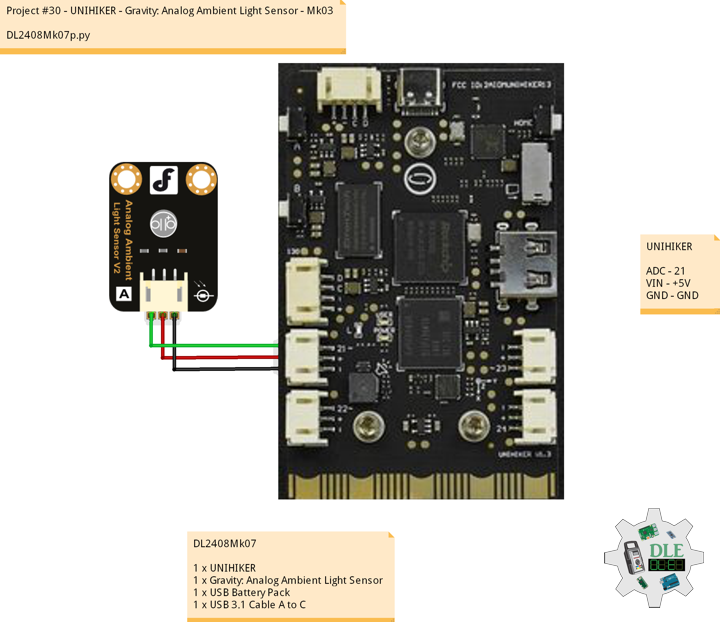



_3u05Tpwasz.png?auto=compress%2Cformat&w=40&h=40&fit=fillmax&bg=fff&dpr=2)
Comments