Negar Rafieedolatabadi
Published

ESP32 + SHT40: Remote Temp & Humidity Monitoring to Google S

This project uses an ESP32 and a Sensirion SHT40 sensor to remotely monitor temperature and humidity over Wi-Fi.

BeginnerFull instructions provided2 hours421
ESP32 + SHT40: Remote Temp & Humidity Monitoring to Google S

Things used in this project

Hardware components

SHT40
Sensirion SHT40
×1
ESP32
Espressif ESP32
×1
USB-A to Mini-USB Cable
×1
Jumper wires (generic)
×1

Software apps and online services

Google Sheets
Google Sheets

Story

Read more

Schematics

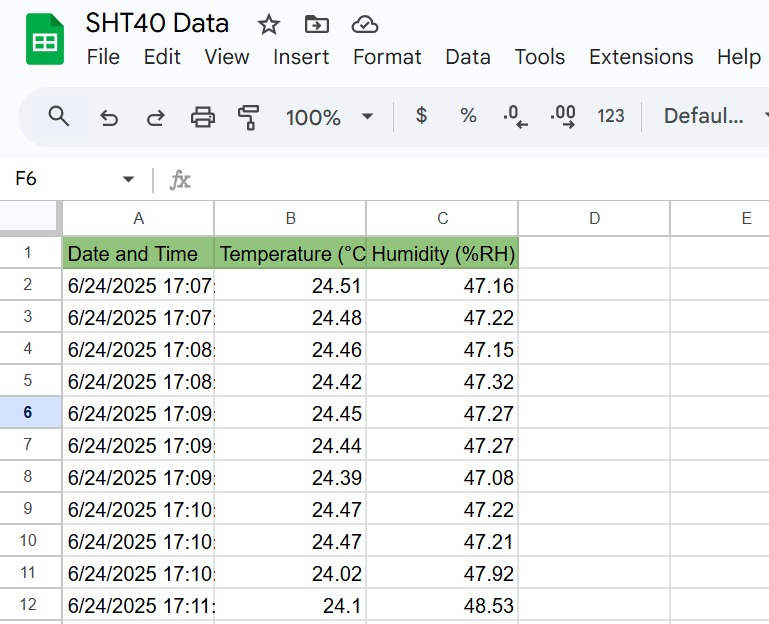
Example of data stored

Code

ESP32 code

C#
Read temperature and humidity values from SHT40, Connect to WiFi and send data to google cloud sheet
#include <WiFi.h>
#include <HTTPClient.h>
#include <Wire.h>
#include <SensirionI2cSht4x.h>
#define NO_ERROR 0

const char* ssid = "Enter Your WiFi SSID";
const char* password = "Enter Your WiFi Passcode";
const char* scriptURL = "Enter your google sheet deploy URL";

SensirionI2cSht4x sensor;

static char errorMessage[64];
static int16_t error;

void setup() {
  Serial.begin(115200);
  while (!Serial) {
    delay(100);
  }

  Wire.begin();
  sensor.begin(Wire, SHT40_I2C_ADDR_44);
  sensor.softReset();
  delay(10);

  uint32_t serialNumber = 0;
  error = sensor.serialNumber(serialNumber);
  if (error != 0) {
    Serial.print("Error trying to execute serialNumber(): ");
    errorToString(error, errorMessage, sizeof(errorMessage));
    Serial.println(errorMessage);
  } else {
    Serial.print("Sensor serialNumber: ");
    Serial.println(serialNumber);
  }

  Serial.print("Connecting to WiFi");
  WiFi.begin(ssid, password);
  while (WiFi.status() != WL_CONNECTED) {
    delay(500);
    Serial.print(".");
  }

  Serial.println("\nWiFi Connected!");
  Serial.print("IP: ");
  Serial.println(WiFi.localIP());
}

void loop() {
  float aTemperature = 0.0;
  float aHumidity = 0.0;
  delay(20);
  error = sensor.measureLowestPrecision(aTemperature, aHumidity);

  if (error != NO_ERROR) {
    Serial.print("Sensor read error: ");
    errorToString(error, errorMessage, sizeof(errorMessage));
    Serial.println(errorMessage);
  } else {
    Serial.print("Temp: ");
    Serial.print(aTemperature);
    Serial.print(" °C\tHumidity: ");
    Serial.print(aHumidity);
    Serial.println(" %");

    if (WiFi.status() == WL_CONNECTED) {
      HTTPClient http;

      String url = String(scriptURL) + "?temp=" + String(aTemperature, 2) + "&hum=" + String(aHumidity, 2);
      Serial.println("Sending to: " + url);
      
      http.begin(url);
      int httpCode = http.GET();

      Serial.print("HTTP response code: ");
      Serial.println(httpCode);

      if (httpCode > 0) {
        String response = http.getString();
        Serial.println("Server response: " + response);
      } else {
        Serial.println("Failed to send data.");
      }

      http.end();
    } else {
      Serial.println("WiFi disconnected");
    }
  }

  delay(20000);  // Send every 20 sec
}

Google Sheet Extension Code

JavaScript
It logs temperature and humidity data to your Google Sheet, along with a timestamp, whenever a GET request with temp and hum parameters is received.
function doGet(e) {
  var sheet = SpreadsheetApp.getActiveSpreadsheet().getActiveSheet();
  var temp = e.parameter.temp;
  var hum = e.parameter.hum;
  var time = new Date();
  sheet.appendRow([time, temp, hum]);
  return ContentService.createTextOutput("Success");
}

Credits

Negar Rafieedolatabadi
6 projects • 6 followers

Comments