


List of Brainstormed Ideas
People: Kevin Albers, Naren Vasanad, Adarsh Mani, Robert Bui (non 260A), José Oyola (non 260A)
- Design an app for a smart-watch that gathers all notifications in one place.
- Some sort of mobile app that connects with Finale (music notation system) and aids the user somehow.
- Scanning device that sends information that is easily accessed from mobile phones. These can be inventory scanning devices that can read bar codes or probably even RFID tags
- An app to connect to a smart video camera (not the phone one) to manage the memory and automatically download it to your computer or a server.
- The vet hospital folks said they need an app for pet owners that helps people give their pets medicines at the right times and makes it easier to access pet information like medical records and scan data.
- A reminder system to feed the cats that can sync across multiple users to verify if the cats are fed.
- In the future when automatic cat feeding systems are invented, then this can sync with those systems, and you can get the current statistics of your cat. Such as weight, amount eaten, and a smart collar could provide data on how much time your cat spend sleeping, are causing trouble. Will also show cat level.
- Also, combine this with idea 5
- Smart Tea timer that connects to your phone and rings if you are in another room (interface would pretty much completely be the timer). This could apply to anything, microwave, Washing machine, dishwasher
7. Perhaps some way to manage all the chores you are doing at once, could have countdown with different color for each type of appliance.
a. For devices not connected, take a picture of the timer and add it to the countdown through image processing (NFC integration might be a future improvement)
- Companion app that informs patients of when they have to take some medication. Also, remind parents of vaccination schedules for babies.
- Companion app that reads sensors + RFID tags on medication bottles to keep track of how many tablets are present, when a refill is required, directly inform the pharmacist to deliver the medicine.
- Bartenders need an app that would allow you to easily keep track of the tabs run by their customers.
- Bouncers need an app that can scan an ID, run it through a central system, and verify the authenticity of the ID.
- An app that automatically polls the calendars of people that needs to attend a meeting and give multiple options for possible meeting times.
- App that takes your to do lists and schedules them on a calendar with real times.
- An app that notifies you only if a certain number of notifications has arrived. For example, only if five Facebook notifications have arrived will it signal that there’s something for you to look at. This can improve productivity while working.
My favorite idea
The Pet notification idea was my favorite. There are a lot of pet owners in Berkeley and every one of them has busy schedules and they keep forgetting to give their pets medicines on time. Using this app they will never forget again.
Explanation of the Application
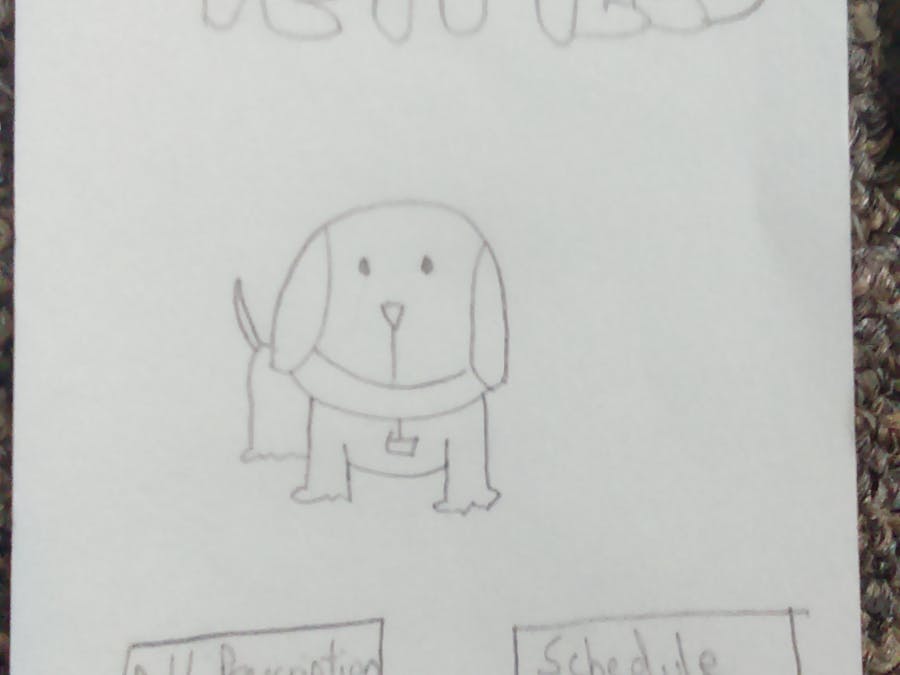
The home screen of the application has the picture of the users pet and the various options to control the tool.. The back button on the top left corner of the screen leads you back to this home screen.
The first option is to add a pet to the list. You can do this by clicking on either the Add Pet option or going to the Pet List and adding another pet from there. The UI then asks you to fill up critical information including a picture of your pet followed by clicking on the done button. This leads you to the updated list of pets.
You can also add a prescription by clicking the appropriate button. An option to take a photo or to choose from your phones file system (PDF file sent by the doctor) can be added and this automatically converts the information and adds it to your calendar. You can also define how you want to be notified by using the Settings option. You can choose to get a vibration or even get a sound alert. You can also ask the user to authenticate the animal by clicking a picture by choosing the appropriate option.
The next important part of the app is the calendar that allows you to view on a daily, weekly or monthly basis the medicine schedule of any of your pets. The daily view also shows whether you have given your pet the medicine at the right time or not. You could also move between days, weeks and months and check information for a particular day.
The most important part of the application is the notification. The notification pops up at the right time to indicate which pet has to be fed and what it needs to be fed. If you had chosen the option to authenticate your pet, the Take Picture screen would show up and a successfully fed message would pop up if everything went fine. Also, the calendar will open up when done is clicked and open up the daily view of the calendar and update the medicine status.
Interviews
Deborah - Dog Owner
I had a really nice chat with Deborah about the pet pill app and I got a lot of insights. Firstly, she asked me to change the name to PetHealth rather than PetPills since health would be a much broader definition. The app only allowed you to enter doctor prescriptions. However, she mentioned that there was a lot of homeopathic medicine that was not doctor approved that she wanted to give to her pet. She also had difficulty moving from one option of the app to the other. For example, she faced challenges while wanting to see the schedule of a particular pet under the list of pets. That feature was not present in the initial design. She indicated that a lot of vital information about the pet like weight, sex and so on were missing.
A key feature addition she asked for was the ability to enter medicines that were not on a daily basis but on a weekly or monthly basis. These types of activities include getting shots, fur cleaning, etc. This should get automatically added to the calendar and the calendar part of the app needs to be updated and opened as well. Deborah also wanted more information of the doctors to be stored in the app like the location, email address and phone number. She also asked for a way to add timelines that were not fixed. A particular task may not happen at a pre-defined time but at a custom time since you are not always around your pet. It was also suggested that a revert button be provided in case you indicated that you fed your pet by mistake. Another valid suggestion was that different notification sounds could be played for different pets. Deborah also wanted to be able to enter the medicines from the calendar and not necessarily go back to the add prescription section.
In the end she was looking forward to me designing the app and she also asked me to ask her for more inputs whenever I came up with changes for the app.
Sukun - Dog owner
Sukun liked the app but wanted a feature to connect with his friends online and see if they’re vets and other dedication that could be used. He was also confused with the word prescription that was meant to be the receipt that the doctor gave that had information about the medicines to be given to the pet. Also, he was confused as to whether Add Prescription actually meant ordering medicines online. Another point where he got stuck was when he had to add pet information and didn’t know how to add the picture of the pet since it wasn’t very obvious. He also wanted to know if he could schedule alarms manually and set the time according to his convenience rather than having pre-defined times in the app.

Comments