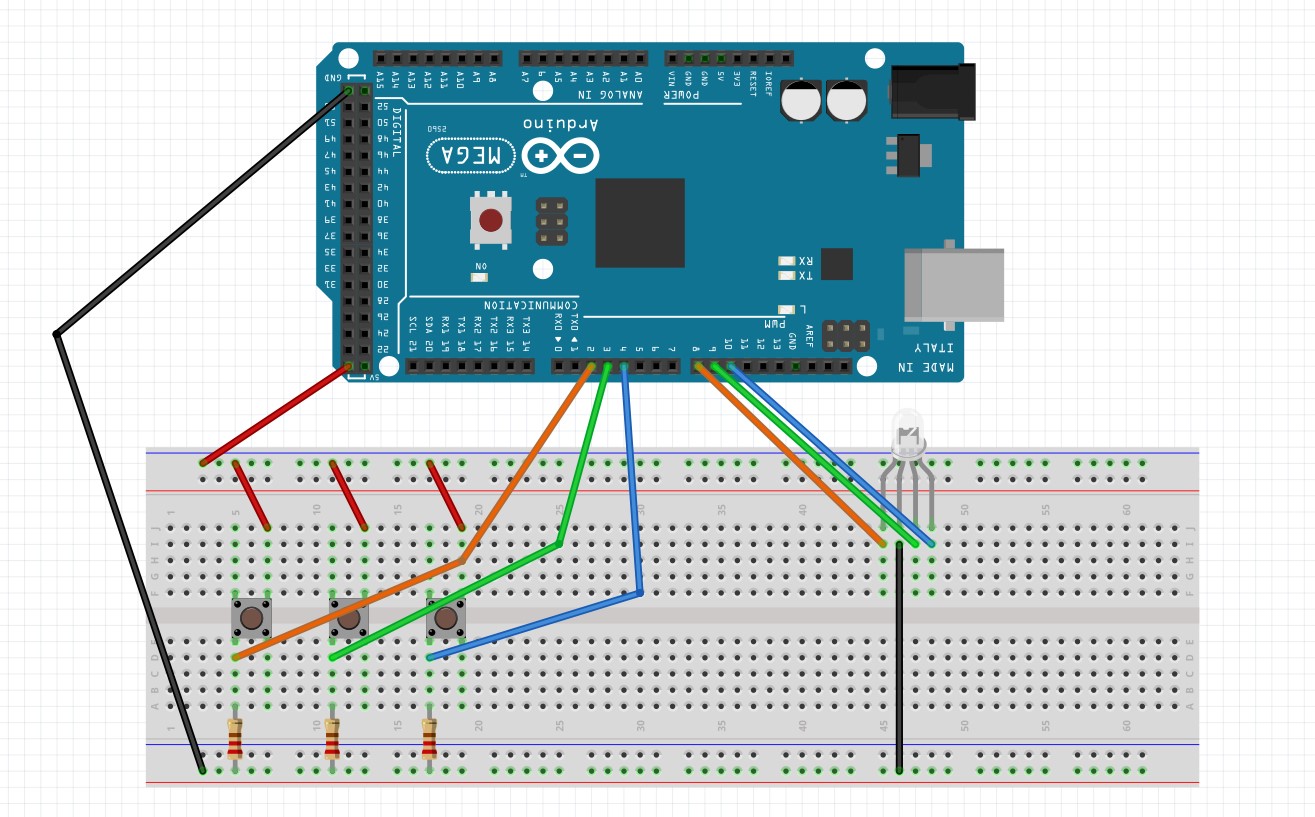
const int button1 = 2;     // the number of button 1 pin
const int button2 = 3;    // the number of button 2 pin
const int button3 = 4;    // the number of button 3 pin
const int red =  8;      // the number of the red pin
const int green = 9;    //the number of the green pin
const int blue = 10;    //the number of the blue pin

// variables will change:
int a = 0;         // variable for reading the pushbutton status
int b = 0;
int c = 0;

void setup() {
  Serial.begin(9600);
  // initialize the LED pins as an output:
  pinMode(red, OUTPUT);
  pinMode(green, OUTPUT);
  pinMode(blue, OUTPUT);
   // initialize the pushbutton pins as an input:
  pinMode(button1, INPUT);
  pinMode(button2, INPUT);
  pinMode(button3, INPUT);
}

void loop() {
  // read the state of the pushbuttons value:
  a = digitalRead(button1);
  b = digitalRead(button2);
  c = digitalRead(button3);

  // Show the state of pushbuttons on serial monitor
  Serial.println(a);
  Serial.println(b);
  Serial.println(c);

  // check if the pushbutton is pressed.
  // if it is, the buttonState is HIGH:
  if (a == HIGH) {
    // turn LED on:
    digitalWrite(red, HIGH);
  } else {
    // turn LED off:
    digitalWrite(red, LOW);
  }
  if (b == HIGH) {
    digitalWrite(green, HIGH);
  } else {
    digitalWrite(green, LOW);
  }
  if (c == HIGH) {
    digitalWrite(blue, HIGH);
  } else {
    digitalWrite(blue, LOW);
  }
  // Added the delay so that we can see the output of button
  delay(100);
}


_wzec989qrF.jpg?auto=compress%2Cformat&w=48&h=48&fit=fill&bg=ffffff)




Comments