


Hardware components | ||||||
 |
| × | 1 | |||
 |
| × | 1 | |||
 |
| × | 1 | |||
 |
| × | 1 | |||
Software apps and online services | ||||||
 |
| |||||
Hand tools and fabrication machines | ||||||
 |
| |||||
 |
| |||||
- The project is born from the observation of clothing stores, where customers cannot call staff or request assistance directly from the fitting room (for example to search sizes, replacement of a garment, request for help, etc.).
- Furthermore, the statistical monitoring on the use of all the fitting rooms and of the types of staff calls (times and frequency of use of each etc.), would be very useful for commercial purposes.
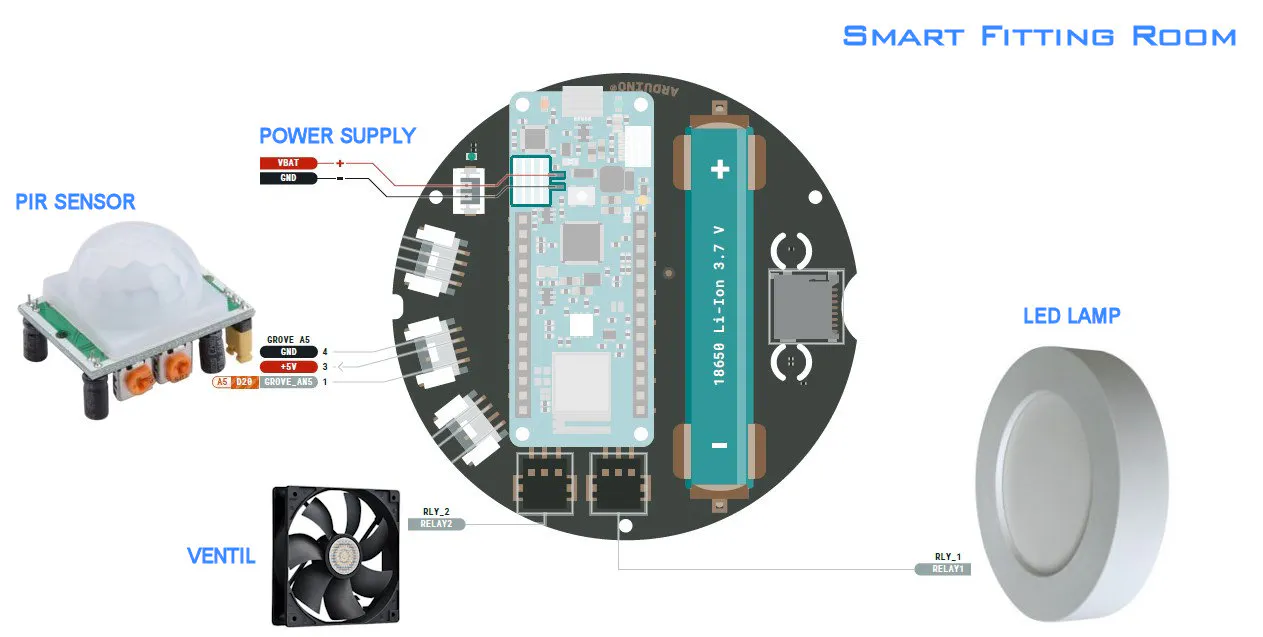
- Finally, the presence of an IOT device within each fitting room allows the "occupied" signal, but also to reduce energy waste, as the lighting and the ventilation system can only be turned on when the fitting room is actually occupied by a customer.
ArchitectureThis video represents how the project is composed, its functionality and how it is used by customers in the Smart Fitting Room:
1) Detection of the presence of people in the dressing room with automatic ignition of ventilation, light, bell and red light of occupied. Each presence is reported and stored on the cloud to allow subsequent presence statistics.
2) Remote management from App or Cloud for the staff of clothing store and complete statistical analysis of the use of the dressing rooms on PC, tablet, smartphone or smartwatch.
3) Complete management of calls to staff and related answers to the customer, using the display of messages and the sound of the bell.
4) Ventilation management, to customize the climate of the smart fitting room.
5) Automatic messages and direct communications to the customer, by pressing a button on the tablet or text typing from the PC or tablet / smartphone / smartwatch app.
6) Multi platform data collection of attendance in the dressing room, environmental data, consumption of the dressing room and data of calls to the staff.
7) Automatic shutdown of light and ventilation of the smart fitting room just the customer leaves, to maximize energy savings and allow total statistics on the use of the dressing room and its consumption.
Possible system extensions• Adding the QR Code scan of the personal code, to register the operator who carried out the assistance required by the customer
• Scalability of the system to all the stores of the same affiliate chain, to have global statistics on presence, times and frequencies of use of the fitting rooms, consumption and types of assistance carried out by each individual staff component
• Adding audio intercom features, for customer support by staff without going to the fitting rooms
• Adding other languages for automatic messaging
#include "arduino_secrets.h"
/*-------------------------------------------------------------------------------
// Smart_Fitting_Room.ino
//
// Autore:      Charge Of Things       [www.chargeofthings.com]
// Progetto:    Smart Fitting Room     [Arduino Cloud Game]
//
// Descrizione: Gestione integrata e cloud dei camerini di prova per i negozi
//              di abbigliamento, con la gestione condivisa delle chiamate dei
//              clienti allo staff e l'invio di messaggi, avvisi e promo.
//
// Release:     1.0                    [febbraio 2022]
//
// Video che illustra tutte le funzionalit: [https://youtu.be/3khBZGicUEI]
//-----------------------------------------------------------------------------*/

/*
  Sketch generated by the Arduino IoT Cloud Thing "Untitled"
  https://create.arduino.cc/cloud/things/e0bf64c4-9a92-408d-a0e8-eec068f47df2

  Arduino IoT Cloud Variables description

  The following variables are automatically generated and updated when changes are made to the Thing

  String messaggio;
  float durata;
  float luminosita;
  float temperatura;
  float umidita;
  int chiamateTotaliGiorno;
  int livelloLuce;
  int livelloVentilazione;
  int presenzeTotaliGiorno;
  bool automazione;
  bool chiamata;
  bool luce;
  bool msg1;
  bool msg2;
  bool msg3;
  bool occupato;
  bool presenza;
  bool risposta;
  bool ventilazione;

  Variables which are marked as READ/WRITE in the Cloud Thing will also have functions
  which are called when their values are changed from the Dashboard.
  These functions are generated with the Thing and added at the end of this sketch.
*/

//----- librerie e file inclusi -----
#include "thingProperties.h"
#include <Arduino_MKRIoTCarrier.h>
#include "visuals.h"
#include "pitches.h"


//----- dichiarazioni -----
MKRIoTCarrier carrier;

int pir = A5;
int pirState = 0;
int pirStatePrec = 0;

uint32_t greenColor = carrier.leds.Color( 255, 0, 0);
uint32_t redColor = carrier.leds.Color( 0, 255, 0);
uint32_t blueColor = carrier.leds.Color( 0, 0, 255);
uint32_t whiteColor = carrier.leds.Color( 255, 255, 255);
uint32_t noColor = carrier.leds.Color( 0, 0, 0);

//----- definizione melodia del campanello ----
int melody[] = {
  NOTE_C4, NOTE_G3, NOTE_G3, NOTE_A3
};
int noteDurations[] = {
  4, 8, 8, 4
};

//----- dichiarazione variabili -----
int proximity = 0;
int r = 0, g = 0, b = 0;
unsigned long lastUpdate = 0;
unsigned long lastUpdate2 = 0;
String screenMsg;
String screenMsgPrec;
bool refreshScr;
bool buttonChecked[] = {false, false, false, false, false};


//-------------------------------------------------------------------------------
//----- funzione di setup dell'applicazione -----
//-------------------------------------------------------------------------------
void setup() {

  //----- inizializzazione variabili globali -----
  presenzeTotaliGiorno = 0;
  presenza = false;
  occupato = false;
  durata = 0.0;
  luminosita = 0.0;
  temperatura = 0.0;
  umidita = 0.0;
  automazione = true;
  luce = false;
  ventilazione = false;
  livelloLuce = 60;
  livelloVentilazione = 60;
  chiamateTotaliGiorno = 0;
  chiamata = false;
  risposta = false;
  msg1 = false;
  msg2 = false;
  msg3 = false;
  refreshScr = true;

  //----- inizializzazione seriale -----
  Serial.begin(9600);
  delay(1500);

  //----- inizializzazione Carrier -----
  CARRIER_CASE = true;
  if (!carrier.begin())
  {
    Serial.println("Carrier not connected, check connections");
    while (1);
  }

  //----- inizializzazione rel -----
  carrier.Relay1.close();         //spegni il rel 1 della luce
  carrier.Relay2.close();         //spegni il rel 2 della ventilazione

  //----- inizializzazione led -----
  carrier.leds.setBrightness(20);
  carrier.leds.fill(noColor, 0, 5);
  carrier.leds.show();

  delay(200);

  //----- suona il campanello -----
  suonaCampanello();

  //----- inizializzazione schermo -----
  carrier.display.fillScreen(0x0000);
  //Basic configuration for the text
  carrier.display.setRotation(0);
  carrier.display.setTextWrap(true);
  carrier.display.drawBitmap(45, 30, arduino_logo, 150, 106, 0x253);
  carrier.display.setTextColor(0xFFFF);
  carrier.display.setTextSize(2);
  carrier.display.setCursor(15, 150);
  carrier.display.print("Smart Fitting Room");
  carrier.display.setCursor(45, 180);
  carrier.display.print("  Loading");
  //Printing a three dots animation
  for (int i = 0; i < 3; i++)
  {
    carrier.display.print(".");
    delay(1000);
  }

  //----- inizializzazione pir -----
  pinMode(A5, INPUT);
  pirState = 0;
  pirStatePrec = 0;

  //----- accensione dei led -----
  carrier.leds.setPixelColor(0, noColor);
  carrier.leds.setPixelColor(1, greenColor);
  carrier.leds.setPixelColor(2, noColor);
  carrier.leds.setPixelColor(3, redColor);
  carrier.leds.setPixelColor(4, blueColor);
  carrier.leds.show();

  //----- inizializzazione connessione a IoT Cloud -----
  initProperties();
  ArduinoCloud.begin(ArduinoIoTPreferredConnection);
  setDebugMessageLevel(4);
  ArduinoCloud.printDebugInfo();

  //----- ciclo di attesa della connessione a IoT Cloud -----
  while (ArduinoCloud.connected() != 1) {
    ArduinoCloud.update();
    delay(500);
  }
  delay(250);

  //----- reinizializzazione variabili globali dopo connessione a IoT Cloud -----
  presenzeTotaliGiorno = 0;
  presenza = false;
  occupato = false;
  durata = 0.0;
  luminosita = 0.0;
  temperatura = 0.0;
  umidita = 0.0;
  automazione = true;
  luce = false;
  ventilazione = false;
  livelloLuce = 60;
  livelloVentilazione = 60;
  chiamateTotaliGiorno = 0;
  chiamata = false;
  risposta = false;
  msg1 = false;
  msg2 = false;
  msg3 = false;
  refreshScr = true;

  delay(250);

  //----- inizializzazione schermo -----
  messaggio = "  Camerino      libero";
  //----- stampa messaggio -----
  lastUpdate2 = millis();
  screenMsg = messaggio;
  printMsg();
}


//-------------------------------------------------------------------------------
//----- ciclo principale di esecuzione dell'applicazione -----
//-------------------------------------------------------------------------------
void loop() {

  //----- segnatempo principale ogni secondo -----
  if (millis() - lastUpdate > 1000) {
    lastUpdate = millis();
    if (presenza == true) {
      durata = durata + 1;            //se occupato incrementa la durata di utilizzo del camerino
    }

    //----- sincronizza Arduino Cloud -----
    ArduinoCloud.update();
    delay(200);

    //----- lettura sensori -----
    readSensor();

    //----- verifica presenza nel camerino -----
      if (pirState == HIGH  && pirStatePrec == LOW) {           //se c' qualcuno
        pirStatePrec = pirState;
        presenzeTotaliGiorno = presenzeTotaliGiorno + 1;        //incrementa le presenze del giorno
        presenza = true;
        occupato = true;                                        //segnala camerino occupato accendendo la luce rossa
        messaggio = "Camerino occupato";

        //----- stampa messaggio -----
        lastUpdate2 = millis();
        screenMsg = "  Benvenuto, premi Chiama  se occorre";
        printMsg();

        //----- accendi led bianco di presenza -----
        carrier.leds.setPixelColor(2, whiteColor);
        carrier.leds.show();

        //----- esegui accensioni se l'automazione  attiva -----
        if (automazione == true) {
          luce = true;
          ventilazione = true;
          carrier.Relay1.open();          //accendi il rel 1 della luce
          carrier.Relay2.open();          //accendi il rel 2 della ventilazione
        }

        //----- suona il campanello -----
        suonaCampanello();

      } else if (pirState == LOW && pirStatePrec == HIGH) {     //se non c' pi nessuno
        pirStatePrec = pirState;
        presenza = false;
        chiamata = false;                                       //interrompi eventuale chiamata
        carrier.leds.setPixelColor(0, noColor);
        carrier.leds.setPixelColor(1, greenColor);
        carrier.leds.show();
        occupato = false;                                       //camerino libero
        messaggio = "  Camerino      libero";

        //----- stampa messaggio -----
        lastUpdate2 = millis();
        screenMsg = messaggio;
        printMsg();

        //----- spegni led di presenza -----
        carrier.leds.setPixelColor(2, noColor);
        carrier.leds.show();
        durata = 0.0;                                           //azzera durata presenza

        //----- esegui accensioni se l'automazione  attiva -----
        if (automazione == true) {
          luce = false;
          ventilazione = false;
          carrier.Relay1.close();         //spegni il rel 1 della luce
          carrier.Relay2.close();         //spegni il rel 2 della ventilazione
        }
      }

    //----- sincronizza Arduino Cloud -----
    ArduinoCloud.update();
    delay(200);
  }

  //----- gestione pulsanti -----
  buttonChecked[0] = false;
  buttonChecked[1] = false;
  buttonChecked[2] = false;
  buttonChecked[3] = false;
  buttonChecked[4] = false;

  carrier.Buttons.update();

  if (carrier.Buttons.onTouchDown(TOUCH0) && buttonChecked[0] == false)    //pulsante annulla chiamata
  {
    buttonChecked[0] = true;
    if (chiamata == true) {
      chiamata = false;
      carrier.leds.setPixelColor(0, noColor);
      carrier.leds.setPixelColor(1, greenColor);
      carrier.leds.show();
      //----- stampa messaggio -----
      lastUpdate2 = millis();
      messaggio = "  Chiamata    annullata";
      screenMsg = messaggio;
      printMsg();
    }
  }

  if (carrier.Buttons.onTouchUp(TOUCH1) && buttonChecked[1] == false)      //pulsante chiama Staff
  {
    buttonChecked[1] = true;
    if (chiamata == false) {
      chiamata = true;
      chiamateTotaliGiorno = chiamateTotaliGiorno + 1;
      carrier.leds.setPixelColor(0, redColor);
      carrier.leds.setPixelColor(1, noColor);
      carrier.leds.show();
      //----- suona il campanello -----
      suonaCampanello();
      //----- stampa messaggio -----
      lastUpdate2 = millis();
      messaggio = " Chiamata     in corso";
      screenMsg = messaggio;
      printMsg();
    }
  }

  if (carrier.Buttons.getTouch(TOUCH2))       //pulsante men
  {
    buttonChecked[2] = true;
    //----- inserimento codice per la gestione di altre funzionalit -----
    delay(100);
  }

  if (carrier.Buttons.onTouchUp(TOUCH3) && buttonChecked[3] == false)      //pulsante + temperatura
  {
    buttonChecked[3] = true;
    if (presenza == true) {
      livelloVentilazione = livelloVentilazione + 10;
      //----- stampa messaggio -----
      lastUpdate2 = millis();
      messaggio = "  Alza la   Ventilazione    a " + String(livelloVentilazione) + "%";
      screenMsg = messaggio;
      printMsg();
    }
  }

  if (carrier.Buttons.onTouchDown(TOUCH4) && buttonChecked[4] == false)    //pulsante - temperatura
  {
    buttonChecked[4] = true;
    if (presenza == true) {
      livelloVentilazione = livelloVentilazione - 10;
      //----- stampa messaggio -----
      lastUpdate2 = millis();
      messaggio = " Abbassa la  Ventilazione    a " + String(livelloVentilazione) + "%";
      screenMsg = messaggio;
      printMsg();
    }
  }

  //----- segnatempo ogni 10 secondi -----
  if (millis() - lastUpdate2 > 10000) {
    lastUpdate2 = millis();

    //----- aggiorna schermo -----
    updateScreen();
  }
}

//-------------------------------------------------------------------------------
//----- funzione di lettura dei sensori  -----
//-------------------------------------------------------------------------------
void readSensor() {

  //----- lettura sensori di temperatura e umidit -----
  temperatura = carrier.Env.readTemperature();
  umidita = carrier.Env.readHumidity();

  //----- lettura sensore di luminosit -----
  if (carrier.Light.proximityAvailable()) {           //lettura prossimit
    proximity = carrier.Light.readProximity();
  }
  if (carrier.Light.colorAvailable()) {               //lettura colori rgb
    carrier.Light.readColor(r, g, b);
  }
  luminosita =  (r + g + b) / 3.0;

  //----- lettura sensore pir -----
  pirState = digitalRead(pir);
  delay(200);
}


//-------------------------------------------------------------------------------
//----- funzione di aggiornamento schermo  -----
//-------------------------------------------------------------------------------
void updateScreen() {

  carrier.display.fillScreen(0x0000);
  carrier.display.setRotation(0);
  carrier.display.setTextWrap(true);

  //----- gestione chiamata -----
  carrier.display.setTextColor(ST77XX_WHITE);
  carrier.display.setTextSize(2);
  if (chiamata == true) {                   //se c' chiamata incorso
    carrier.display.drawBitmap(15, 145, nobell_logo, 88, 64, ST77XX_RED);
    carrier.display.setCursor(10, 90);
    carrier.display.print("Annulla");
    carrier.display.setCursor(10, 110);
    carrier.display.print("Chiamata");
  } else {                                  //se non c' chiamata incorso
    carrier.display.drawBitmap(15, 20, ringbell_logo, 88, 64, ST77XX_GREEN);
    carrier.display.setCursor(10, 90);
    carrier.display.print(" Chiama");
    carrier.display.setCursor(15, 110);
    carrier.display.print(" STAFF");
  }

  //----- gestione temperatura -----
  carrier.display.drawBitmap(140, 47, temperature_logo, 100, 100, ST77XX_WHITE);
  carrier.display.setTextColor(ST77XX_RED);
  carrier.display.setTextSize(4);
  carrier.display.setCursor(170, 22);
  carrier.display.print("+");
  carrier.display.drawCircle(179, 36, 16, ST77XX_RED);
  carrier.display.setTextColor(ST77XX_BLUE);
  carrier.display.setTextSize(4);
  carrier.display.setCursor(170, 170);
  carrier.display.print("-");
  carrier.display.drawCircle(179, 184, 16, ST77XX_BLUE);
  carrier.display.setTextColor(ST77XX_WHITE);
  carrier.display.setTextSize(3);
  carrier.display.setCursor(163, 140);
  carrier.display.print(String(int(temperatura)));
  carrier.display.setCursor(193, 130);
  carrier.display.print(char(248));

}

//-------------------------------------------------------------------------------
//----- funzione di stampa messaggi  -----
//-------------------------------------------------------------------------------
void printMsg() {

  carrier.display.fillScreen(0x0000);
  carrier.display.setRotation(0);
  carrier.display.setTextWrap(true);

  //----- stampa messaggio -----
  carrier.display.drawBitmap(70, 10, msg_logo, 88, 64, ST77XX_WHITE);
  carrier.display.setTextColor(ST77XX_WHITE);
  carrier.display.setTextSize(3);
  carrier.display.setCursor(10, 90);
  carrier.display.print(screenMsg);
}

//-------------------------------------------------------------------------------
//----- funzione per suonare il campanello  -----
//-------------------------------------------------------------------------------
void suonaCampanello() {

  //----- suona il campanello -----
  for (int thisNote = 0; thisNote < 4; thisNote++) {
    int noteDuration = 1000 / noteDurations[thisNote];
    carrier.Buzzer.sound(melody[thisNote]);
    delay(noteDuration);
    int pauseBetweenNotes = noteDuration * 1.0;
    delay(pauseBetweenNotes);
    carrier.Buzzer.noSound();
  }
}

//-------------------------------------------------------------------------------
//----- eventi e funzioni di sincronizzazione variabili con iOT Cloud  -----
//-------------------------------------------------------------------------------

/*
  Since Messaggio is READ_WRITE variable, onMessaggioChange() is
  executed every time a new value is received from IoT Cloud.
*/
void onMessaggioChange()  {
  //----- stampa messaggio che arriva dal cloud -----
  if (presenza == true) {
    screenMsg = messaggio;
    printMsg();
  }
}
/*
  Since Durata is READ_WRITE variable, onDurataChange() is
  executed every time a new value is received from IoT Cloud.
*/
void onDurataChange()  {
  // Add your code here to act upon Durata change
}
/*
  Since Luminosita is READ_WRITE variable, onLuminositaChange() is
  executed every time a new value is received from IoT Cloud.
*/
void onLuminositaChange()  {
  // Add your code here to act upon Luminosita change
}
/*
  Since Temperatura is READ_WRITE variable, onTemperaturaChange() is
  executed every time a new value is received from IoT Cloud.
*/
void onTemperaturaChange()  {
  // Add your code here to act upon Temperatura change
}
/*
  Since Umidita is READ_WRITE variable, onUmiditaChange() is
  executed every time a new value is received from IoT Cloud.
*/
void onUmiditaChange()  {
  // Add your code here to act upon Umidita change
}
/*
  Since LivelloLuce is READ_WRITE variable, onLivelloLuceChange() is
  executed every time a new value is received from IoT Cloud.
*/
void onLivelloLuceChange()  {
  // Add your code here to act upon LivelloLuce change
}
/*
  Since LivelloVentilazione is READ_WRITE variable, onLivelloVentilazioneChange() is
  executed every time a new value is received from IoT Cloud.
*/
void onLivelloVentilazioneChange()  {
  // Add your code here to act upon LivelloVentilazione change
}
/*
  Since Automazione is READ_WRITE variable, onAutomazioneChange() is
  executed every time a new value is received from IoT Cloud.
*/
void onAutomazioneChange()  {
  // Add your code here to act upon Automazione change
}
/*
  Since Chiamata is READ_WRITE variable, onChiamataChange() is
  executed every time a new value is received from IoT Cloud.
*/
void onChiamataChange()  {
  // Add your code here to act upon Chiamata change
}
/*
  Since Luce is READ_WRITE variable, onLuceChange() is
  executed every time a new value is received from IoT Cloud.
*/
void onLuceChange()  {
  // Add your code here to act upon Luce change
}
/*
  Since Msg1 is READ_WRITE variable, onMsg1Change() is
  executed every time a new value is received from IoT Cloud.
*/
void onMsg1Change()  {
  //----- stampa messaggio 1 se richiesto dal cloud -----
  if (presenza == true) {
    //----- stampa messaggio -----
    lastUpdate2 = millis();
    messaggio = "  Benvenuto, premi Chiama  se occorre";
    screenMsg = messaggio;
    printMsg();
  }
}
/*
  Since Msg2 is READ_WRITE variable, onMsg2Change() is
  executed every time a new value is received from IoT Cloud.
*/
void onMsg2Change()  {
  //----- stampa messaggio 2 se richiesto dal cloud -----
  if (presenza == true) {
    //----- stampa messaggio -----
    lastUpdate2 = millis();
    messaggio = "Siamo subito    da Lei";
    screenMsg = messaggio;
    printMsg();
  }
}
/*
  Since Msg3 is READ_WRITE variable, onMsg3Change() is
  executed every time a new value is received from IoT Cloud.
*/
void onMsg3Change()  {
  //----- stampa messaggio 3 se richiesto dal cloud -----
  if (presenza == true) {
    //----- stampa messaggio -----
    lastUpdate2 = millis();
    messaggio = "La preghiamo di attendere";
    screenMsg = messaggio;
    printMsg();
  }
}
/*
  Since Occupato is READ_WRITE variable, onOccupatoChange() is
  executed every time a new value is received from IoT Cloud.
*/
void onOccupatoChange()  {
  // Add your code here to act upon Occupato change
}
/*
  Since Presenza is READ_WRITE variable, onPresenzaChange() is
  executed every time a new value is received from IoT Cloud.
*/
void onPresenzaChange()  {
  // Add your code here to act upon Presenza change
}
/*
  Since Risposta is READ_WRITE variable, onRispostaChange() is
  executed every time a new value is received from IoT Cloud.
*/
void onRispostaChange()  {
  //----- risposta alla chiamata se attivata dal cloud -----
  if (risposta == true) {
    if (chiamata == true) {
      chiamata = false;
      risposta = false;
      carrier.leds.setPixelColor(0, noColor);
      carrier.leds.setPixelColor(1, greenColor);
      carrier.leds.show();
      //----- stampa messaggio -----
      lastUpdate2 = millis();
      messaggio = "  Chiamata  accolta siamosubito da Lei";
      screenMsg = messaggio;
      printMsg();
      //----- suona il campanello -----
      suonaCampanello();
    }
  }
}
/*
  Since Ventilazione is READ_WRITE variable, onVentilazioneChange() is
  executed every time a new value is received from IoT Cloud.
*/
void onVentilazioneChange()  {
  // Add your code here to act upon Ventilazione change
}

/*
  Since ChiamateTotaliGiorno is READ_WRITE variable, onChiamateTotaliGiornoChange() is
  executed every time a new value is received from IoT Cloud.
*/
void onChiamateTotaliGiornoChange()  {
  // Add your code here to act upon ChiamateTotaliGiorno change
}

/*
  Since PresenzeTotaliGiorno is READ_WRITE variable, onPresenzeTotaliGiornoChange() is
  executed every time a new value is received from IoT Cloud.
*/
void onPresenzeTotaliGiornoChange()  {
  // Add your code here to act upon PresenzeTotaliGiorno change
}


Comments