



Hardware components | ||||||
| × | 1 | ||||
| × | 1 | ||||
| × | 1 | ||||
| × | 1 | ||||
Software apps and online services | ||||||
 |
| |||||
Hand tools and fabrication machines | ||||||
 |
| |||||
Navigating and manipulating 3D models with a traditional mouse is unintuitive, slow, and often frustrating. Designers and engineers must rely on awkward combinations of clicks, modifier keys, scroll wheels, and on-screen widgets to rotate, pan, and inspect objects. These controls were built for 2D interaction and feel unnatural when working in 3D environments, causing workflow interruptions, repetitive strain, and reduced precision, especially during complex modeling tasks.
For decades, the industry standard for 3D navigation has been dominated by force-sensitive stationary controllers. If you’ve ever used a professional 3D mouse like a 3Dconnexion SpaceMouse, you know two things: they are incredibly expensive, and they have a surprisingly steep learning curve.
I have had the privilege of using one at my university. While it’s a beautifully engineered tool, it always felt a bit detached. The primary issue with force-based controllers is that they don't actually move. You are pushing against an elastic spring system to command a velocity in digital space. This creates a steep learning curve because your brain must translate pressure into movement. I wanted to build something that felt like holding the digital model in my hand: a device where a 30-degree physical rotation of the controller resulted in an exact 30-degree rotation of the on-screen object. This led to the creation of SphereCAD: a handheld, 9-DOF spherical input device that prioritizes displacement over force.
Introducing a more intuitive solutionSphereCAD replaces cumbersome 2D mouse gestures with a natural, physical interaction: simply rotate a sphere in your hand, and your 3D model rotates with you. By embedding a 9-DOF IMU inside a spherical shell, SphereCAD directly maps real-world hand motion to virtual 3D orientation.
This eliminates the need for complex mouse/keyboard combinations and creates a smooth, intuitive, and ergonomic way to explore 3D space. The device can communicate over USB or Bluetooth, is compact and wireless-friendly, and is designed for CAD professionals, 3D artists, and makers who want faster, more intuitive model manipulation.
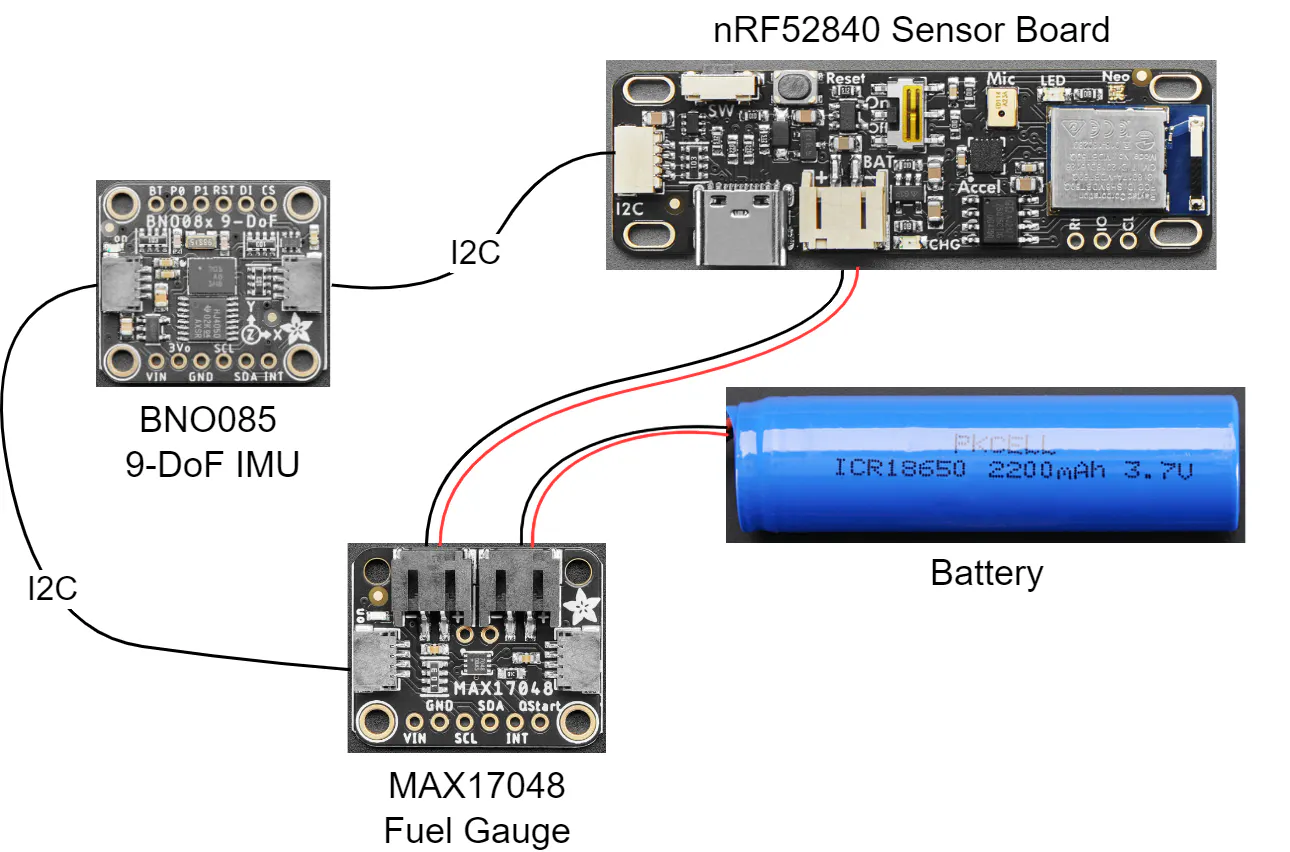
Technical DetailsSphereCAD is built on a high-speed I2C bus utilizing the Qwiic ecosystem. At the heart of the device is the Adafruit nRF52840 Sensor Board, which serves as the MCU. This is daisy-chained via Qwiic to a MAX17048 LiPoly fuel gauge and the BNO085 9-DOF IMU. The fuel gauge is an important addition for a handheld device, providing high-resolution voltage monitoring to ensure the user is never caught off guard by a dying battery during a complex design session.
Most hobbyist-grade IMUs provide Euler angles (pitch, yaw, and roll), which are prone to Gimbal Lock, a state where two axes align and the sensor loses a degree of freedom. To provide the fluid, 360-degree navigation required for professional CAD work, SphereCAD operates entirely in Quaternion space.
The BNO085 is a 9-DOF (degrees of freedom) inertial measurement unit (IMU) that combines three types of MEMS sensors (accelerometer, gyroscope, and magnetometer) to provide comprehensive motion and orientation data. It has the following core ouputs:
- Accelerometer (Acceleration Vector): measures acceleration on three axes. This includes acceleration due to gravity plus any linear motion, expressed in m/s².
- Gyroscope (Angular Velocity Vector): measures rotational speed around the three axes (i.e. how fast the device is rotating), in radians per second.
- Magnetometer (Magnetic Field Vector): measures the ambient magnetic field in three axes, in microteslas (µT). This is used to detect orientation relative to the Earth’s magnetic field (i.e. a “compass” reference).
- Derived Vectors: the BNO085 can also output data such as linear acceleration (acceleration minus gravity), or a gravity vector (the component of acceleration due only to gravity, without linear motion).
However, raw sensor readings alone are often insufficient for stable, drift-free orientation tracking: accelerometer data is noisy and influenced by motion or vibration; gyroscopes drift over time when you integrate angular velocity to estimate orientation; magnetometer readings can be disturbed by nearby ferromagnetic materials or electromagnetic interference.
To overcome these limitations, the BNO085 runs on-board sensor-fusion firmware. This firmware continuously combines (fuses) data from accelerometer, gyroscope, and magnetometer to compute a stable, reliable estimate of the device’s orientation in 3D space.
The BNO085 supports several types of rotation-vector reports, each optimized for different use cases:
- Absolute Orientation / Rotation Vector (Quaternion): the most accurate orientation output, fused from accelerometer, gyro, and magnetometer. It is referenced to both gravity (downwards) and magnetic north, giving a real-world orientation reference.
- Geomagnetic Rotation Vector: a low-power option that fuses only accelerometer and magnetometer data (no gyro). It’s less responsive and less accurate for rapid motion, but useful when conserving power is important.
- Game Rotation Vector: fuses accelerometer and gyro data (ignoring magnetometer). This provides a smooth, low-latency orientation output, avoiding magnetic disturbances, which is good for applications needing fast response under frequent motion.
Because of this fusion, the BNO085 can provide real-time, low-drift, stable 3D orientation. That means if you rotate the sensor (or the sphere in SphereCAD), the quaternion output tracks that orientation precisely, suitable for mapping to 3D rotations in CAD software.
The firmware then translates these four-dimensional vectors into HID (Human Interface Device) signals that the host computer interprets as smooth, continuous motion. This allows for complex rotations that feel seamless to the artist, avoiding the jerky axis-snapping common in cheaper input devices.
The most significant hurdle in making SphereCAD feel natural was not the code, but the mechanical geometry. Early prototypes suffered from a disorienting wobble. If the IMU is even slightly offset from the geometric center of the sphere, the sensor perceives a linear acceleration whenever the ball is rotated. This off-axis placement breaks the user’s immersion; instead of the model spinning in place, it feels like it is swinging on a pendulum. Achieving a truly intuitive feel required multiple iterations of an internal mounting cage. I had to design a skeleton that suspended the Adafruit BNO085 exactly at the dead center of the 3D-printed outer shell. Only when the sensor was perfectly concentric with the sphere did the math align with the physical sensation. At that point, the device stopped feeling like a peripheral and started feeling like a physical extension of the CAD environment.
Another challenge that I discovered only after I had started development was that the BNO085 IMU I2C implementation violates the I2C protocol in some circumstances, which causes it not to work well with certain chip families. According to Adafruit, operation with SAMD51, RP2040, STM32F4, and nRF52840 MCUs is more reliable.
Next StepsI’m currently working on v2 of SphereCAD, improving the following things that prevent it from being my go-to input device for CAD:
- Weight distribution: The heavy battery filling one half of SphereCAD results in an imbalanced feel during rotation. Splitting the large battery into two smaller ones and putting them in separate halves might balance the tool.
- Charging Experience: A magnetic charging dock would be more appropriate. By embedding induction coils or pogo-pin contacts into the base of the sphere, the user could simply set SphereCAD down on a cradle to charge when not in use.
- Expanding functionality: While the main benefit for me is a better CAD experience, SphereCAD can be used in a variety of different use cases. From virtual reality, architecture…

Comments