Project OverviewThis project demonstrates how to build a smart attendance system using RFID technology and an Arduino board. Instead of manual registers, users can scan RFID cards to record attendance instantly. The system reads each card’s unique ID and logs the data, making it suitable for schools, offices, and small organizations.
What Makes This Project Useful- Reduces manual errors in attendance tracking
- Saves time compared to traditional methods
- Can be expanded with storage or cloud integration
- Beginner-friendly hardware setup
How It WorksAn RFID reader scans the card when it is placed near the module. Each RFID tag contains a unique identifier. The Arduino reads this UID and compares it with stored IDs. If the card is recognized, the system marks attendance and provides feedback through an LCD display or serial monitor.
Components Required- Arduino Uno (or compatible board)
- RFID Reader (MFRC522 module)
- RFID Tags/Cards
- Jumper wires
- Breadboard
- Optional: LCD display or buzzer for feedback
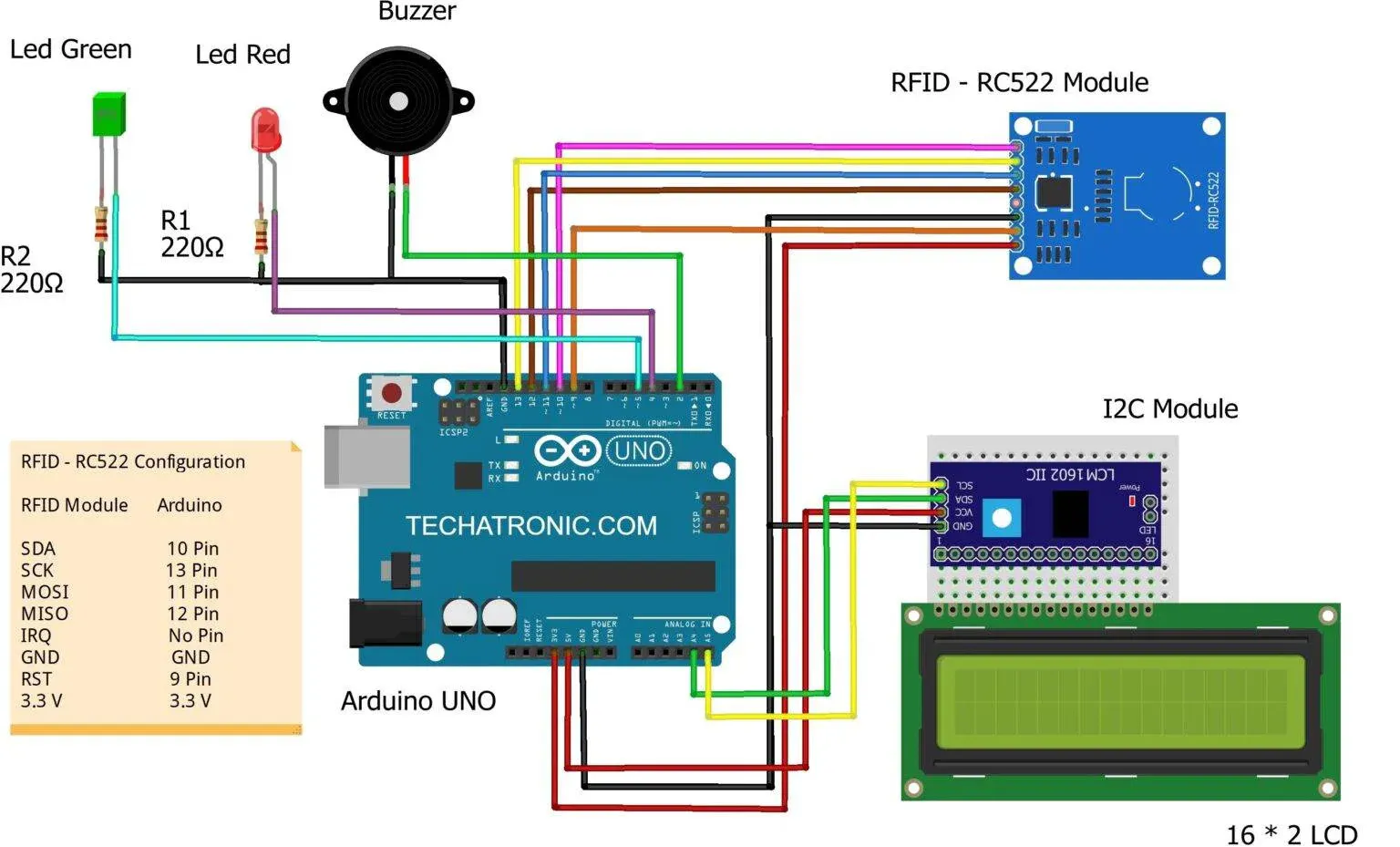
Circuit SetupConnect the RFID module to the Arduino using SPI communication pins. Ensure proper wiring of SDA, SCK, MOSI, MISO, and RST pins. Power the module using 3.3V and connect ground properly to avoid unstable readings.
Programming the ArduinoInstall the required RFID library in the Arduino IDE. Upload the code that reads RFID data and compares it with predefined card IDs. The code can be modified to store multiple users and log timestamps.
Testing the SystemAfter uploading the code:
- Open the Serial Monitor
- Scan an RFID card
- Check if the UID is displayed and recognized
- Add or remove authorized cards as needed
Possible Improvements- Add SD card module for data logging
- Integrate real-time clock (RTC) for timestamps
- Connect to a web server for remote access
- Use Wi-Fi modules like ESP8266 for cloud tracking
Use Cases- Classroom attendance tracking
- Employee check-in systems
- Library access monitoring
- Event entry management



_ztBMuBhMHo.jpg?auto=compress%2Cformat&w=48&h=48&fit=fill&bg=ffffff)




Comments