This project revisits a minimalist Pong-style arcade game built with an Arduino Uno and an 8×8 LED matrix driven by the MAX7219.
Originally developed as an early learning exercise, the project was later refactored to improve structure, readability, and overall maintainability, along with a redesigned game-over animation.
The paddle is controlled via a potentiometer, while the ball movement is implemented using discrete position updates combined with deterministic collision detection logic. Over time, the game dynamically increases in difficulty by progressively reducing the frame delay.
Beyond being a compact arcade implementation, this project demonstrates several core embedded systems concepts:
Analog-to-Digital Conversion (ADC)
Real-time control logic
Collision detection in constrained environments
SPI-based communication with the MAX7219
Dynamic difficulty scaling
A video showing the gameplay
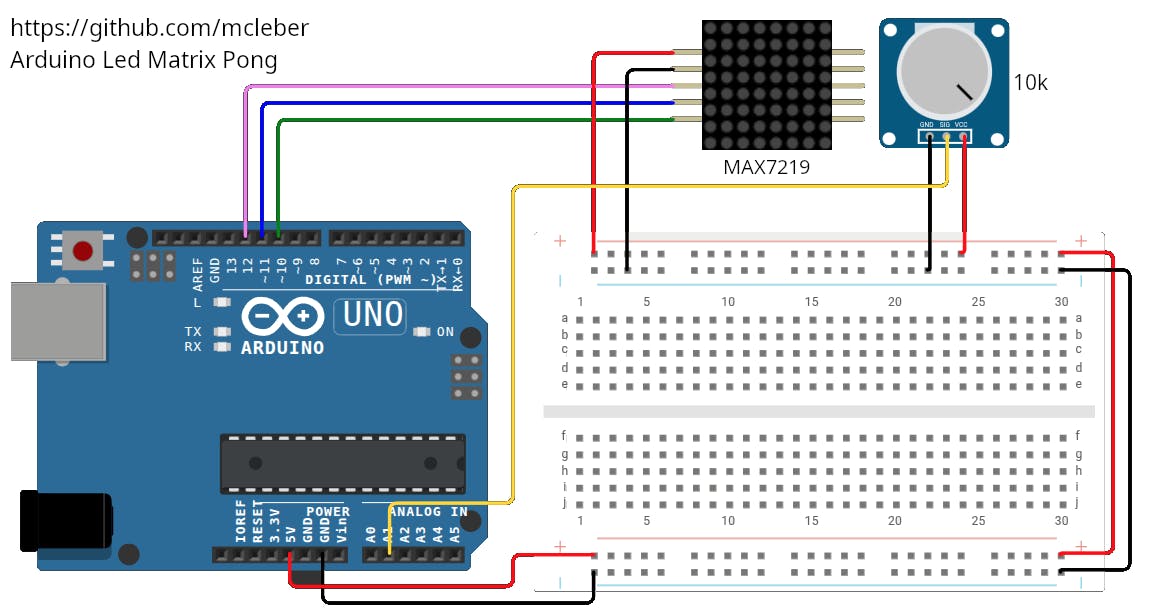
Hardware Setup
MAX7219
The MAX7219 simplifies LED matrix control by handling multiplexing internally and communicating through a SPI-like interface.
MAX7219 Connections
VCC → 5V
GND → GND
DIN → D12
CS → D11
CLK → D10
Potentiometer Connections
Left pin → GND
Right pin → 5V
Middle pin → A1
How the Game Works
The firmware follows a structured embedded architecture:
The potentiometer is read using the Arduino ADC.
The paddle position is mapped to the LED matrix.
The ball position is updated using direction vectors.
Collision detection determines wall and paddle impacts.
The frame is rendered on the LED matrix.
Game speed increases over time to raise difficulty.
A custom animation is triggered when the player loses.
#include<LedControl.h>/* ================================================== HARDWARE CONFIGURATION ================================================== */// Pin connections to MAX72XXconstexprbytePIN_DIN=12;constexprbytePIN_CS=11;constexprbytePIN_CLK=10;constexprbyteNUM_DEV=1;// Create LED matrix control objectLedControlmatrix(PIN_DIN,PIN_CLK,PIN_CS,NUM_DEV);/* ================================================== GAME CONFIGURATION ================================================== */constexprbyteMATRIX_SIZE=8;// 8x8 LED matrixconstexprbytePADDLE_PIN=A1;// Potentiometer pinconstexprbytePADDLE_COLUMN=7;// Paddle position (right side)constexprbyteBALL_START_X=1;// Initial ball columnintballX,ballY;// Ball positionintdirX=1;// Ball horizontal directionintdirY=1;// Ball vertical directionintpaddlePosition=0;// Paddle top LED positionunsignedintballSpeed=300;// Ball delay (ms)unsignedlongframeCount=0;// Frame counter/* ================================================== INITIALIZATION ================================================== */voidsetup(){// Wake up MAX72XX from power saving modematrix.shutdown(0,false);// Set LED brightness (015)matrix.setIntensity(0,4);// Clear displaymatrix.clearDisplay(0);// Seed random generatorrandomSeed(analogRead(A0));// Initialize gameresetGame();}/* ================================================== MAIN LOOP ================================================== */voidloop(){readPaddle();// Read potentiometermoveBall();// Update ball positiondetectCollisions();// Check walls and paddledrawScene();// Render frameupdateSpeed();// Increase difficultydelay(ballSpeed);// Control game speedframeCount++;}/* ================================================== GAME FUNCTIONS ================================================== */// Read paddle position from potentiometervoidreadPaddle(){intrawValue=analogRead(PADDLE_PIN);// Limit to central range to avoid slow extremesintminRaw=200;// Ignore ~0–200intmaxRaw=800;// Ignore ~800–1023rawValue=constrain(rawValue,minRaw,maxRaw);// Map the useful range to the full paddle movementinttargetPosition=map(rawValue,minRaw,maxRaw,0,MATRIX_SIZE-3);// Move paddle directly to the target (fast)paddlePosition=targetPosition;}// Update ball positionvoidmoveBall(){ballX+=dirX;ballY+=dirY;}// Detect collisions with walls and paddlevoiddetectCollisions(){// Left wallif(ballX<=0)dirX=1;// Top wallif(ballY<=0)dirY=1;// Bottom wallif(ballY>=MATRIX_SIZE-1)dirY=-1;// Paddle collisionif(ballX==PADDLE_COLUMN-1&&dirX>0){if(ballY>=paddlePosition&&ballY<=paddlePosition+2){dirX=-1;}}// If ball reaches right side Game Overif(ballX>=MATRIX_SIZE-1){gameOverAnimation();resetGame();}}// Draw ball and paddlevoiddrawScene(){matrix.clearDisplay(0);// Draw ballmatrix.setLed(0,ballX,ballY,true);// Draw paddle (3 LEDs)for(inti=0;i<3;i++){matrix.setLed(0,PADDLE_COLUMN,paddlePosition+i,true);}}// Gradually increase game speedvoidupdateSpeed(){if(frameCount%20==0&&ballSpeed>60){ballSpeed-=10;}}// Reset game statevoidresetGame(){ballX=BALL_START_X;ballY=random(0,MATRIX_SIZE);dirX=1;dirY=random(0,2)?1:-1;ballSpeed=300;frameCount=0;}/* ================================================== GAME OVER ANIMATION ================================================== */voidgameOverAnimation(){for(intrepeat=0;repeat<4;repeat++){matrix.clearDisplay(0);// Draw X patternfor(inti=0;i<MATRIX_SIZE;i++){matrix.setLed(0,i,i,true);matrix.setLed(0,i,MATRIX_SIZE-1-i,true);}delay(250);matrix.clearDisplay(0);delay(250);}}




_ztBMuBhMHo.jpg?auto=compress%2Cformat&w=48&h=48&fit=fill&bg=ffffff)




Comments