matthias
Published © LGPL

Arduino Game Controller

This is a universally usable game controller that can emulate seven different key inputs.

BeginnerFull instructions provided5 hours196
Arduino Game Controller

Things used in this project

Hardware components

Arduino Leonardo
Arduino Leonardo
×1
Resistor 10k ohm
Resistor 10k ohm
×7
Jumper wires (generic)
×1
Pushbutton 6mm
×7
circuit board
×1
Heat Set Insert M3
×17
M3x8 Countersunk Screw
×4
M3x10 Socket Head Screw
×13
3D-Printer Filament
×1

Software apps and online services

Arduino IDE
Arduino IDE

Hand tools and fabrication machines

Soldering iron (generic)
3D Printer (generic)

Story

Read more

Custom parts and enclosures

CAD Document

FreeCAD File

main body

STL-file

backplate

STL-file

attachment direction

STL-file

attachment

STL-file, print 3 of these

button direction

STL-file

button

STL-file, print 3 of these

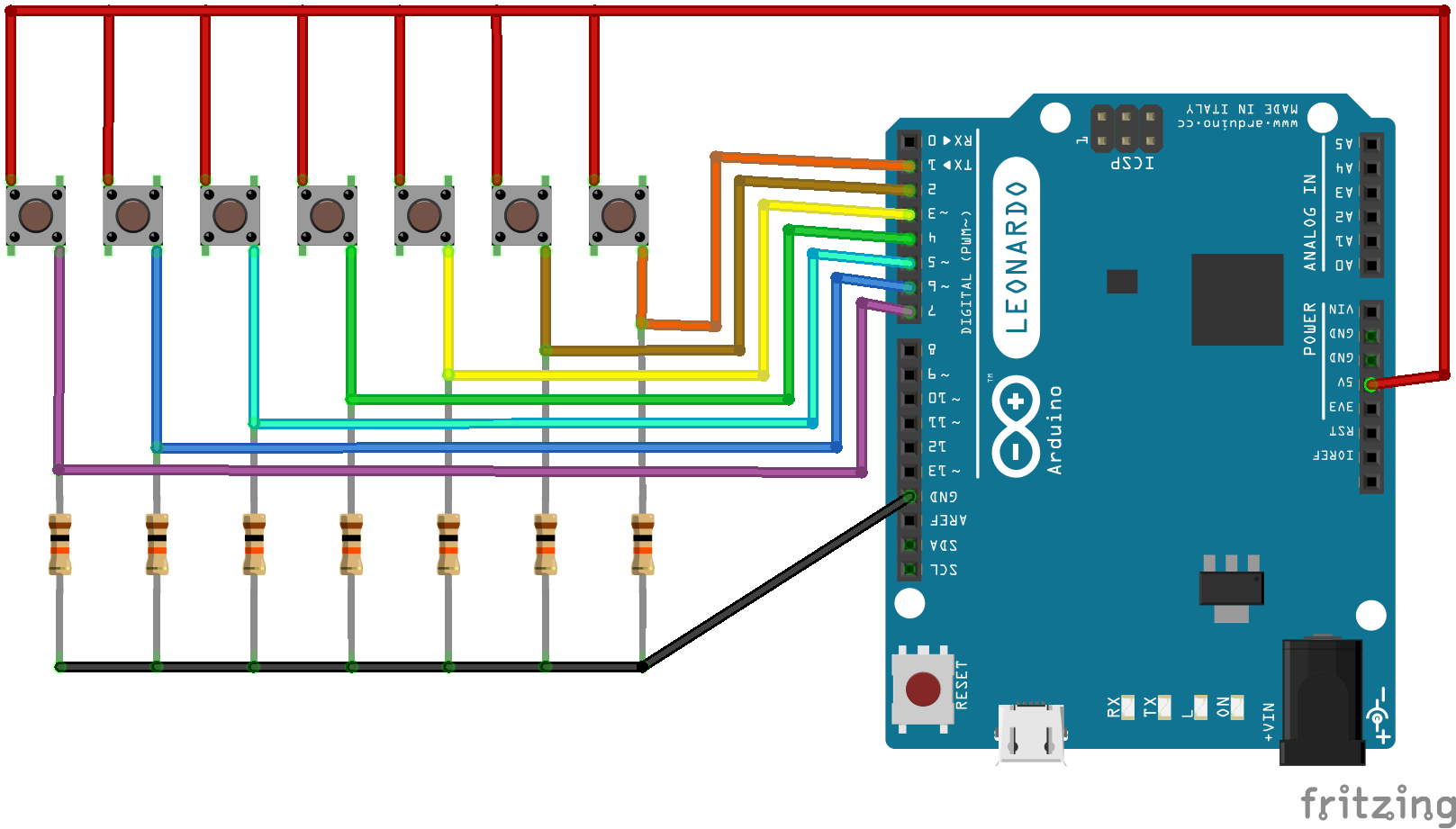
Schematics

controller_steckplatine_686Ez5xH1d.png

Code

Game Controller

Arduino
Download the keyboard library.
# include "Keyboard.h"

int StateOld[7];
int StateNew[7];
int Pin_Number[7] = {1,2,3,4,5,6,7};
int Key_to_Press[7] = {KEY_LEFT_ARROW, KEY_RIGHT_ARROW, KEY_UP_ARROW, KEY_DOWN_ARROW,'a','s','d'};

void setup(){
  int i;
  Serial.begin(9600);
  for (i = 0; i < 7; ++i ) {
    pinMode(Pin_Number[i], INPUT);
    digitalWrite(Pin_Number[i], LOW);
    StateOld[i] = digitalRead(Pin_Number[i]);
    StateNew[i] = digitalRead(Pin_Number[i]);
  }
}

void loop() {
  int i;

  for( i = 0 ; i < 7 ; ++i ) {
    if (StateOld[i] != StateNew[i]) {
      StateOld[i]  = digitalRead (Pin_Number[i]);
      if (StateOld[i] == HIGH) {
        Keyboard.press(Key_to_Press[i]);
      }
      else if (StateOld[i] == LOW) {
        Keyboard.release(Key_to_Press[i]);
      }
    }
    StateNew[i] = digitalRead (Pin_Number[i]);
   }
}

Credits

matthias
1 project • 0 followers

Comments