INTRODUCTIONThe Perception Accuracy Test (PAT) is a simple IoT device that allows a user to test their perception and estimation skills (i.e. eyeballing) via a series of small games. I developed it as my midterm project for an IoT/Rapid Prototyping bootcamp offered through CNM Ingenuity.
The project was inspired by The Eyeballing Game by Matthias Wandel.
My goal with this project was to create a game platform that integrates most of the concepts I’ve learned in the bootcamp so far.
I wanted the device to be ergonomic and easy to use. I also wanted the design and code to be open and flexible to allow more components and games to be added in the future.
GAME MODES (SO FAR)- Guess Hue - A random hue is displayed on a Phillips Hue Bulb and the user must try to replicate it by turning an encoder.
- Guess Line Midpoint - A random line is drawn on the OLED display and the user must try to find the midpoint by turning an encoder.
- Guess Temperature - The BME280 takes a temperature reading, which is compared against the user's guess at the current temperature in the room.
After each game, the player's accuracy is calculated and displayed on the OLED display and represented by a servo-driven gauge in the top of the device. Scores above 95% also get a lightshow.
Here's a demo of the Guess Line Midpoint game.
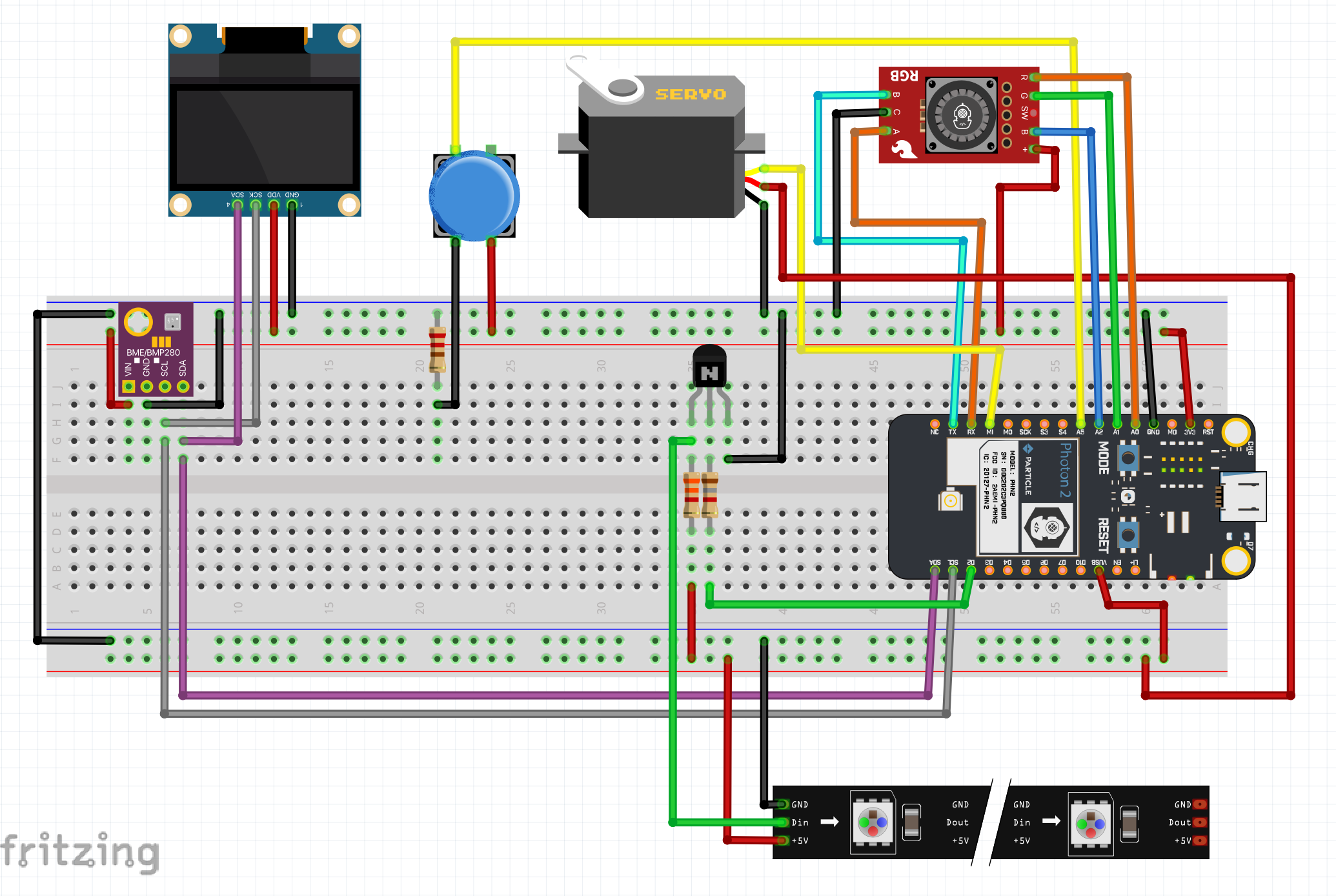
DESIGN PROCESS - WIRINGOnce I had determined all of the components I would be using in this project, I chose the necessary pins on my Photon 2, making sure that component requirements were met (e.g. PWM pin for Neopixels, separate 5V / 3.3V power rails, etc.). I configured my button as input pulldown and added an emitter follower between the Photon 2 and the Neopixels to drop the voltage to a more consistent range.
DESIGN PROCESS - HOUSINGI started my housing design with a notebook brainstorming session. Once I settled on a design that met all my criteria, I refined it, calculated its dimensions, and created it in OnShape. The "Laser Joint" and "Auto Layout" custom features I learned in this video were very helpful for creating the project's housing. The other parts I modeled were knobs for encoders, a mount for a servo, and a pointer to be moved by the servo to display a user's accuracy.
1 / 5 • Original housing cut and extruded from a humble cube, then laid out neatly
I have a good amount of prior coding experience, so this wasn't too difficult. It was one of the first times I coded in a strongly-typed language (C++), so that took some getting used to. The Particle library is also making things significantly easier, saving keystrokes on the often alien-looking academic C++ code examples found on StackOverflow.
After I determined the main flow of the program in my notebook, I started writing functions. My goal was to stay out of the main loop as much as possible, and I think I achieved that. I could probably pare things down a bit more, but for now the project works as intended.
THE FUTUREThere are a lot more ways I'd like to add to and improve this project. Here are just a few:
- Code cleanup
- More robust automatic mode
- More game modes using more senses, e.g. pitch/rhythm (no taste or smell, don’t worry)
- More OLED game modes to get more practice with graphics
- Etch-a-Sketch mode with dual encoders
- Use Neopixels to make use of the hsv -> rgb library I found
- Improve fit and finish / housing redesign






Comments