


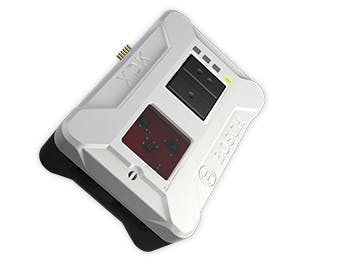
This tutorial covers basic programming Bosch XDK using Bosch Workbench (Eclipse) tool. We are going to research how to create multitasking application with device and FreeRTOS.
PrerequisitesFor this project you need:
- BOSCH XDK device
- BOSCH workbench
- Basic knowledge about freeRTOS
The application consists of two modules : Main and BlinkLED. First is auto-generated module for each new project. Main.c is required to start up the freeRTOS operating system. All code implementations will take place in additional interface header .h files and implementation .c files. It will be started when device pass through boot process. There is only one important line of code
...
/* start scheduler */
 vTaskStartScheduler();
...
We are going to create multitasking application ... Real Time Scheduler is the part of the RTOS kernel that is responsible for deciding which task should be executing. For blinking each LED we are going to create two separate task and we will discuss them later. Image below shows simplified timeline for multitasking
A real time application that uses an RTOS can be structured as a set of independent tasks. Each task is executed within its own context with no coincidental dependency on other tasks within the system or the RTOS scheduler itself. Only one task within the application can be executed at any point in time and the scheduler is responsible for deciding which task this should be. The scheduler may therefore repeatedly start and stop each task (swap each task in and out) as the application executes.
Each task is function, and simplified template for each task is something like following code
void myTaskFunction(void *pParameters)
{
    (void) pParameters;
    for (;;)
    {
        //do something
        vTaskDelay(SECONDS(3));
    }
}
Our task function for blinking one LED (located in BlinkLED.c):
void taskRed(void * pvParameters)
{
    (void) pvParameters;
     for(;;){
         BSP_LED_Switch((uint32_t) BSP_XDK_LED_R, (uint32_t) BSP_LED_COMMAND_ON);
         myDelay(1000);
         BSP_LED_Switch((uint32_t) BSP_XDK_LED_R, (uint32_t) BSP_LED_COMMAND_OFF);
         myDelay(1000);
    }
}
And the main function is appInitSystem
void appInitSystem(void * CmdProcessorHandle, uint32_t param2)
{
 if (CmdProcessorHandle == NULL)
    {
 printf("Command processor handle is null \n\r");
 assert(false);
    }
 BCDS_UNUSED(param2);
 LedInitialize();
 xTaskCreate(taskRed,(const char * const) "Red blink",256,NULL,1,&redTaskHandle);
 xTaskCreate(taskYellow,(const char * const) "Yellow blink",256,NULL,1,&yellowTaskHandle);
}
... that's it :). It is not so complicated.
You will find full code below in the Code section
Useful links


Comments