



Hardware components | ||||||
 |
| × | 1 | |||
 |
| × | 1 | |||
 |
| × | 1 | |||
 |
| × | 1 | |||
 |
| × | 1 | |||
| × | 1 | ||||
Software apps and online services | ||||||
 |
| |||||
 |
| |||||
 |
| |||||
| ||||||
Smart speakers such as Amazon Echo and Google Nest have already become a familiar part of everyday life. They can answer questions, play music, and interact with compatible smart-home devices using voice commands.
But for makers and embedded developers, there is another interesting question:
Can we build our own AI smart speaker—one that we can customize and connect to our own hardware?
Building one from scratch gives us much more freedom to experiment with the voice interface, the AI assistant, and the way it interacts with physical devices. Instead of being limited to the capabilities and ecosystem of a commercial product, we can decide what our assistant should understand and what actions it should perform.
For this project, we chose the reSpeaker XMOS XVF3800 with XIAO ESP32-S3 as the heart of our voice interface. We used Xiaozhi as the AI assistant platform and created our own voice assistant, "Joy", with the wake word “Hi, Joy.”
The goal was not simply to build a device that could listen and respond. We wanted "Joy" to understand natural-language requests and turn them into real actions—for example, switching a light on when we say “It's very dark, ” turning on the AC when we say “It's very hot, ” or changing multiple devices together through a smart-home scene.
To make the system more practical, we expanded it with a CrowPanel Advance 7 touchscreen dashboard and a dedicated Home Controller built around another XIAO ESP32-S3. The dashboard provides a visual interface for controlling the connected appliances and monitoring their current states, while the Home Controller manages the relay-based switching and environmental sensing.
We also integrated a Sensirion SHT40 temperature and humidity sensor into the Home Controller. This allows the system to monitor the surrounding environment and make live temperature and humidity readings available to both Joy and the touchscreen dashboard.
The result is a customizable, embedded AI-powered smart-home system that brings together natural voice interaction, AI-driven appliance control, a touchscreen dashboard, and real-time environmental monitoring. With Joy as the voice interface, the CrowPanel as the visual control panel, and the dedicated Home Controller connecting everything to the physical world, the project has evolved well beyond a standalone AI smart speaker.
With the overall idea established, let's first look at what we wanted this system to achieve.
What We Wanted to BuildOur objective was to build more than a conventional voice-controlled IoT prototype. We wanted to create a customizable AI smart speaker that could understand natural-language requests and use them to interact with real devices around us.
The project was designed around five core goals.
- First, we wanted a natural voice interface. Instead of relying on rigid commands, we wanted to be able to speak to the assistant as we would normally speak to another person. Our assistant, "Joy", responds to the wake word “Hi, Joy” and can understand requests such as “Turn on the light” or “Turn off the fan.”
- Second, we wanted to connect the AI assistant to the physical world. The system controls four devices—Light, AC, Fan, and TV—through a dedicated XIAO ESP32-S3-based controller and a four-channel relay module. This means a voice request doesn't stop with a response from the assistant; it can result in an actual change in the connected hardware.
- Third, we wanted the system to understandintent and context, rather than simply matching predefined phrases. For example, saying “It's very dark” can turn on the light, while “It's very hot” can turn on the AC. We also created smart-home scenes such as Movie Mode and Departure Mode, allowing a single request to control multiple devices.
- Fourth, we wanted a second, visual way to interact with the system. A touchscreen acts as the smart-home dashboard, allowing us to manually control the devices, view their current states, and see whether the home controller is online.
- Finally, we also wanted the system to monitor the surrounding environment. We integrated a Sensirion SHT40 temperature and humidity sensor into the dedicated Home Controller, allowing us to obtain live environmental readings. These readings are not limited to the dashboard; Joy can also retrieve the sensor data and respond to questions about the current temperature and humidity.
The result is a system where voice interaction, AI-driven device control, environmental sensing, and a touchscreen interface work together as one integrated smart-home platform. By combining appliance control with real-time temperature and humidity monitoring, we wanted to make the system more useful than a conventional voice-controlled smart speaker.
The Core of the Voice Interface — reSpeaker XMOS XVF3800At the center of our project is the reSpeakerXMOS XVF3800 with XIAO ESP32-S3 (Case Version). It combines a circular four-microphone array based on the XMOS XVF3800 with a pre-soldered XIAO ESP32-S3, giving us a compact platform for building the voice interface of our assistant.
Seeed describes the reSpeaker as a professional four-microphone array designed for advanced voice applications, with 360° far-field voice capture up to 5 meters and a range of built-in audio-processing capabilities.
What makes the XVF3800 particularly interesting for our application is that the microphone array is not simply capturing raw audio. The XVF3800 performs several stages of audio processing, including Acoustic Echo Cancellation (AEC), Automatic Gain Control (AGC), Direction of Arrival (DoA), beamforming, Voice Activity Detection (VAD), noise suppression, and de-reverberation.
Lets see these features In detail:
- 360° far-field voice capture → "Joy" doesn't need us to speak directly into one particular microphone.
- Beamforming → helps focus on the desired sound source.
- Noise suppression → helps deal with unwanted background noise.
- AEC → useful when the assistant is playing audio while listening.
- DoA (Direction of Arrival) → allows the system to determine where a sound is coming from.
- VAD (Voice Activity Detection) → helps determine when speech is present.
- AGC → helps maintain a suitable audio level.
- De-reverberation → helps compensate for room reflections.
These capabilities are important for a voice assistant that is intended to operate in a real room. The 360° microphone arrangement allows voice to be captured from different directions, while beamforming and noise suppression help improve the quality of the captured speech. AEC is particularly useful for an assistant that can speak back to the user, since the system may need to distinguish the user's voice from audio being played by the device itself. DoA and VAD provide additional information about where sound is coming from and whether speech is present.
The XIAO ESP32-S3 complements the XVF3800 by providing the embedded processing and connectivity required for our application. In the XIAO-integrated configuration, the two devices communicate using I2S for audio and I2C for configuration and control, allowing the XIAO to work as the host for the microphone array.
Another useful aspect of the platform is its dual-operation capability. The reSpeaker can operate in USB mode for plug-and-play connection to systems such as PCs and Raspberry Pi, or in INT-Device/I2S mode for integration with embedded hosts such as the XIAO ESP32-S3. For our project, we use the I2S-based configuration with the XIAO.
For our project, this combination gives us something more useful than a simple microphone connected to an ESP32. The reSpeaker provides the ears and audio-processing front end, while the XIAO provides the embedded platform on which our voice assistant runs.
With the voice interface established, the next step is to connect it to the rest of our smart-home system and turn those voice interactions into real actions.
Other HardwareIn addition to the reSpeaker XVF3800, we used the following hardware to build the complete smart-home system:
- XIAO ESP32-S3 (Joy / Voice Assistant): Runs the Xiaozhi firmware and handles voice-assistant functionality
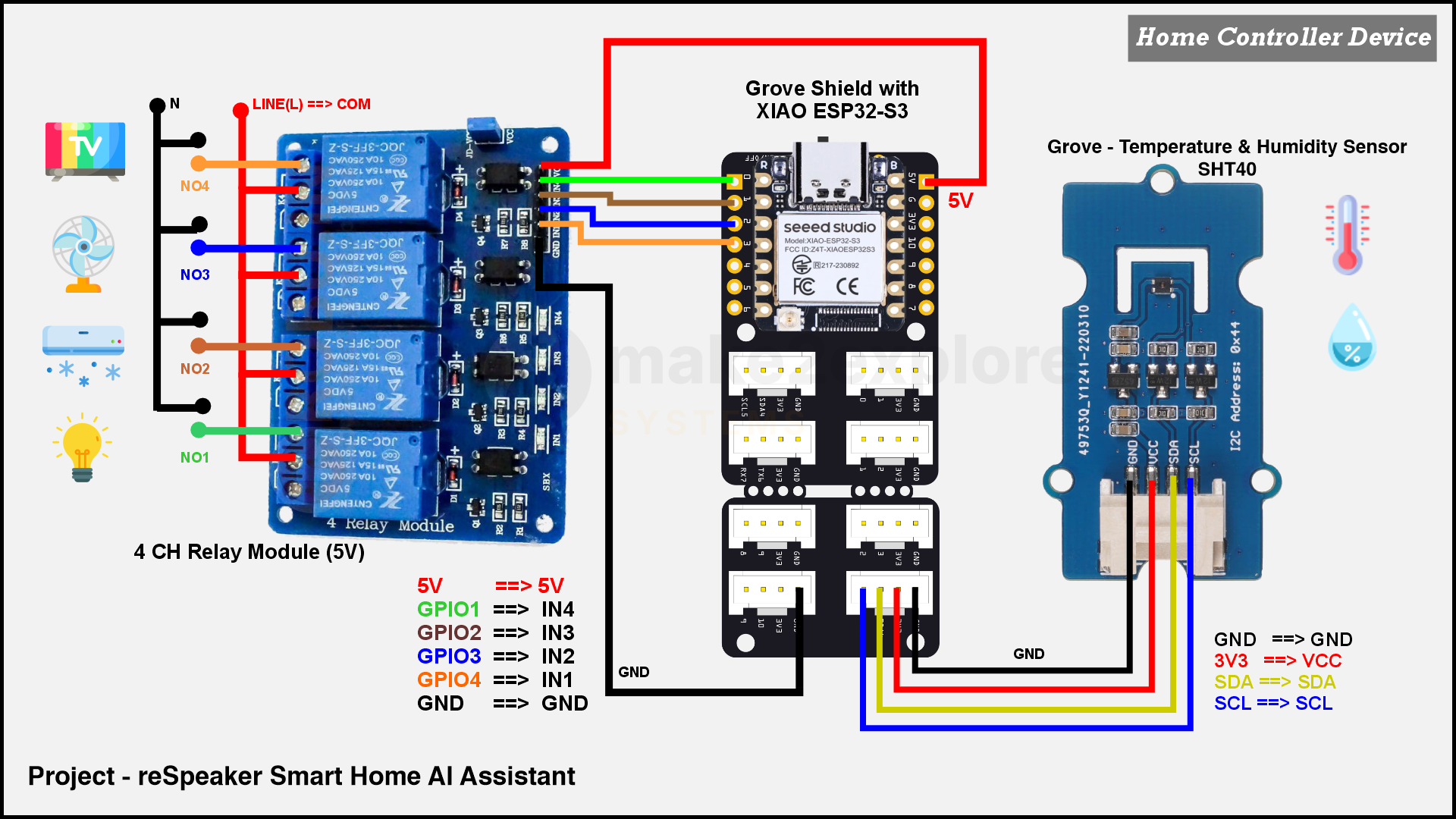
- XIAO ESP32-S3 (Home Controller): Acts as the dedicated controller for appliance control and environmental sensing.
- Elecrow CrowPanel Advance 7-inch ESP32-S3: Provides the touchscreen interface for monitoring and controlling the smart-home system.
- 4-Channel Relay Module (5V): Controls four appliances — Light, AC, Fan and TV.
- Sensirion SHT40 Temperature and Humidity Sensor: Measures the surrounding temperature and humidity.
- Speakers: We Used USB powered Speakers for audio output and Joy's spoken responses.
Speaker options: For audio output, you are not restricted to the speakers used in our build. You can connect external powered speakers through the reSpeaker XVF3800's 3.5 mm audio jack. Alternatively, you can connect a compatible passive speaker through its onboard amplified speaker output (JST connector). Make sure the speaker's electrical specifications are compatible with the board's output.How the System Works
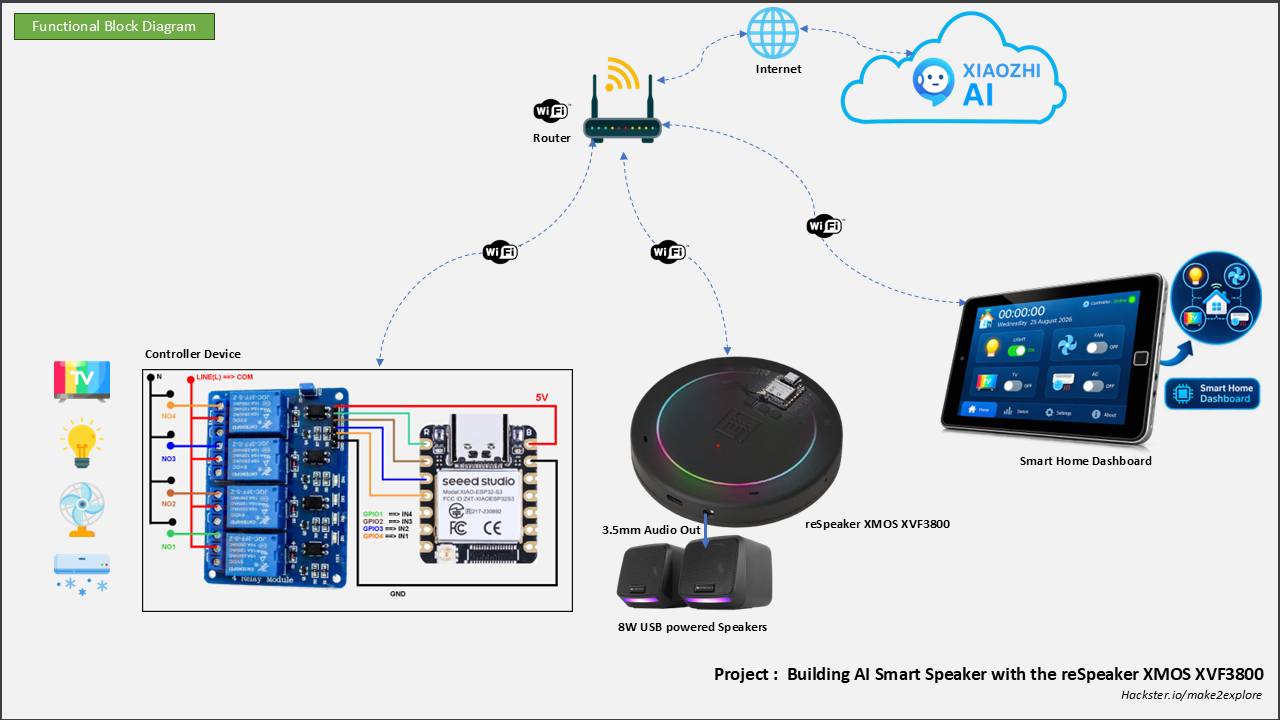
Our system consists of three main components:
1. the voice assistant,
2. the touchscreen dashboard,
3. and a dedicated Home Controller.
Joy provides natural voice interaction through the reSpeaker and XIAO ESP32-S3, while the CrowPanel Advance 7 touchscreen provides a visual interface for controlling the connected devices. The separate Home Controller, also built around a XIAO ESP32-S3, connects these interfaces to the physical appliances and handles environmental sensing. Together, these components provide voice control, touchscreen operation, and real-time environmental monitoring.
When we say the wake word “Hi, Joy, ” the reSpeaker XMOS XVF3800 captures our voice and passes the audio to the XIAO ESP32-S3. The XIAO runs the Xiaozhi voice-assistant firmware, which connects to the Xiaozhi AI service to process our request and determine what we want the system to do.
The important part is that 'Joy'is not limited to simple, predefined commands. A natural-language request can be interpreted according to its intent.
- For example, saying “It's very dark” can be understood as a request to turn on the light, while “It's very hot” can result in the AC being switched on.
Once an action is determined, Joy sends the corresponding device-control request to our dedicated Home Controller through its local API. The Home Controller processes the request and operates the appropriate channel of the four-channel relay module. It controls four devices—Light, AC, Fan, and TV—allowing a voice request to produce a real-world action. Keeping the relay operation on a separate controller also allows the voice-assistant interface and physical device-control hardware to operate independently.
We also added the CrowPanel Advance 7" touchscreen as a second control interface. From the dashboard, we can manually switch the same devices on or off and monitor their current states. This gives us a visual alternative when we don't want to use voice commands.
In addition to appliance control, the Home Controller also monitors the surrounding environment using a Sensirion SHT40 temperature and humidity sensor. It makes the sensor readings available through its local API, allowing both Joy and the touchscreen dashboard to access the latest environmental data. This means we can not only control our smart-home devices through voice or touch but also ask Joy about the current temperature and humidity or view these readings directly on the dashboard.
The result is a complete interaction loop:
- we speak → Joy understands → the system decides the action → the hardware responds.
- The touchscreen provides another path to the same smart-home controls, making the system both voice-driven and manually controllable.
Once the hardware foundation was ready, the next step was to turn the reSpeaker XVF3800 and XIAO ESP32-S3 into an actual voice assistant. For this, we chose Xiaozhi, an open-source voice-assistant platform that provides the foundation for voice interaction and AI-powered conversations. We built our assistant, named Joy, on top of Xiaozhi and extended its capabilities to interact with our smart-home system.
Our goal was not simply to make the XIAO recognize a few fixed commands. We wanted to create an assistant that could communicate naturally, understand what we were asking, and then connect that understanding to our own smart-home system. We named the assistant 'Joy' and configured the wake word as “Hi, Joy.”
Connecting the reSpeaker to the XIAO
- The first important part of the implementation was getting the reSpeaker XVF3800 and XIAO ESP32-S3 working together in I2S mode. Seeed's documentation provides dedicated firmwareand configuration for using the XVF3800 with an embedded host such as the XIAO. In this setup, the reSpeaker handles microphone capture and audio processing, while the XIAO ESP32-S3 acts as the host, running the Xiaozhi-based voice-assistant firmware.
- This configuration is important because the reSpeaker's default USB-oriented operation differs from what is required for our embedded application. When using the XVF3800 with the XIAO ESP32-S3, the appropriate I2S firmware and configuration must be used.
- Once the I2S audio interface was established, the XIAO could receive the processed audio from the XVF3800 and pass it into the Xiaozhi voice-assistant pipeline.
From Xiaozhi to "Joy"
- With the voice interface working, we used Xiaozhi as the foundation for Joy rather than building the complete voice-assistant pipeline ourselves. Xiaozhi provides the framework for voice interaction and AI-powered conversations. It handles the communication between our embedded device and the AI service, allowing Joy to understand spoken requests and generate responses.
- However, we wanted Joy to do more than answer questions or carry on a conversation. We wanted it to interact with our own embedded smart-home hardware. This is where MCP (Model Context Protocol) comes into the picture.
- MCP provides a standard way for an AI application to discover and invoke external tools or functions. In our implementation, we extended the Xiaozhi firmware with custom MCP functions that connect Joy to our Home Controller. When a request requires an action or information from the physical system, Joy can invoke the appropriate function instead of simply generating a conversational response.
- For example, these functions allow Joy to control connected appliances, retrieve their current states, and obtain temperature and humidity readings from the SHT40 sensor. The Home Controller handles the interaction with the physical hardware, while MCP provides the connection between Joy and those capabilities.
- By extending Xiaozhi with custom MCP functions, we transformed a voice-chat assistant into an AI-powered interface that can interact with our embedded smart-home system.
Giving 'Joy' Control of the Smart Home
We extended the Xiaozhi firmware with three custom smart-home functions using MCP, allowing Joy to interact with our Home Controller:
self.home.device_control— Sends requests to control the connected appliances (Light, AC, Fan, and TV)self.home.device_status— Retrieves the current states of the connected appliances.self.home.environment— Retrieves temperature and humidity readings from the SHT40 sensor through the Home Controller's local API.
Together, these functions allow Joy to control appliances, check their current states, and respond to questions about the surrounding temperature and humidity.
For device control, 'Joy' can work with four devices (You can add more, four just for demonstration purpose)
- Light | AC | Fan | TV
==> When a control request is generated, the function uses the device name and its requested state (ON or OFF) to send the corresponding request to our local Home Controller API.
==> We also implemented a device-status function. This allows Joy to retrieve information about the current state of the connected devices, rather than simply sending commands without knowing their status.
==> With these capabilities in place, Joy can do more than respond to voice queries—it can interact with and control the physical devices in our smart-home setup.
Connecting "Joy" to the Physical WorldIn this section we will see,
From Voice to Physical Action
- Making 'Joy' understand a request was only part of the project. The more interesting challenge was making that understanding produce a real action in the physical world. For this, we connected 'Joy' to our own smart-home controller, which acts as the bridge between the AI assistant and the devices in our setup.
- Our controller is built around a XIAO ESP32-S3 and a four-channel relay module, giving 'Joy' control over four devices: Light, AC, Fan, and TV. Each device is associated with one relay channel, allowing a command generated by the assistant to ultimately switch the corresponding physical device.
- For example, when 'Joy' interprets a request as turning on the fan, the device-control function is invoked with the corresponding device and state, such as
fan → on. Our controller then processes that request and operates the appropriate relay. - This is an important part of our implementation because the AI does not directly drive a GPIO pin. 'Joy' decides what action is required; our controller is responsible for carrying out that action.
From Natural Language to Device Control
- This separation also allows us to go beyond rigid commands. For example, when we say “It's very dark, ” 'Joy' can interpret the intent as a request to turn on the light. Similarly, “It's very hot” can result in the AC being switched on.
- The actual wording of the request therefore does not have to match a predefined command such as “Turn on the light.” The AI interprets the natural-language request, while our device-control function provides the mechanism for performing the resulting action.
- We also implemented a device-status function alongside device control. This allows 'Joy' to work with the current state of the devices rather than treating control as a one-way operation.
- For our four devices, the system can maintain the states of the Light, AC, Fan, and TV. This becomes particularly useful when the assistant needs to know what is currently happening, or when we want the same state information to be reflected through another interface.
Scenes and a Second Way to Control the Home
- We also wanted 'Joy' to handle situations where controlling one device at a time would be inconvenient. For this reason, we created smart-home scenes such as Movie Mode and Departure Mode.
- A scene allows a single request to represent a combination of device actions rather than requiring separate commands for every device. This makes the system more useful as a smart-home assistant because we can describe what we want the home to do, instead of having to issue individual instructions for each device.
- At this point, the system already has a complete voice-to-action path: 'Joy' interprets the request, the appropriate control function is invoked, and the home controller operates the physical devices.
- But voice is not always the most convenient way to interact with a smart home. We therefore added a second interface—the CrowPanel Advance 7 touchscreen dashboard—which gives us a visual way to control the same devices and monitor their current states.
That takes us to the next part of the project: building the touchscreen interface around the same smart-home controller.
Adding a Touchscreen DashboardIn this section we will see,
A Second Interface for the Smart Home
- Voice interaction makes 'Joy' convenient, but it is not always the most practical way to interact with a smart home. Sometimes we may want to see the current state of the devices at a glance, or control a device manually without speaking a command. To provide this second interaction method, we added a CrowPanel Advance 7 touchscreen dashboard to our system.
- The CrowPanel acts as a visual control panel for the same smart-home devices that 'Joy' controls through voice. Instead of creating a separate control system, we connected the dashboard to our existing home-control setup so that both interfaces work with the same Light, AC, Fan, and TV devices.
- This means we can use 'Joy' for voice-based interaction while the CrowPanel provides direct touchscreen control.
Designing the Dashboard
- We designed the dashboard to provide the essential information and controls without making the interface unnecessarily complicated. The screen provides controls for the four connected devices and displays their current states, allowing us to see what is ON or OFF and change the state directly from the touchscreen.
- We also included the home-controller connection/status information, so the dashboard can provide a quick visual indication of whether the controller is available.
- An important part of this design is that the CrowPanel is not intended to replace 'Joy'. Both are simply different ways of interacting with the same smart-home system. A device can be controlled through a voice request from 'Joy' or manually through the touchscreen, while the dashboard provides a visual representation of the device states.
- This gives the system two complementary interaction methods: voice when we want hands-free control, and touch when we want direct visual control.
- With the voice interface, AI assistant, physical device controller, and touchscreen dashboard now working together, the individual pieces of the project start to form a single system. The next step was to bring these components together and verify how they behave as one complete AI-powered smart-home assistant.
In this section we will see,
From Voice Command to Physical Action
- After building the individual parts, we finally brought the complete system together. The reSpeaker XMOS XVF3800 with XIAO ESP32-S3 handles the voice interface, Xiaozhi powers Joy, our XIAO-based home controller operates the four connected devices, and the CrowPanel Advance 7 provides the second, touchscreen-based interface.
- The important part is that these are not separate demonstrations. They work together as one smart-home system, with voice and touch providing two different ways to interact with the same devices.
- We first tested the basic voice-control path with direct commands. After waking Joy with “Hi, Joy, ” we could issue a request such as “Turn on the fan.” Joy processes the request, invokes the appropriate device-control function, and the home controller switches the corresponding relay.
- This demonstrates the complete path from spoken command to physical action.
Understanding Natural-Language Requests
- We then moved beyond direct commands and tested whether Joy could respond to requests expressed more naturally. For example, saying “It's very dark” can result in the light being switched on, while “It's very hot” can turn on the AC.
- This is where the AI-based approach becomes more useful than a conventional voice-control system based only on fixed commands. We can communicate the intent of what we want, rather than always having to use a specific predefined phrase.
Controlling Multiple Devices with Scenes
- We also tested the smart-home scenes we created. Movie Mode and Departure Mode allow multiple device actions to be grouped into a single request.
- Instead of controlling the Light, AC, Fan, and TV individually, we can ask Joy to activate a scene and let the system apply the corresponding combination of device states.
Voice and Touch Working Together
- The same devices can also be controlled from the CrowPanel Advance 7. This gives us a useful alternative when we prefer a visual interface instead of voice. The dashboard can show the current device states and allows us to control them directly from the touchscreen.
- The two interfaces therefore complement each other: Joy provides natural, hands-free interaction, while the CrowPanel provides direct visual control.
What We Achieved
- With these pieces working together, the project goes beyond a simple AI voice-assistant demonstration. We have a system where natural-language voice interaction, AI-driven decisions, physical device control, device status, smart-home scenes, and touchscreen interaction come together in a single embedded platform.
- What started as the idea of building our own AI smart speaker has therefore evolved into a customizable AI-powered smart-home assistant—with Joy at the center of the interaction.





Comments