



Hardware components | ||||||
| × | 1 | ||||
| × | 1 | ||||
| × | 1 | ||||
| × | 1 | ||||
 |
| × | 1 | |||
| × | 1 | ||||
| × | 1 | ||||
| × | 1 | ||||
| × | 1 | ||||
Software apps and online services | ||||||
 |
| |||||
https://www.donluc.com/?p=4584
Facebookhttps://www.facebook.com/reel/828707752851766
YouTubeDFRobothttps://learn.dfrobot.com/makelog-315056.html
#DonLucElectronics #DonLuc #TouchSensor #FireBeetle2ESP32E #ESP32 #DFRobot #Display #IoT #Project #Fritzing #Programming #Electronics #Microcontrollers #Consultant
This little sensor can "Feel" people and metal touch and feedback a High / Low voltage level. Even isolated by cloth or paper, it still can feel the touch. The sensitivity will decrease as the isolation getting thick.
Gravity: Digital Blue LED Light ModuleThis Blue LED light module has a shiny blue color.
DL2510Mk041 x DFRobot FireBeetle 2 ESP32-E
1 x Fermion: 2.0" 320x240 IPS TFT LCD
1 x GDL Line 10 CM
1 x Gravity: IO Shield for FireBeetle 2
1 x Gravity: Digital Capacitive Touch Sensor
1 x Gravity: Digital Blue LED Light Module
1 x Lithium Ion Battery - 1000mAh
1 x Switch
1 x USB 3.0 to Type-C Cable
DL2510Mk04pDL2510Mk04p.ino
getDisplay.ino
getEEPROM.ino
getTouch.ino
setup.ino
People can contact us:http://www.donluc.com/?page_id=1927
Consultant, R&D, Electronics, IoT, Teacher and Instructor- Programming Language
- Microcontrollers (PIC, Arduino, Raspberry Pi, Arm, Silicon Labs, Espressif, Etc...)
- IoT
- Wireless (Radio Frequency, Bluetooth, WiFi, Etc...)
- Robotics
- Automation
- Camera and Video Capture Receiver Stationary, Wheel/Tank, Underwater and UAV Vehicle
- Unmanned Vehicles Terrestrial, Marine and UAV
- Machine Learning
- Artificial Intelligence (AI)
- RTOS
- Sensors, eHealth Sensors, Biosensor, and Biometric
- Research & Development (R & D)
- Consulting
- Etc...
Facebook:https://www.facebook.com/neosteam.labs.9/
YouTube:https://www.youtube.com/@thesass2063
Twitter:https://twitter.com/labs_steam
Pinterest:https://www.pinterest.com/NeoSteamLabs/
Instagram:https://www.instagram.com/neosteamlabs/
DFRobot:https://learn.dfrobot.com/user-10186.html
Elecrow:https://www.elecrow.com/share/sharepj/center/no/760816d385ebb1edc0732fd873bfbf13
TikTok:https://www.tiktok.com/@luc.paquin
Hackster:https://www.hackster.io/luc-paquin
LinkedIn:https://www.linkedin.com/in/jlucpaquin/
Don Luc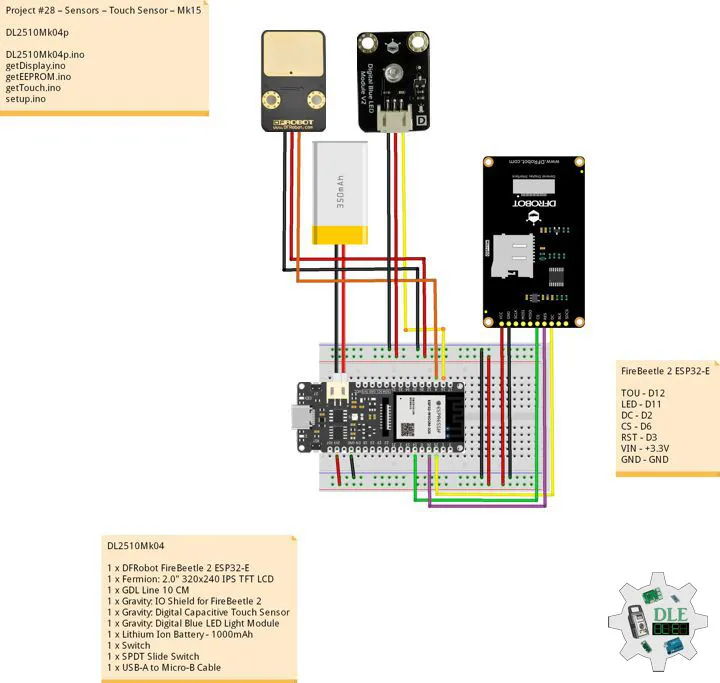


_3u05Tpwasz.png?auto=compress%2Cformat&w=40&h=40&fit=fillmax&bg=fff&dpr=2)
Comments