



Hardware components | ||||||
| × | 1 | ||||
| × | 1 | ||||
| × | 1 | ||||
| × | 1 | ||||
| × | 1 | ||||
| × | 1 | ||||
| × | 1 | ||||
| × | 1 | ||||
| × | 1 | ||||
| × | 1 | ||||
| × | 1 | ||||
| × | 1 | ||||
| × | 1 | ||||
| × | 1 | ||||
| × | 1 | ||||
| × | 1 | ||||
| × | 1 | ||||
| × | 1 | ||||
Software apps and online services | ||||||
 |
| |||||
|
| |||||
https://www.donluc.com/?p=4634
Facebookhttps://www.facebook.com/share/v/1DTgMFzWtC/
YouTubeDFRobothttps://learn.dfrobot.com/makelog-315081.html
#DonLucElectronics #DonLuc #Grayscale #FireBeetle2ESP32E #ESP32 #DFRobot #Display #IoT #Project #Fritzing #Programming #Electronics #Microcontrollers #Consultant
This gray scale sensor is able to measure the intensity of light from black to white. A gray scale is also known as black-and-white, are composed exclusively of shades of gray, varying from black at the weakest intensity to white at the strongest.
The gray scale sensor for Arduino is a composition of a photocell (light-controlled variable resistor) and a integrated white LED on board aiming just front of the sensor. It's connected LED will let you compare and provide some reflective feedback to analyse gray scale light ranges. Different colors will apply but only gray scale values will be outputted. This new design includes a much better quality connector that increases life span of the sensor, better voltage range and easy to use. This is a common sensor for automatic lamps that are turned on when light is not enough.
DL2512Mk011 x DFRobot FireBeetle 2 ESP32-E
1 x Fermion: 3.5” 480x320 TFT LCD Capacitive
1 x GDL Line 10 CM
1 x Gravity: IO Shield for FireBeetle 2
1 x Terminal Block Board for FireBeetle 2 ESP32-E IoT
1 x Gravity: Analog Grayscale Sensor
1 x Gravity: Digital RGB LED Module
1 x Lithium Ion Battery - 1000mAh
1 x USB 3.0 to Type-C Cable
DL2512Mk01pDL2512Mk01p.ino
getDisplay.ino
getEEPROM.ino
getGray.ino
setup.ino
People can contact us:http://www.donluc.com/?page_id=1927
Consultant, R&D, Electronics, IoT, Teacher and Instructor- Programming Language
- Microcontrollers (PIC, Arduino, Raspberry Pi, Arm, Silicon Labs, Espressif, Etc...)
- IoT
- Wireless (Radio Frequency, Bluetooth, WiFi, Etc...)
- Robotics
- Automation
- Camera and Video Capture Receiver Stationary, Wheel/Tank, Underwater and UAV Vehicle
- Unmanned Vehicles Terrestrial, Marine and UAV
- Machine Learning
- Artificial Intelligence (AI)
- RTOS
- Sensors, eHealth Sensors, Biosensor, and Biometric
- Research & Development (R & D)
- Consulting
- Etc...
Facebook:https://www.facebook.com/neosteam.labs.9/
YouTube:https://www.youtube.com/@thesass2063
DFRobot:https://learn.dfrobot.com/user-10186.html
Elecrow:https://www.elecrow.com/share/sharepj/center/no/760816d385ebb1edc0732fd873bfbf13
TikTok:https://www.tiktok.com/@luc.paquin
Hackster:https://www.hackster.io/luc-paquin
LinkedIn:https://www.linkedin.com/in/jlucpaquin/
Don Luc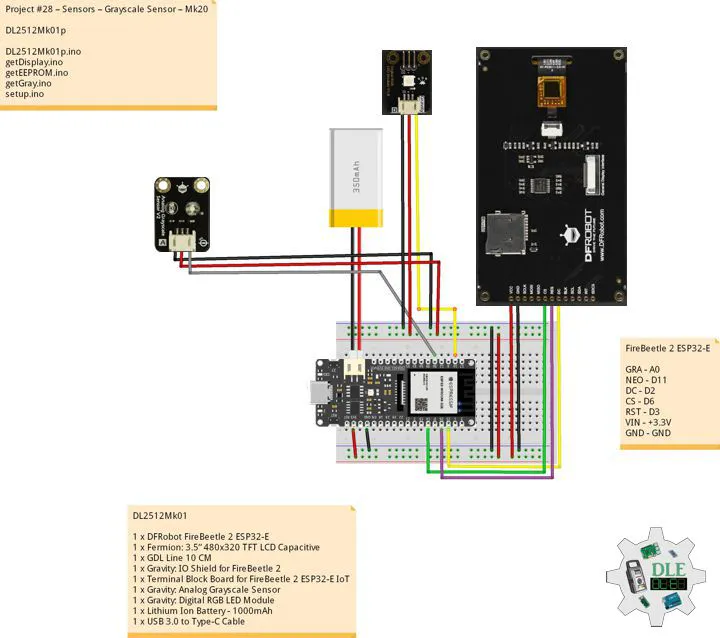


Comments