Luc Paquin
Published © CC BY

Project #28 – Sensors – Barometer – Mk25

Project #28 – Sensors – Barometer – Mk25

BeginnerFull instructions provided1 hour50
Project #28 – Sensors – Barometer – Mk25

Things used in this project

Hardware components

SparkFun Thing Plus - ESP32 WROOM
×1
Adafruit SHARP Memory Display
×1
Elecrow Crowtail - BMP180 Barometer
×1
Adafruit Terminal Block Breakout FeatherWing
×1
DFRobot Lithium Ion Battery - 1000mAh
×1
DFRobot Micro USB Cable
×1

Software apps and online services

Arduino IDE
Arduino IDE

Story

Read more

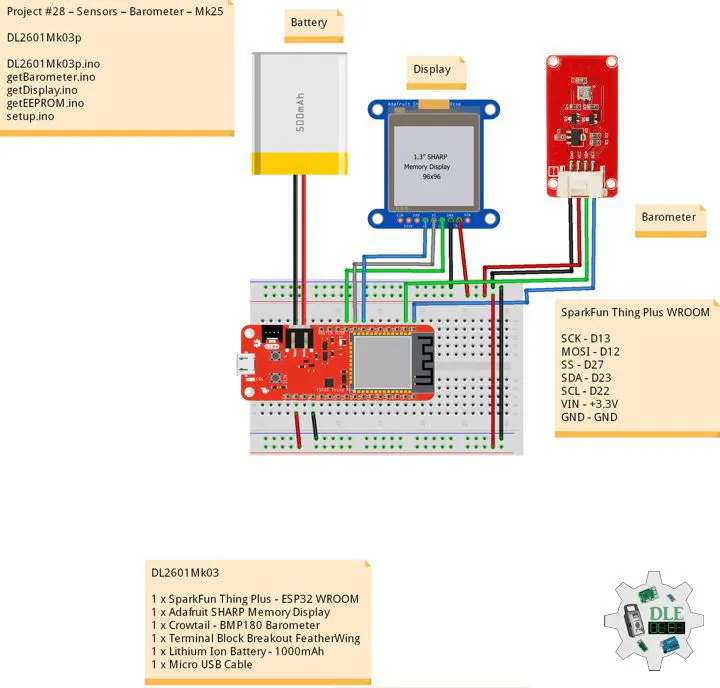
Schematics

Fritzing

Code

DL2601Mk03p.ino

Arduino
/****** Don Luc Electronics © ******
Software Version Information
Project #28 – Sensors – Barometer – Mk25
28-25
DL2601Mk03p.ino
DL2601Mk03
1 x SparkFun Thing Plus - ESP32 WROOM
1 x Adafruit SHARP Memory Display
1 x Crowtail - BMP180 Barometer
1 x Terminal Block Breakout FeatherWing
1 x Lithium Ion Battery - 1000mAh
1 x Micro USB Cable
*/

// Include the Library Code
// EEPROM Library to Read and Write EEPROM with Unique ID for Unit
#include "EEPROM.h"
// Wire
#include <Wire.h>
// SHARP Memory Display
#include <Adafruit_SharpMem.h>
#include <Adafruit_GFX.h>
// BMP180 Barometer
#include <SFE_BMP180.h>

// BMP180 Barometer
SFE_BMP180 pressure;
// Altitude 8.23
#define ALTITUDE 8.23
// Status
char status;
// Temperature
double dTemp;
String sT;
// Pressure
double dPre;
String sP;
// Sea Level ALTITUDE
double dP0;
String sP0;
// ALTITUDE
double dAlt;
String sA;

// SHARP Memory Display
#define SHARP_SCK  13
#define SHARP_MOSI 12
#define SHARP_SS   27
// Set the size of the display here, e.g. 144x168!
Adafruit_SharpMem display(SHARP_SCK, SHARP_MOSI, SHARP_SS, 144, 168);
// The currently-available SHARP Memory Display (144x168 pixels)
// requires > 4K of microcontroller RAM; it WILL NOT WORK on Arduino Uno
// or other <4K "classic" devices.
#define BLACK 0
#define WHITE 1

// Software Version Information
// EEPROM Unique ID Information
#define EEPROM_SIZE 64
String uid = "";

// Software Version Information
String sver = "28-25";

void loop() {
  
  // Barometer Sensor
  isBarometer();

  // isDisplay Barometer
  isDisplayBarometer();

  // Delay 1 Second
  delay( 1000 );

}

getBarometer.ino

Arduino
// Barometer Sensor
// is Barometer
void isBarometer(){

  // Temperature 
  status = pressure.getTemperature( dTemp );

  
     if (status != 0) {
  
       status = pressure.getPressure( dPre, dTemp );
       
       if (status != 0) {

         // Temperature 
         sT = dTemp;
      
         // Pressure
         sP = dPre;

         // Sea Level ALTITUDE
         sP0 = pressure.sealevel( dPre, ALTITUDE );

         sA = ALTITUDE;

       }

     }

}

getDisplay.ino

Arduino
// SHARP Memory Display
// SHARP Memory Display - UID
void isDisplayUID() {

    // Text Display 
    // Clear Display
    display.clearDisplay();
    display.setRotation(4);
    display.setTextSize(3);
    display.setTextColor(BLACK);
    // Don Luc Electronics
    display.setCursor(0,10);
    display.println( "Don Luc" );
    display.setTextSize(2);
    display.setCursor(0,40);
    display.println( "Electronics" );
    // Version
    //display.setTextSize(3);
    display.setCursor(0,70);
    display.println( "Version" );
    //display.setTextSize(2);
    display.setCursor(0,95);   
    display.println( sver );
    // EEPROM
    display.setCursor(0,120);
    display.println( "EEPROM" );
    display.setCursor(0,140);   
    display.println( uid );
    // Refresh
    display.refresh();
    delay( 100 );
    
}
// Display Barometer
void isDisplayBarometer() {

    // Text Display Barometer
    // Clear Display
    display.clearDisplay();
    display.setRotation(4);
    display.setTextSize(2);
    display.setTextColor(BLACK);
    // Barometer Sensor
    display.setCursor(0,5);
    display.println( "Barometer" );
    display.setCursor(0,35);
    // Temperature 
    display.print( "Temp: " );
    display.setCursor(60,35);
    display.print( sT );
    display.setCursor(120,35);
    display.println( "C" );
    // Pressure
    display.setCursor(0,65);
    display.print( "Baro: " );
    display.setCursor(60,65);
    display.println( sP );
    // Sea Level ALTITUDE
    display.setCursor(0,95);
    display.print( "BaSe: " );
    display.setCursor(60,95);
    display.println( sP0 );
    // ALTITUDE
    display.setCursor(0,125);
    display.print( "Alt: " );
    display.setCursor(60,125);
    display.print( sA );
    display.setCursor(120,125);
    display.println( "M" );
    // Refresh
    display.refresh();
    delay( 100 );

}

getEEPROM.ino

Arduino
// isUID EEPROM Unique ID
void isUID()
{
  
  // Is Unit ID
  uid = "";
  for (int x = 0; x < 7; x++)
  {
    uid = uid + char(EEPROM.read(x));
  }
  
}

setup.ino

Arduino
// Setup
void setup()
{
 
  // Delay
  delay( 100 );

   // EEPROM Size
  EEPROM.begin(EEPROM_SIZE);
  
  // EEPROM Unique ID
  isUID();

  // Delay
  delay( 100 );

  // SHARP Display Start & Clear the Display
  display.begin();
  // Clear Display
  display.clearDisplay();

  // Delay
  delay( 100 );
  
  // Initialize the sensor (it is important to get calibration values
  // stored on the device).
  pressure.begin();

  // Delay
  delay( 2000 );

  // Temperature
  pressure.startTemperature();

  // Pressure
  pressure.startPressure(3);

  // Delay
  delay( 100 );

  // Display UID
  // Don Luc
  // Electronic
  // Version
  // EEPROM
  isDisplayUID();

  // Delay 5 Second
  delay( 5000 );

}

Credits

Luc Paquin
75 projects • 5 followers
Teacher, Instructor, E-Mentor, R&D and Consulting -Programming Language -Microcontrollers -IoT -Robotics -Machine Learning -AI -Sensors

Comments