



Hardware components | ||||||
 |
| × | 1 | |||
 |
| × | 1 | |||
 |
| × | 2 | |||
 |
| × | 1 | |||
| × | 1 | ||||
 |
| × | 1 | |||
Software apps and online services | ||||||
 |
| |||||
https://www.donluc.com/?p=4209
https://www.tiktok.com/@luc.paquin8/video/7446840226711964934
#DonLucElectronics #DonLuc #Arduino #ASM #Project #Patreon #Electronics #Microcontrollers #IoT #Fritzing #Programming #Consultant
Soil moisture is the critical parameter in agriculture. If there is a shortage or overabundance of water, plants may die. At the same time, this data depends on many external factors, primarily weather conditions and climate changes. That is why it is so vital to understand the most effective methods for analyzing soil moisture content.
This term refers to the entire quantity of water in the ground’s pores or on its surface. The moisture content of soil depends on such factors as weather, type of land, and plants. The parameter is vital in monitoring soil moisture activities, predicting natural disasters, managing water supply, etc. This data may signal a future flood or water deficit ahead of other indicators.
DL2411Mk031 x SparkFun RedBoard Qwiic
1 x Gravity: Analog Soil Moisture Sensor
2 x LED
1 x ProtoScrewShield
1 x USB Battery Pack
1 x USB Micro-B Cable
SparkFun RedBoard QwiicASM - A0
LEDP- 13
LEDG- 12
VIN - +5V
GND - GND
DL2411Mk03pDL2411Mk03p.ino
getSoilMoisture.ino
setup.ino
People can contact us:http://www.donluc.com/?page_id=1927
Electronics, IoT, Teacher, Instructor, R&D and Consulting- Programming Language
- Microcontrollers (PIC, Arduino, Raspberry Pi, Arm, Silicon Labs, Espressif, Etc...)
- IoT
- Wireless (Radio Frequency, Bluetooth, WiFi, Etc...)
- Robotics
- Automation
- Camera and Video Capture Receiver Stationary, Wheel/Tank and Underwater Vehicle
- Unmanned Vehicles Terrestrial and Marine
- Machine Learning
- Artificial Intelligence (AI)
- RTOS
- Sensors, eHealth Sensors, Biosensor, and Biometric
- Research & Development (R & D)
- Consulting
- Etc...
Facebook: https://www.facebook.com/neosteam.labs.9/
YouTube:https://www.youtube.com/@thesass2063
Twitter:https://twitter.com/labs_steam
Pinterest:https://www.pinterest.com/NeoSteamLabs/
Instagram:https://www.instagram.com/neosteamlabs/
Patreon:https://patreon.com/DonLucElectronics59
DFRobot:https://learn.dfrobot.com/user-10186.html
Elecrow: https://www.elecrow.com/share/sharepj/center/no/760816d385ebb1edc0732fd873bfbf13
TikTok:https://www.tiktok.com/@luc.paquin8
Twitch: https://www.twitch.tv/lucpaquin
LinkedIn:https://www.linkedin.com/in/jlucpaquin/
Don Luc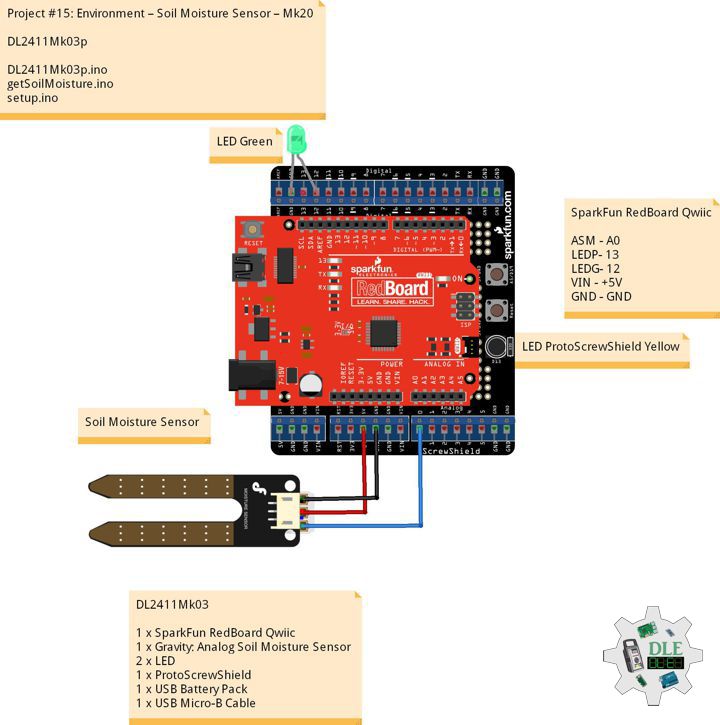


_3u05Tpwasz.png?auto=compress%2Cformat&w=40&h=40&fit=fillmax&bg=fff&dpr=2)
Comments