



Hardware components | ||||||
| × | 1 | ||||
| × | 1 | ||||
| × | 1 | ||||
| × | 1 | ||||
| × | 1 | ||||
| × | 1 | ||||
| × | 1 | ||||
| × | 1 | ||||
Software apps and online services | ||||||
 |
| |||||
https://www.donluc.com/?p=4899
Facebookhttps://www.facebook.com/share/v/1D3t4DvHgr/
YouTubeDFRobothttps://learn.dfrobot.com/makelog-315271.html
#DonLucElectronics #DonLuc # #TCRT5000 #Robotics #FireBeetle2ESP32E #ESP32 #Display #IoT #Project #Fritzing #Programming #Electronics #Microcontrollers #Consultant
The TCRT5000 is an infrared optical sensor widely used as a line follower in mobile robots and proximity detection systems. It consists of an infrared emitter (IR LED) and a phototransistor receiver, housed in a single package. Its operation is based on the principle of reflection: the LED emits infrared light toward a surface, and the phototransistor detects the amount of light reflected. Light surfaces (such as white lines) reflect more light, while dark surfaces (such as black lines) absorb it, allowing the sensor to differentiate between the two. This capability makes it an essential tool for line-following robots, as it enables them to detect and follow paths marked on the ground.
The TCRT5000 infrared optical sensor, commonly used as a line follower, has diverse applications in electronics and robotics projects. Its main uses include line-following robots, edge detection, speed or rotation measurement with encoders, and object or people counting.
DL2606Mk031 x DFRobot FireBeetle 2 ESP32-E
1 x Fermion: 3.5” 480x320 TFT LCD Capacitive
1 x GDL Line 10 CM
1 x TCRT5000 Optical Infrared Line Follower
1 x Gravity: IO Shield for FireBeetle 2
1 x Terminal Block Board for FireBeetle 2 ESP32-E IoT
1 x Lithium Ion Battery - 1000mAh
1 x USB 3.0 to Type-C Cable
DL2606Mk03pDL2606Mk03p.ino
getDisplay.ino
getEEPROM.ino
getTCRT5000.ino
setup.ino
People can contact us:http://www.donluc.com/?page_id=1927
Consultant, R&D, Electronics, IoT, Teacher and Instructor- Programming Language
- Microcontrollers (PIC, Arduino, Raspberry Pi, Arm, Silicon Labs, Espressif, Etc...)
- IoT
- Wireless (Radio Frequency, Bluetooth, WiFi, Etc...)
- Robotics
- Automation
- Camera and Video Capture Receiver Stationary, Wheel/Tank, Underwater and UAV Vehicle
- Unmanned Vehicles Terrestrial, Marine and UAV
- Machine Learning
- Artificial Intelligence (AI)
- RTOS
- Sensors, eHealth Sensors, Biosensor, and Biometric
- Research & Development (R & D)
- Consulting
- Etc...
https://www.donluc.com/luc/LucPaquinCVEng2026Mk01.pdf
Web:https://www.jlpconsultants.com/
Facebook:https://www.facebook.com/neosteam.labs.9/
YouTube:https://www.youtube.com/@thesass2063
DFRobot:https://learn.dfrobot.com/user-10186.html
TikTok:https://www.tiktok.com/@luc.paquin
Hackster:https://www.hackster.io/luc-paquin
LinkedIn:https://www.linkedin.com/in/jlucpaquin/
Don Luc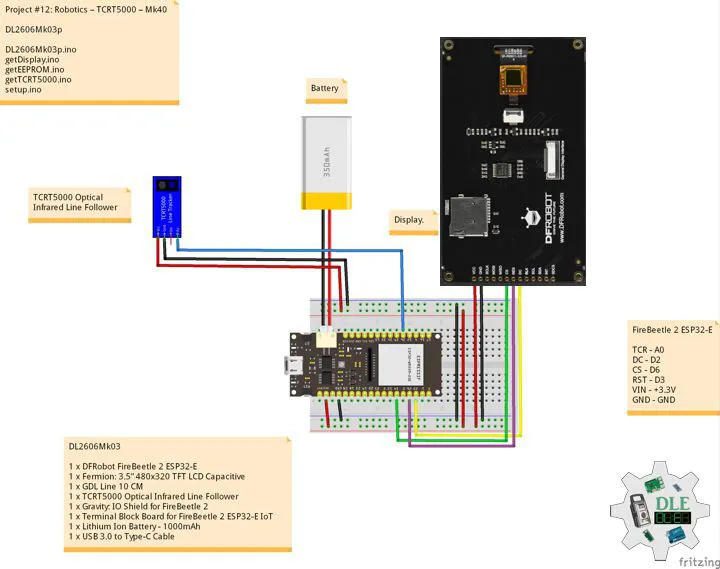


Comments