Luc Paquin
Published © CC BY-ND

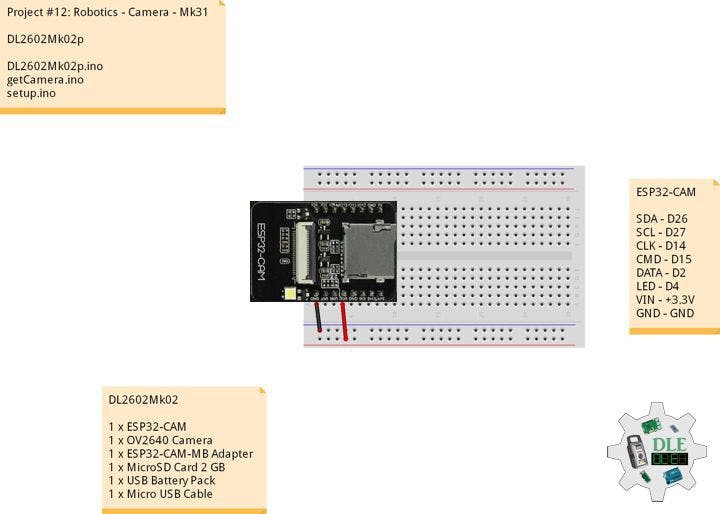
Project #12: Robotics - Camera - Mk31

Project #12: Robotics - Camera - Mk31

BeginnerFull instructions provided1 hour20
Project #12: Robotics - Camera - Mk31

Things used in this project

Hardware components

ESP32-CAM
×1
OV2640 Camera
×1
ESP32-CAM-MB Adapter
×1
Adafruit MicroSD Card 8 GB
×1
USB Battery Pack
×1
DFRobot Micro USB Cable
×1

Software apps and online services

Arduino IDE
Arduino IDE

Story

Read more

Schematics

Fritzing

Code

DL2602Mk02p.ino

Arduino
/****** Don Luc Electronics © ******
Software Version Information
Project #12: Robotics - Camera - Mk31
12-31
DL2602Mk02p.ino
DL2602Mk02
1 x ESP32-CAM
1 x OV2640 Camera
1 x ESP32-CAM-MB Adapter
1 x MicroSD Card 2 GB
1 x USB Battery Pack
1 x Micro USB Cable
*/

// Include the Library Code
 // ESP Camera
#include "esp_camera.h"
// Arduino
#include "Arduino.h"
// SD Card ESP32
#include "FS.h"
// SD Card ESP32
#include "SD_MMC.h"
// Disable brownout problems
#include "soc/soc.h"
// Disable brownout problems
#include "soc/rtc_cntl_reg.h" 
// Driver
#include "driver/rtc_io.h"
// Read and write from flash memory
#include <EEPROM.h>

// Define the number of bytes you want to access
#define EEPROM_SIZE 1

// Pin definition for CAMERA_MODEL_AI_THINKER
#define PWDN_GPIO_NUM     32
#define RESET_GPIO_NUM    -1
#define XCLK_GPIO_NUM      0
#define SIOD_GPIO_NUM     26
#define SIOC_GPIO_NUM     27
#define Y9_GPIO_NUM       35
#define Y8_GPIO_NUM       34
#define Y7_GPIO_NUM       39
#define Y6_GPIO_NUM       36
#define Y5_GPIO_NUM       21
#define Y4_GPIO_NUM       19
#define Y3_GPIO_NUM       18
#define Y2_GPIO_NUM        5
#define VSYNC_GPIO_NUM    25
#define HREF_GPIO_NUM     23
#define PCLK_GPIO_NUM     22
 
 // Picture Number
int pictureNumber = 0;

// Software Version Information
String sver = "12-31";

void loop() {
  
}

getCamera.ino

Arduino
// Camera
// Camera Setup
void isCameraSetup(){

  // Disable brownout detector
  WRITE_PERI_REG(RTC_CNTL_BROWN_OUT_REG, 0);

  // Camera Config
  camera_config_t config;
  config.ledc_channel = LEDC_CHANNEL_0;
  config.ledc_timer = LEDC_TIMER_0;
  config.pin_d0 = Y2_GPIO_NUM;
  config.pin_d1 = Y3_GPIO_NUM;
  config.pin_d2 = Y4_GPIO_NUM;
  config.pin_d3 = Y5_GPIO_NUM;
  config.pin_d4 = Y6_GPIO_NUM;
  config.pin_d5 = Y7_GPIO_NUM;
  config.pin_d6 = Y8_GPIO_NUM;
  config.pin_d7 = Y9_GPIO_NUM;
  config.pin_xclk = XCLK_GPIO_NUM;
  config.pin_pclk = PCLK_GPIO_NUM;
  config.pin_vsync = VSYNC_GPIO_NUM;
  config.pin_href = HREF_GPIO_NUM;
  config.pin_sccb_sda = SIOD_GPIO_NUM;
  config.pin_sccb_scl = SIOC_GPIO_NUM;
  config.pin_pwdn = PWDN_GPIO_NUM;
  config.pin_reset = RESET_GPIO_NUM;
  config.xclk_freq_hz = 20000000;
  config.pixel_format = PIXFORMAT_JPEG;
  config.grab_mode = CAMERA_GRAB_LATEST;

  // Camera Config
  if(psramFound()){

    // FRAMESIZE_ + QVGA|CIF|VGA|SVGA|XGA|SXGA|UXGA
    config.frame_size = FRAMESIZE_UXGA; 
    config.jpeg_quality = 10;
    config.fb_count = 2;

  } else {

    config.frame_size = FRAMESIZE_SVGA;
    config.jpeg_quality = 12;
    config.fb_count = 1;

  }

  // Delay
  delay( 100 );

  // Init Camera
  esp_err_t err = esp_camera_init(&config);
  if (err != ESP_OK) {

    // Camera init failed;
    return;

  }

  // Delay 
  delay(500);

  if(!SD_MMC.begin()){

    // SD Card Mount Failed
    return;

  }
 
  // Card Type
  uint8_t cardType = SD_MMC.cardType();
  if(cardType == CARD_NONE){

    // No SD Card attached
    return;

  }
   
  // Camera
  camera_fb_t * fb = NULL;
  
  // Take Picture with Camera
  fb = esp_camera_fb_get();  
  if(!fb) {

    // Camera capture failed
    return;

  }

  // Initialize EEPROM with predefined size
  EEPROM.begin(EEPROM_SIZE);
  pictureNumber = EEPROM.read(0) + 1;

  // Path where new picture will be saved in SD Card
  String path = "/picture" + String(pictureNumber) +".jpg";

  // Camera
  fs::FS &fs = SD_MMC; 
  File file = fs.open(path.c_str(), FILE_WRITE);
  if(!file){

    // Failed to open file in writing mode

  } 
  else {

    // Payload (image), payload length
    file.write(fb->buf, fb->len); 
    EEPROM.write(0, pictureNumber);
    EEPROM.commit();

  }

  // Close
  file.close();
  esp_camera_fb_return(fb); 
  
  // Turns off the ESP32-CAM white on-board LED (flash) connected to GPIO 4
  pinMode(4, OUTPUT);
  digitalWrite(4, LOW);
  rtc_gpio_hold_en(GPIO_NUM_4);
  
  delay(2000);
  // Going to sleep now
  delay(2000);
  esp_deep_sleep_start();
  // This will never be printed

}

setup.ino

Arduino
// Setup
void setup()
{
 
  // Delay
  delay( 100 );

  // Camera Setup
  isCameraSetup();

  // Delay 1 Second
  delay( 1000 );

}

Credits

Luc Paquin
62 projects • 5 followers
Teacher, Instructor, E-Mentor, R&D and Consulting -Programming Language -Microcontrollers -IoT -Robotics -Machine Learning -AI -Sensors

Comments