



Hardware components | ||||||
 |
| × | 1 | |||
| × | 1 | ||||
| × | 2 | ||||
| × | 1 | ||||
| × | 1 | ||||
| × | 3 | ||||
| × | 1 | ||||
Software apps and online services | ||||||
 |
| |||||
https://www.donluc.com/?p=4835
Facebookhttps://www.facebook.com/share/v/1FKSaDBPrS/
YouTubeDFRobothttps://learn.dfrobot.com/makelog-315240.html
#DonLucElectronics #DonLuc #Robotics #BLE #L298N #MotorDC #ArduinoUNOR4 #Project #Fritzing #Programming #Electronics #Microcontrollers #Consultant
Bluetooth Low Energy, often referred to as Bluetooth LE, is a wireless communication technology designed for short-range data exchange between electronic devices. It emerged as a response to the need for energy-efficient wireless communication in various applications, especially those where power consumption is a critical concern.
DL2603Mk051 x Arduino UNO R4 WiFi
1 x L298N DC Motor Driver Module
2 x Motor DC
1 x Power Switch
1 x 18650 Battery Holder (11 Volts)
3 x 18650 Battery
1 x USB 3.0 to Type-C Cable
DL2603Mk05pDL2603Mk05p.ino
getDrive.ino
setup.ino
People can contact us:http://www.donluc.com/?page_id=1927
Consultant, R&D, Electronics, IoT, Teacher and Instructor- Programming Language
- Microcontrollers (PIC, Arduino, Raspberry Pi, Arm, Silicon Labs, Espressif, Etc...)
- IoT
- Wireless (Radio Frequency, Bluetooth, WiFi, Etc...)
- Robotics
- Automation
- Camera and Video Capture Receiver Stationary, Wheel/Tank, Underwater and UAV Vehicle
- Unmanned Vehicles Terrestrial, Marine and UAV
- Machine Learning
- Artificial Intelligence (AI)
- RTOS
- Sensors, eHealth Sensors, Biosensor, and Biometric
- Research & Development (R & D)
- Consulting
- Etc...
https://www.donluc.com/luc/LucPaquinCVEng2026Mk01.pdf
Web:https://www.jlpconsultants.com/
Facebook:https://www.facebook.com/neosteam.labs.9/
YouTube:https://www.youtube.com/@thesass2063
DFRobot:https://learn.dfrobot.com/user-10186.html
Elecrow:https://www.elecrow.com/share/sharepj/center/no/760816d385ebb1edc0732fd873bfbf13
TikTok:https://www.tiktok.com/@luc.paquin
Hackster:https://www.hackster.io/luc-paquin
LinkedIn:https://www.linkedin.com/in/jlucpaquin/
Don Luc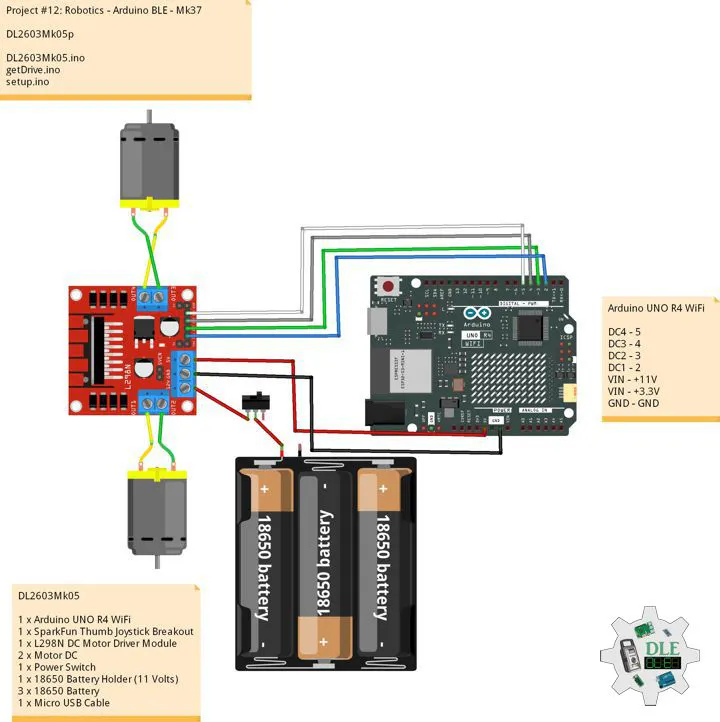


Comments