


Hardware components | ||||||
 |
| × | 1 | |||
 |
| × | 2 | |||
 |
| × | 1 | |||
 |
| × | 1 | |||
 |
| × | 1 | |||
Software apps and online services | ||||||
 |
| |||||
I stumbled across a Snake game for the Micro:bit and instantly got hooked. After a few rounds, I started wondering what it would feel like to play it using real hardware instead of buttons on a screen. That thought wouldn’t leave me alone… so I grabbed my Snap Circuits and built a physical controller for Snake!
HowToBuild
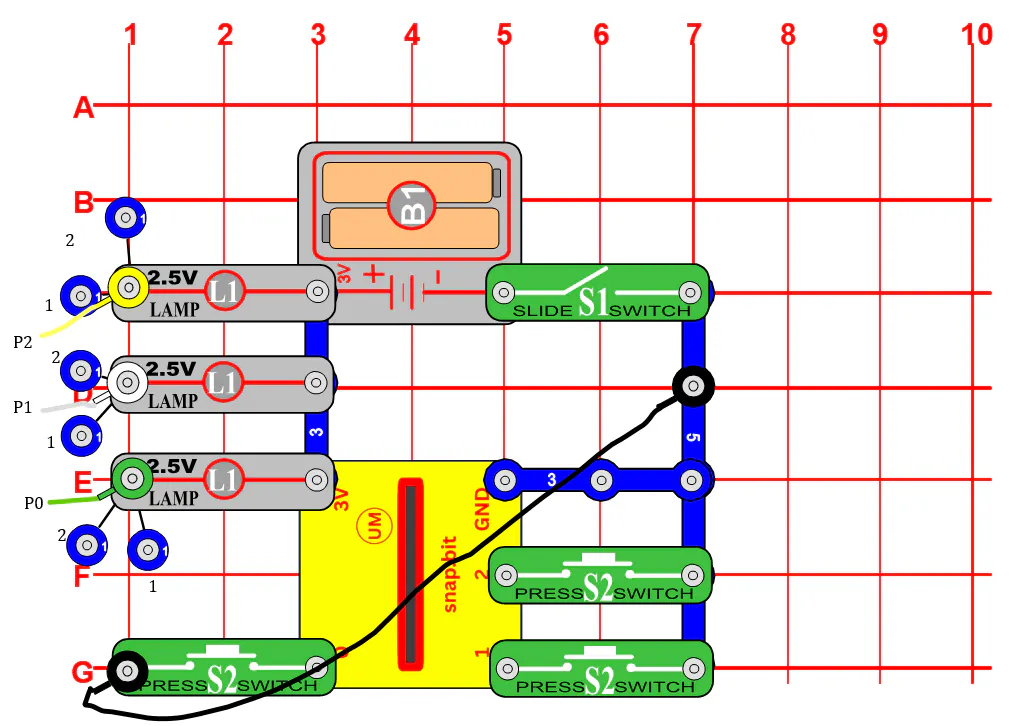
1. Build the circuit diagram as shown below (in "Schematics" section), omitting the white, green, and yellow wires for now.
2. Plug the Micro:bit into the breakout board, then the breakout board into the Snap:bit board (I have the Snap:bit board labeled as "UM" in the diagram to fit Snap Circuits part naming convention).
3. Plug the socket side of three of the Snap-to-female Wires into the breakout board in pins P0, P1, and P3 (I used green, white, and yellow respectively). Note the order you have them in.
4. Plug the snap side of the Snap-to-female Wires to the lamps in the same order (from left to right) as before. If you have done both steps correctly, the left lamp should be connected to P0, the middle to P1, and the right to P2.
5. Download the code onto the Micro:bit, plug it back into the breakout board, slide the slide switch (S1) on, and play!
HowtoPlay
The game starts with a snake two LEDs long. Press the left button (or A) to move left, and the right button (or B) to move right. Eat the blinking LED “apple” to grow longer and increase your score. But be careful - if you hit the wall or your own tail, the game ends!


Comments