


Hardware components | ||||||
 |
| × | 1 | |||
| × | 1 | ||||
Software apps and online services | ||||||
 |
| |||||
ECLIPSE CORE is my attempt at building a tiny standalone computer-like system around an Arduino UNO R4 WiFi.
It started as a relatively simple electronics project, but it kept growing.
What started with a display, a few inputs, and some basic sensors eventually became a little embedded system with its own menu system, games, persistent settings, high scores, sensor applications, music, sound effects, and even its own visual identity.
And honestly, a lot of the project came from me asking:
“Okay, but what else can I make this thing do?”That question is basically how ECLIPSE CORE became what it is.
The ideaI didn’t want ECLIPSE CORE to just be another Arduino project where an LED blinks or a sensor prints a number to the Serial Monitor.
I wanted it to feel like an actual device.
The Arduino is the hardware underneath it, but the goal is for the person using it to interact with a system rather than thinking about the Arduino itself.
There is a main menu, applications, games, settings, persistent data, sounds, graphics, and sensors.
The built-in 12×8 LED matrix on the UNO R4 WiFi became a particularly important part of this. I use it for the ECLIPSE logo, game graphics, numbers, animations, and the games themselves.
The 16×2 LCD provides the text interface, while the rotary encoder acts as the primary control.
So instead of needing a computer to interact with the project, you can basically just turn it on and start using it.
HardwareThe core of the project is an Arduino UNO R4 WiFi.
The current hardware includes:
- Arduino UNO R4 WiFi
- 16×2 parallel LCD
- KY-040 rotary encoder
- DHT11 temperature/humidity sensor
- HC-SR04 ultrasonic distance sensor
- Photoresistor
- RGB LED
- Passive piezo buzzer
- Push button
- 10K potentiometer for LCD contrast
- Resistors
- Breadboard
- Jumper wires
The UNO R4 WiFi’s built-in LED matrix is also used extensively, so I didn’t need an external display just for graphics.
The interfaceThe main interface is built around three things:
LCD + rotary encoder + LED matrix.The rotary encoder lets you navigate menus and control applications. Pressing it selects things, while a separate back button lets you move back through the system.
The LCD handles the text, while the LED matrix handles the visual side.
The RGB LED also gives the system a little bit of status feedback. Different parts of ECLIPSE CORE can use different colors to communicate what is happening.
For example, games can use different colors for normal play, success, failure, and other states.
And yes, there are sounds for a lot of this too.
The softwareECLIPSE CORE is written in C++ for the Arduino UNO R4 WiFi.
I eventually split the project into separate modules instead of keeping everything inside one enormous.ino file.
The project now has separate components for things like:
- Input
- Display
- Sound
- Storage
- Menus
- Games
- Sensors
- Settings
- Songs
- Core information
That ended up making a huge difference as the project grew.
I also use EEPROM to store information that should survive a restart, such as high scores and settings.
GamesOne of my favorite parts of ECLIPSE CORE is that it isn’t just a sensor dashboard.
It has games.
ECLIPSE CODEA four-digit code-breaking game.
You enter a four-digit combination using the rotary encoder, and the system tells you how many digits are in the correct position and how many are correct but in the wrong position.
The game keeps track of attempts and gives you a score when you solve it.
ECLIPSE REACTA reaction-time game.
The system waits for a random amount of time and then tells you to press the button.
If you press too early, you lose.
If you wait for the signal and react quickly, you get a better score.
ECLIPSE MEMORYThis one was specifically designed around both visual and audio memory.
The LED matrix displays one quadrant at a time in a sequence, and each quadrant has its own sound.
Level 1 has one flash.
Level 2 has two.
Level 3 has three.
And so on.
After watching the sequence, you use the rotary encoder to select the quadrants in the same order.
The sounds are intentionally part of the game rather than just being decoration.
SNAKEAnd then there’s Snake.
It runs entirely on the UNO R4 WiFi’s built-in LED matrix.
The rotary encoder controls turning, the apple blinks, the LCD shows the score, and the game detects both wall and body collisions.
The high score is saved to EEPROM, so restarting the device doesn’t erase it.
Getting an actual playable Snake game onto a 12×8 LED matrix was probably one of the most fun parts of the project.
SensorsECLIPSE CORE also has a dedicated SENSORS section instead of putting every sensor directly into the main menu.
Currently it contains:
- Light — reads the photoresistor
- Distance — uses the HC-SR04
- Temperature/Humidity — uses the DHT11
The DHT11 is connected to D4, while the other sensors use their own dedicated inputs.
I also added a global sensor setting, so sensors can be disabled from the Settings application.
MusicEventually I decided the buzzer shouldn’t just make menu noises.
It should be able to play music.
So ECLIPSE CORE has a Songs application.
It currently contains:
- SOLUNE
- Haven
- Cannon in D
- Für Elise
The original SOLUNE and HAVEN arrangements came from MIDI files and were adapted into monophonic sequences that can actually be played through the passive buzzer. Both songs are from my video game, SOLUNE (https://gamejolt.com/games/SOLUNE/990404)
Obviously, this isn’t going to sound like a real piano.
That’s kind of the point.
It’s a tiny Arduino playing recognizable music through a little piezo buzzer, and I think that’s pretty cool.
Settings and persistent dataI also wanted ECLIPSE CORE to behave more like an actual device.
So it has a Settings application.
Currently, you can control:
- Sound
- Sensors
Those settings are saved to EEPROM, meaning they remain after the device is powered off.
The games also have persistent high scores.
So ECLIPSE CORE isn’t just running a program from beginning to end anymore. It actually has information that persists between sessions.
One of the hardest problems: the LED matrixThe UNO R4 WiFi’s built-in LED matrix was supposed to make the project easier.
It ended up being one of the more frustrating parts.
The official Arduino_LED_Matrix library has a timer-based refresh system, but I ran into a problem where the matrix would compile correctly and still remain blank in the context of this project.
After a lot of debugging, I ended up implementing my own manual matrix scanner.
Instead of relying on the library’s automatic refresh, ECLIPSE CORE maintains a 12×8 frame buffer and continuously scans the individual LEDs.
That finally worked.
And when I saw the ECLIPSE logo actually appear on the board after fighting with it for so long, that was one of those “FINALLY!” moments that makes an electronics project worth doing.
The hardware wasn’t always this cleanOne thing I want to be honest about with this project is that the current hardware is very much a prototype.
The breadboard is messy.
There are a lot of wires.
The first Fritzing diagram I made looked… well…
It was my first Fritzing diagram.That’s about the nicest way I can put it.
But it represents the actual hardware, and that’s what matters to me more than making a fake-perfect diagram.
I’m gradually cleaning up the documentation and learning how to make the schematics more professional as I go.
What I learnedECLIPSE CORE has taught me a lot more than just Arduino programming.
I’ve learned about:
- Digital and analog electronics
- Sensors
- GPIO
- PWM
- EEPROM
- LCD interfaces
- LED matrix multiplexing
- Rotary encoders
- Button debouncing
- Timing and state machines
- Sound generation
- Game programming
- Modular C++
- Hardware debugging
- Fritzing and circuit documentation
- Git and GitHub
- Designing software around limited hardware
One of the biggest lessons has honestly been that hardware projects don’t always behave the way you expect them to.
Sometimes the code is wrong.
Sometimes the wiring is wrong.
Sometimes the library is the problem.
Sometimes the component is doing something completely different from what you thought it was doing.
And sometimes you spend way too long debugging something only to discover that the servo you forgot was connected was the thing making the random noise.
That happened.
The servo is no longer part of ECLIPSE CORE.
What’s next?ECLIPSE CORE is still a work in progress.
That’s intentional.
I don’t want to call it “finished” just because it currently works.
There are still things I want to improve, including the physical hardware, documentation, UI, games, sensor applications, and overall architecture.
I’d also like to eventually move beyond the breadboard prototype and build a much cleaner physical version of the system.
For now, though, I’m pretty happy with how far it has come.
What started as a collection of Arduino parts has turned into something that actually feels like its own little computer.
And that’s what ECLIPSE CORE is.
A tiny embedded system that I built because I kept asking, “What else can I make this thing do?”
IMAGES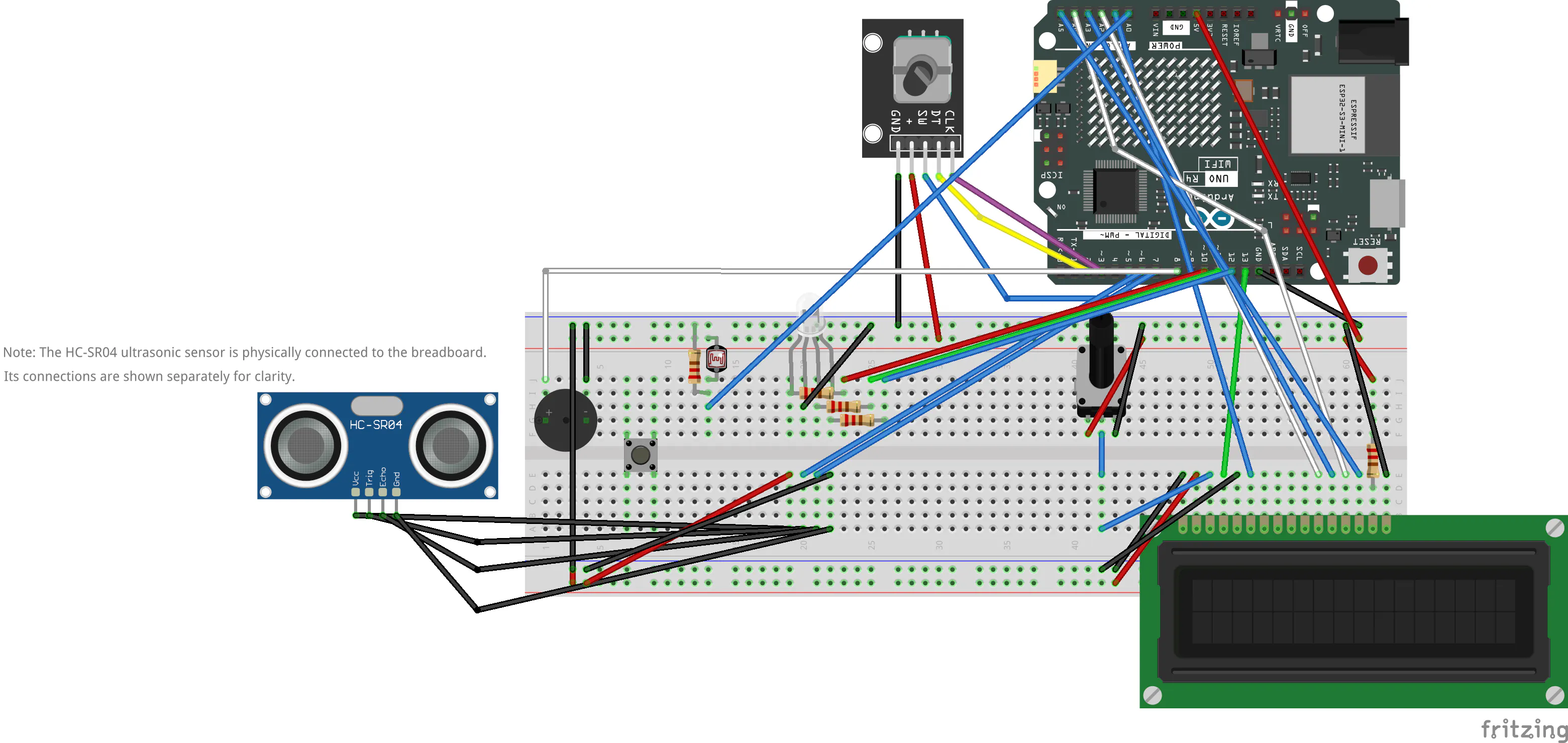


Comments