Kinjal Raykarmakar
Published

DrawerLight

A simple IoT project, which lights up dark drawers as well as alerts you (through SMS) when opened!

IntermediateFull instructions provided88
DrawerLight

Things used in this project

Hardware components

Bolt WiFi Module
Bolt IoT Bolt WiFi Module
×1
IR Sensor Module
×1
High Brightness LED, White
×3
Jumper wires (generic)
×1
Breadboard (generic)
×1
USB-A to Micro-USB Cable
×1

Software apps and online services

VS Code
Microsoft VS Code
Bolt Cloud
Bolt IoT Bolt Cloud
Bolt IoT Android App
SMS Messaging API
Twilio SMS Messaging API

Story

Read more

Schematics

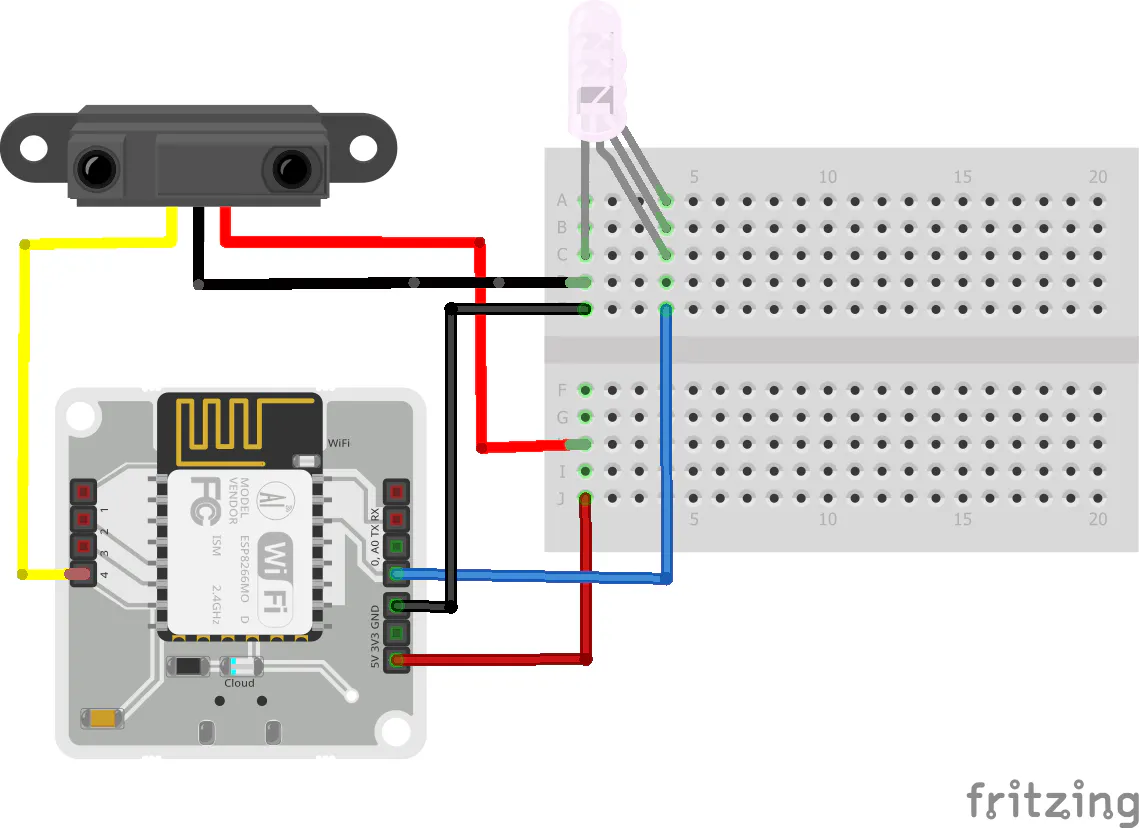
Circuit diagram

Follow the given circuit diagram

Circuit diagram

Fritzing file(.fzz) of the circuit diagram

Code

main.py

Python
The main script for running the whole project
from boltiot import Bolt
import cred, alerts
import json, time

api_key = cred.api_key
device_id  = cred.device_id

mybolt = Bolt(api_key, device_id)

ir_pin = '4'
led_pin = '0'

def get_sensor(pin):
    try:
        data = json.loads(mybolt.digitalRead(pin))
        if data['success'] != 1:
            print('Request Unsuccessful')
            print('Response data ->', data)
            return None
        sensor_value = int(data['value'])
        return sensor_value

    except Exception as e:
        print('An expection occured while returning the sensor value! Details below:')
        print(e)
        return None

prev_sensor = None
while True:
    sensor_value = get_sensor(ir_pin)
    print(sensor_value)
    
    if sensor_value == 1 and prev_sensor != 1:
        response = mybolt.digitalWrite(led_pin, 'HIGH')
        alerts.send_sms(f'Your drawer was opened on {time.ctime(time.time())}! Ignore, if it was you!')
        prev_sensor = sensor_value

    elif sensor_value == 0 and prev_sensor!= 0:
        response = mybolt.digitalWrite(led_pin, 'LOW')
        prev_sensor = sensor_value

    time.sleep(10)
    

creds.py

Python
This file has all the credentials for using Bolt Cloud and Twilio. Import this file to the main script to access all the credentials
# this file contains important Credentials
# import this file to access the following


# Bolt API

api_key =   # Your Bolt API Key, found in the Bolt Cloud Platform
device_id =   # Your Bolt device ID, found in the Bolt Android App: while linking


# Twilio API

# account
account_sid =   # Your Twilio Account SID
auth_token =  # Your Twilio Authorization token

# phone nos.
from_number =   # Your Twilio trial no.
to_number =   # Your phone no. (or receipient's phone no.)

alerts.py

Python
Contains SMS alert function. Import this file, to directly access the function.
from boltiot import Email, Sms

def send_sms(message, ifprint = False):
    sms = Sms(cred.account_sid, cred.auth_token, cred.to_number, cred.from_number)

    response = sms.send_sms(message)

    if(ifprint):
        print(response)

def to_C(sensor):
    return (sensor * 100) / 1024

Credits

Kinjal Raykarmakar
1 project • 1 follower

Comments