



KicoBox is an ideal educational tool for an easy journey into the world of programming, as it is about playing, learning and interaction, where many applications and functionalities in programming are introduced in an easy-to-understand package.
To learn coding in 10 minutes for regular FREE each coding lesson is what makes this product special to parents and teachers, to whom its simplicity in being easy to learn and teach brings incomparable sense of achievement.
What differentiates KicoBox from other programming education tool is that it simply allows you to focus on the task of coding. KicoBox is undoubtedly the gateway to your next sensible way of programming education.
Scratch is a visual programming language and online community targeted primarily at children. Using Scratch, users create their own interactive stories, games and animations, then share and discuss their creations with one another. Developed by the Lifelong Kindergarten group at the MIT Media Lab. KicoBox accommodates convenient switch between visual programming and textual language, and make it easy to learn programming for different age groups.
We prepare idea-card to play for you, with applications on the front, and program illustration and download links on the back, as we hope you are able to complete un-boxing in less than 20 minutes.
To overcome our current challenges:
- We do not want to spend abundant time on teaching software installation and DuPont cable connections before children start to code program.
- For those who may be contemplating or interested in learning about robotics, we often lost 75% of class time fixing up issues created by kids’ unfamiliarity with cable connection or button functions.
- Robot competitions are wonderful way to kids and their parents to interactive by each other. That's why we also prepare a competition map inside KicoBox.
- KicoBox does not just make code-learning simple and fun, but also allows kids to learn anytime, just like a Rubik’s Cube, and anywhere.
KicoBox is an educational tool readily suitable for any age.
- Age 6 and under: As kids at this stage starts to understand principle of deduction, however short their short attention span may be, it is most ideal to guide their code learning through play filled with sound, light and interaction, while allowing them to create or debug simple programs, so as to develop their logic and deductive reasoning, by using devices to create, organize, operate and retrieve digital content.
- Age 11 – 14 : Once kids entering high school age, they would be able to use more than two languages, at least one of them being textual, to create their own programs. As well as the fundamentals of computer hardware-software integration.
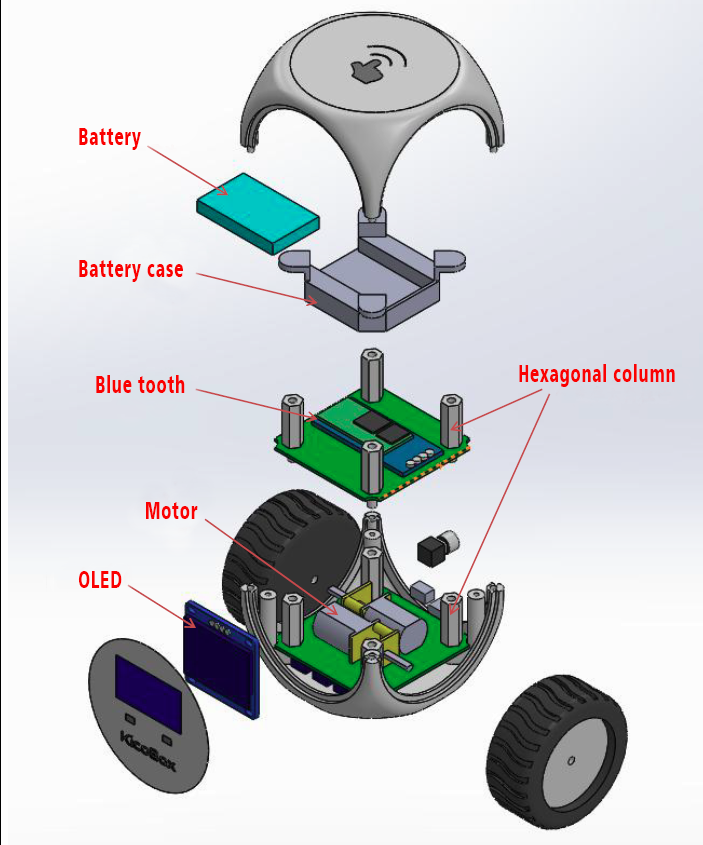
- As the kids mature: we use KicoBox as an integration platform of gyroscope, accelerator, motor control, OLED panel, LED halo, and Bluetooth, to create a self-propelled smart step-meter even "Darth Vader" walking on the floor. ;)
- Age 15 or adult: At such young adult age of maturity, as independent thinking and logical judgement capabilities have already been cultivated, whether it be continued education or entering job market, with KicoBox, it can allow you to embrace the coming of age in AI and IoT by learning and practicing programming anytime, anywhere.
Coding learning is our future.
- We gladly provide a “Shipping Now Reward” for first-round sponsors to receive priority shipment of our first shipment of trial production.
- While giving you 7-day free-return guarantee, in the case of any dissatisfaction on your part, as we strive to deliver to you.
You can absolutely receive your rewards on time.
Our R&D team, consisted mostly of science teachers and electrical engineers, has always strived to develop a fun and interesting way to learn about programming, as our educational products are created to be simple and easy to teach for schools, and to comprehend for kids. In view of the coming of age of IoT, AI, and robotics, we have continuously expanded our offering of programming courses which have received more and more attention and acclaims. Over the past few years, we have accumulated more experiences in programming education, which is precisely why we created KicoBox, and furthermore, we welcome and encourage your participation to join our endeavor to further the programming education our kids would need for the betterment of their future.

Comments