#include <LiquidCrystal.h>
#include <Keypad.h>

LiquidCrystal lcd(A0,A1,A2,A3,A4,A5);
bool doInitializeLCD = true;

//construct keypad
const byte ROWS = 4; //four rows
const byte COLS = 4; //four columns

//define the symbols on the buttons of the keypads
char hexaKeys[ROWS][COLS] = {
  {'1', '2', '3', 'A'},
  {'4', '5', '6', 'B'},
  {'7', '8', '9', 'C'},
  {'*', '0', '#', 'D'}
};
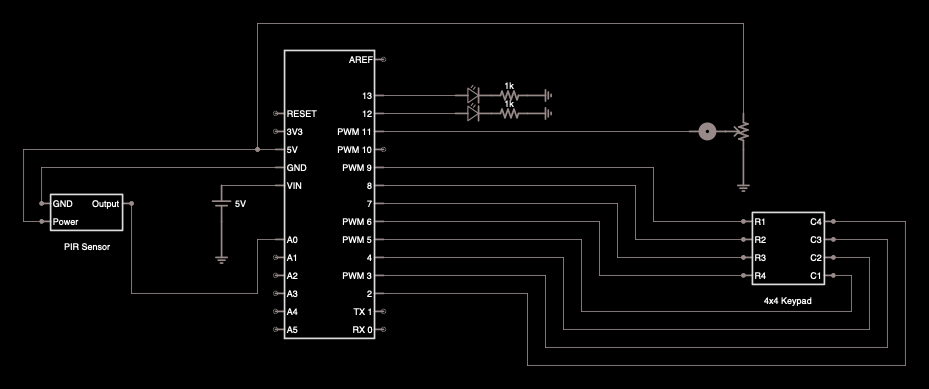
byte rowPins[ROWS] = {9, 8, 7, 6}; //connect to the row pinouts of the keypad
byte colPins[COLS] = {5, 4, 3, 2}; //connect to the column pinouts of the keypad

//create object of Keypad class
Keypad customKeypad = Keypad( makeKeymap(hexaKeys), rowPins, colPins, ROWS, COLS);
char customKey;
char accessCode[] = "1234";
char keyPadInput[] = "zzzz";
unsigned char inputCounter = 0;
unsigned char inputMaxCount = 4;

int alertledPin = 11;  // LED on Pin 11, lights up when PIR is active
int powerledPin = 13; // LED on Pin 13, indicates power on, always HIGH
int pirPin = 23; // Input for HC-S501
int pirValue = 0; // Place to store read PIR Value
int buzzer = 12;//the pin of the active buzzer
boolean IsAlerting = false;

//create armed states
enum ArmedStates {ARMED, DISARMED};
ArmedStates armedState = DISARMED;
short armedTimerInterval = 5;
unsigned long armedTimer = millis();

bool debug = false;

void setup() {
  Serial.begin(9600);
  while (!Serial); // wait for Serial to connect
  Serial.println("ready");

  pinMode(buzzer, OUTPUT); // set up pin as output

  pinMode(alertledPin, OUTPUT); // set up pin as output

  pinMode(powerledPin, OUTPUT); // set pin as output

  pinMode(pirPin, INPUT); // set pin as input

  lcd.begin(16, 2); // set up and register the LCD
}

void loop() {
  digitalWrite(powerledPin, HIGH);

  initializeLCD();

  handleKeyPadInput();

  handlePIR();

  alert();

}

const char* getStateString(enum ArmedStates armedState) {
  switch (armedState)
  {
    case ARMED: return "ARMED";
    case DISARMED: return "DISARMED";
    delay(100);
  }
}

//
void initializeLCD() {
  if (doInitializeLCD) {

    doInitializeLCD = false;
    lcd.clear();
    String a = getStateString(armedState);

    if (debug) {
      Serial.println("armedState: " + a);
    }

    lcd.setCursor(0, 0);
    lcd.print(a);
    lcd.setCursor(0, 1);
    lcd.print("PRESS * to ARM.");
    Serial.println("PRESS * to ARM.");
    //delay(1);
  }
}

void handleLCD(bool shouldClearLCD) {
  if (shouldClearLCD) {
    lcd.clear();
  }

  String a = getStateString(armedState);

  if (debug) {
    Serial.println("armedState: " + a);
  }

  lcd.setCursor(0, 0);
  lcd.print(a);
  lcd.setCursor(0, 1);


  lcd.print("DISARM KEY:");
  uint8_t cursorStart = 11;
  lcd.setCursor(cursorStart, 1);
  lcd.cursor();

  // overwrites the LCD screen positions with blank space or keypad input
  for (int i = 0; i < 4; i++) {
    if (keyPadInput[i] == 'z') {
      lcd.setCursor(cursorStart + i, 1);
      lcd.print(" ");
    } else {
      lcd.setCursor(cursorStart + i, 1);
      lcd.print(keyPadInput[i]);
    }
  }
}

void handleKeyPadInput() {
  customKey = customKeypad.getKey();
  if (customKey) {

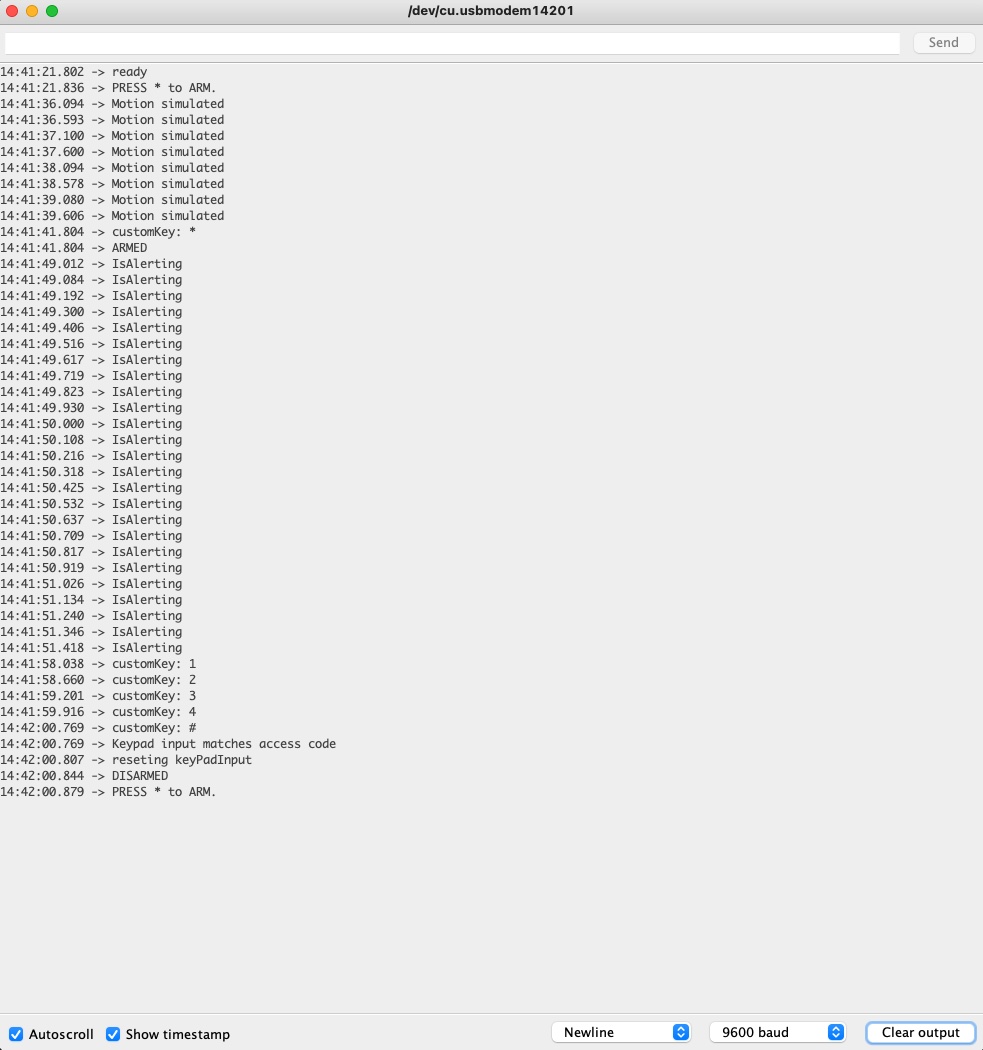
    Serial.print("customKey: ");
    Serial.println(customKey);

    if (armedState == DISARMED ) {
      if (customKey == '*') {
        armedState = ARMED;
        Serial.print("ARMED\n");
        handleLCD(true);
      }
    } else {
      if (customKey == '*') {
        resetCodeInput();
      } else if (customKey == '#') {
        if (strcmp(keyPadInput, accessCode) == 0 ) {
          Serial.println("Keypad input matches access code");
          // Disarm the system
          resetCodeInput();
          armedState = DISARMED;
          Serial.print("DISARMED\n");
          delay(100);
          doInitializeLCD = true;
          initializeLCD();
        } else {
          resetCodeInput();
        }
      } else {
        if (inputCounter <= 3) {
          keyPadInput[inputCounter] = customKey;
          inputCounter++;
          handleLCD(true);
        }
      }
    }
  }
}


void resetCodeInput() {
  Serial.println("reseting keyPadInput");
  for (int i = 0; i < 4; i++) {
    keyPadInput[i] = 'z';
  }
  inputCounter = 0;
  handleLCD(true);
}

void handlePIR(){
  pirValue = digitalRead(pirPin);
  if(pirValue > 0 && armedState == DISARMED){
    Serial.println("Motion simulated");
    delay(500);
    digitalWrite(pirPin, LOW);
  }
}

void alert() {
  if (pirValue > 0 && armedState == ARMED ){
    IsAlerting = true;
    Serial.println("IsAlerting");
  }
  else{
    IsAlerting = false;
  }

  handleLed();

  handleBuzz();

}

void handleLed () {
  // turn on alarm LED
  if (IsAlerting) {
    digitalWrite(alertledPin, HIGH);
  }
  else {
    digitalWrite(alertledPin, LOW);
  }
}

void handleBuzz() {
  if (IsAlerting) {
    unsigned char i;
    for (i = 0; i < 10; i++){
      digitalWrite(buzzer, HIGH);
      delay(1);//wait for 1ms
      digitalWrite(buzzer, LOW);
      delay(1);//wait for 1ms
    }
    //switch frequency
    for (i = 0; i < 20; i++){
      digitalWrite(buzzer, HIGH);
      delay(2);//wait for 2ms
      digitalWrite(buzzer, LOW);
      delay(2);//wait for 2ms
    }
  }
}






Comments