

THE IDEA
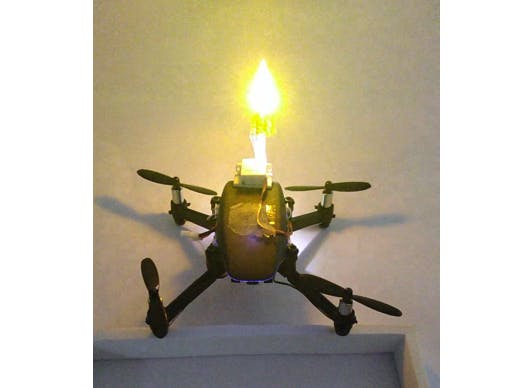
With the arrival of Ganesh Chaturthi, the festival of Lord Ganpati, I got an idea of using Pluto X drone as a lamp for aarti, instead of traditional lamps. I have already done projects using PlutoX, a servo and LEDs. But in all the previous projects I had never used all of them together. This was a new concept for me to use the three in one project.
EXECUTION
HARDWARE
1. Connect 2g Servo to the servo port on the Primus X board
2. Connect the LED to port M1
3. Mount the LED on the servo using a DST. I personally used a piece of straw to pass LED wire through
4. Since I had a white LED, I covered it with yellow gelatin paper to make it yellow or a darker shade which would resemble a lamp. Place the yellow gelatin paper over the LED.
SOFTWARE
For this particular project, I had to try and replicate the characteristics of a flame. there are basically two characteristics which I wanted to replicate. The first one is the random movement of the flame and the second one is the random intensity of the light.
I have previously connected servo on Pluto X but used extreme positions of servo. To replicate the random movement of the servo, I gave the power to the servo which depended on a random variable. Using Pluto X, one can give a PWM of 1000 to 2000. These values would be the extremes of the servo. Hence, I generated random numbers from 0 to 150 and added that to 1100 to get a decent amplitude of flame movement.
For the random light intensity, I generated random number in the range of 0 to 500 and added it to 1200 to give as input to the LED. Thus, both the movement of flame and the light intensity both became random.
The entire program is available below. Build the program and flash it (wireless!) on PlutoX and enjoy the lamp when the Developer Mode is switched ON, on the Pluto Controller App.
Do try it!

_j8zQg4AjGy.png?auto=compress%2Cformat&w=40&h=40&fit=fillmax&bg=fff&dpr=2)


Comments