#include <LiquidCrystal.h>
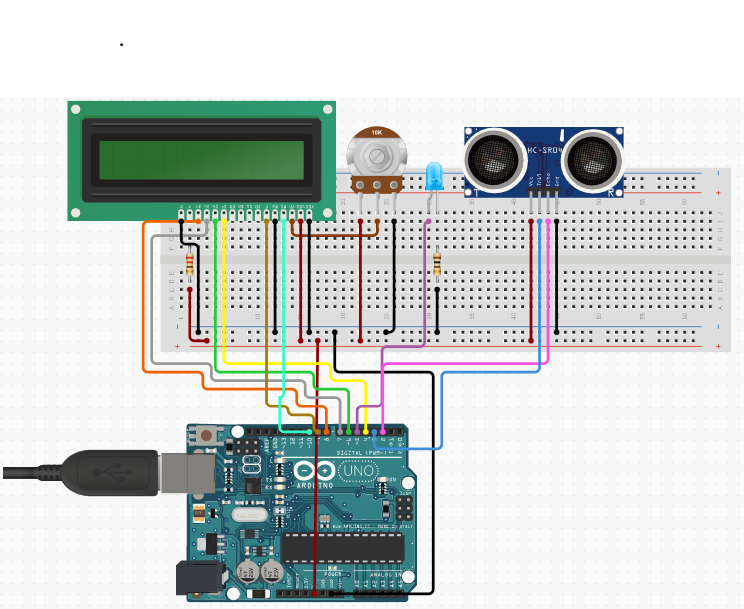
const int trigPin = 13;
const int echoPin = 12;//set pins
long duration;
int distanceCm;
int LED1g = 7;//Define the pin of LED to 7
// initialize the library with the numbers of the interface pins

LiquidCrystal lcd(0, 1, 8, 9, 10, 11); /// REGISTER SELECT PIN,ENABLE PIN,D4 PIN,D5 PIN, D6 PIN, D7 PIN

void setup()

{
  lcd.begin(16, 2);
  pinMode(trigPin, OUTPUT);//Set trigger pin to output because it is sending something
  pinMode(echoPin, INPUT);//Set echo pin to input because it is receiveing something
  pinMode(LED1g, OUTPUT);//Set the LED to output


}

void loop()

{
  // ultrasonic trigger
  digitalWrite(trigPin, LOW);
  delayMicroseconds(2);
  digitalWrite(trigPin, HIGH);
  delayMicroseconds(10);
  digitalWrite(trigPin, LOW);//Controll the trigger pin

  duration = pulseIn(echoPin, HIGH);
  distanceCm= duration*0.034/2;//The math of cm: the duration

  if(distanceCm <= 15){
    digitalWrite(LED1g, HIGH);//Turn on LED if an object is sensed 15 cm or less away
  }
  else if (distanceCm >= 15){
    digitalWrite(LED1g, LOW);//Turn off LED if an object is 15 cm or more away
  }
  delay(0.05);


  // LCD control
  lcd.print("    HAND SENSOR LED");//Show the title of project
  delay(150);
  lcd.setCursor(0,1);//Set cursor to column 0, line 1
  lcd.print("Put hand in front of sensor");//Display intructions
  delay(150);
  lcd.scrollDisplayLeft();//Shift the screen display
  lcd.setCursor(0,0);//Set cursor to column 0, line 2 to go back


}






Comments