Kamil Czaja
Published © GPL3+

Stereo camera pantilt-pi-gamepad

A simple, efficient, and effective dual-camera rotation project for the Xbox Series gamepad. Realtime stereoscopic image via local webpage

BeginnerFull instructions provided2 hours18
Stereo camera pantilt-pi-gamepad

Things used in this project

Hardware components

Raspberry Pi 4 Model B
×1
Camera Module
Raspberry Pi Camera Module
×1
USB camera
×1
Plywood for laser cutting
×1
UBEC 5V 3A
×1
UBEC 6V 6A
×1
16 cahnnel servo controller
×1
LiPo 7.4V Battery
×1

Story

Read more

Custom parts and enclosures

Plywood elements

Laser cut with 3mm plywood

Schematics

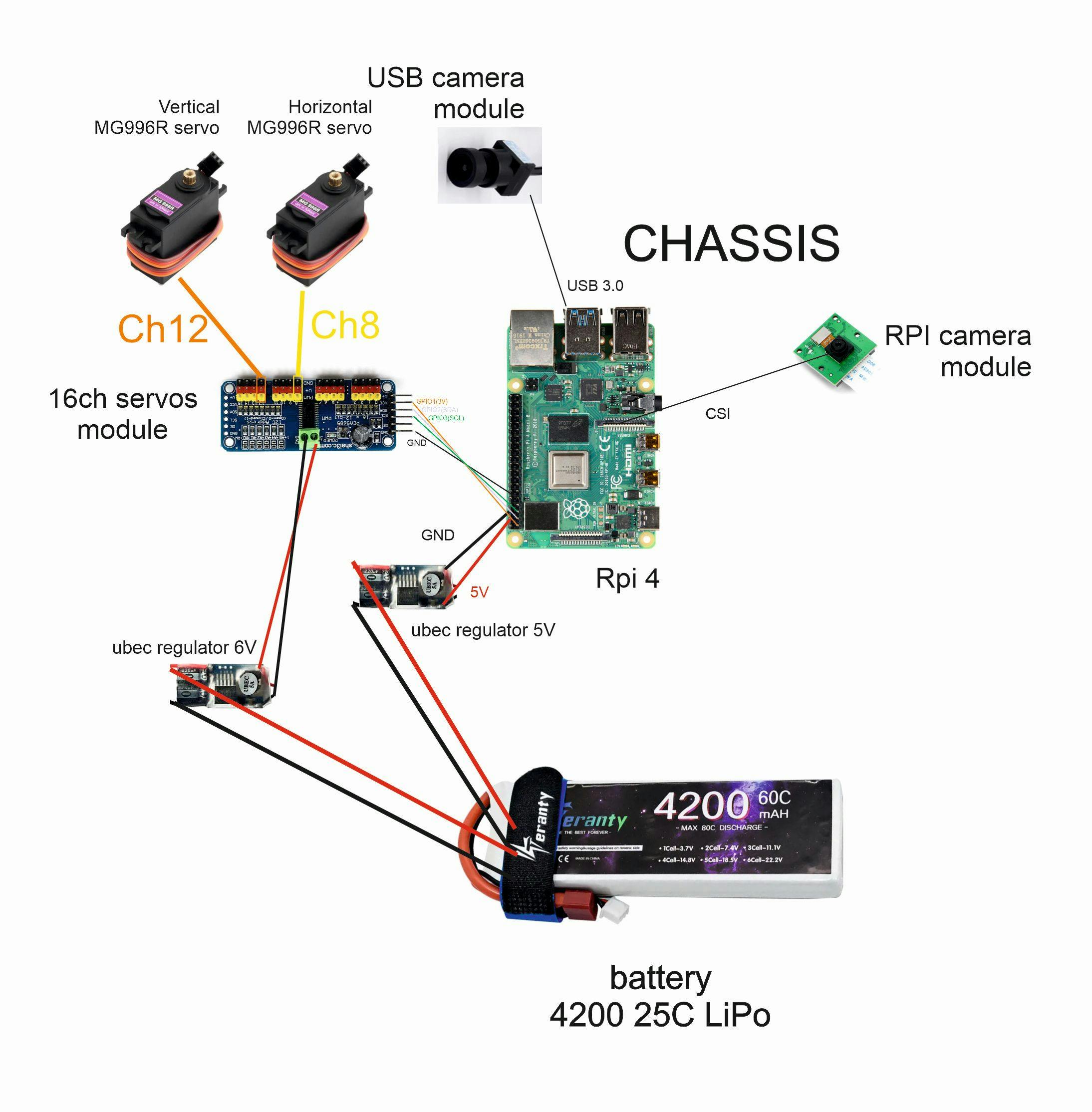
Wiring schema

Code

stereocam.py

Python
Main control program
import cv2
import numpy as np
from flask import Flask, Response
from picamera2 import Picamera2
import sys
import threading
import time
from adafruit_servokit import ServoKit
from evdev import InputDevice, list_devices, ecodes

app = Flask(__name__)

# --- Servos initilization ---
kit = ServoKit(channels=16)
pan = 90
tilt = 90
pan_servo = 12
tilt_servo = 8
kit.servo[pan_servo].angle = pan
kit.servo[tilt_servo].angle = tilt

# --- gamepad control loop ---
def gamepad_loop():
    global pan, tilt
    print("searching for gamepad...")
        
    device = None
    while device is None:
        for path in list_devices():
            try:
                temp_dev = InputDevice(path)
                if "Xbox" in temp_dev.name:
                    device = temp_dev
                    break
            except:
                continue
        if not device:
            time.sleep(2)
    
    print(f"SUCCES! Connected with: {device.name}")

    # remember joystick states
    joystick_state = {'x': 0.0, 'y': 0.0}

    def update_servos():
        global pan, tilt
        while True:            
            if abs(joystick_state['x']) > 0.1:
                pan = max(0, min(180, pan - joystick_state['x'] * 1.6))# 1.6 - sensitivity
                kit.servo[pan_servo].angle = pan
                
            if abs(joystick_state['y']) > 0.1:
                # vertical angle limit 0-140
                tilt = max(0, min(140, tilt + joystick_state['y'] * 1.8))#1.8 - sensitivity
                kit.servo[tilt_servo].angle = tilt
            
            time.sleep(0.02)

    # servos moving threat
    threading.Thread(target=update_servos, daemon=True).start()

    # main loop - reading gamepad status
    for event in device.read_loop():
        if event.type == ecodes.EV_ABS:
            if event.code == 0: # left joystick
                joystick_state['x'] = (event.value - 32768) / 32768.0
            elif event.code == 1: # left joystick
                joystick_state['y'] = (event.value - 32768) / 32768.0
        
        elif event.type == ecodes.EV_KEY:
            if event.code == 304 and event.value == 1: # button A
                pan, tilt = 90, 90
                kit.servo[pan_servo].angle = 90
                kit.servo[tilt_servo].angle = 90


threading.Thread(target=gamepad_loop, daemon=True).start()

# --- Cameras initialization ---
print("Starting Cameras...")
try:
    # 1. USB camera
    cam_usb = cv2.VideoCapture(0, cv2.CAP_V4L2)
    cam_usb.set(cv2.CAP_PROP_FOURCC, cv2.VideoWriter_fourcc(*'MJPG'))
    cam_usb.set(cv2.CAP_PROP_FRAME_WIDTH, 1920)
    cam_usb.set(cv2.CAP_PROP_FRAME_HEIGHT, 1080)
    
    # 2. RPi's camera
    picam2 = Picamera2()
    config = picam2.create_preview_configuration(main={"format": "BGR888", "size": (1024, 768)})
    picam2.configure(config)
    picam2.start()
    print("Cameras online.")
except Exception as e:
    print(f"Cameras error: {e}")
    sys.exit(1)

# --- generating images ---
def gen_frames_usb():
    while True:
        success, frame = cam_usb.read()
        if not success: break
        ret, buffer = cv2.imencode('.jpg', frame, [int(cv2.IMWRITE_JPEG_QUALITY), 80])
        yield (b'--frame\r\n' b'Content-Type: image/jpeg\r\n\r\n' + buffer.tobytes() + b'\r\n')

def gen_frames_rpi():
    while True:
        frame = picam2.capture_array()
        # color correction
        frame = cv2.cvtColor(frame, cv2.COLOR_RGB2BGR) 
        ret, buffer = cv2.imencode('.jpg', frame)
        yield (b'--frame\r\n' b'Content-Type: image/jpeg\r\n\r\n' + buffer.tobytes() + b'\r\n')

# --- FLASK TRACES ---
@app.route('/video_usb')
def video_usb():
    return Response(gen_frames_usb(), mimetype='multipart/x-mixed-replace; boundary=frame')

@app.route('/video_rpi')
def video_rpi():
    return Response(gen_frames_rpi(), mimetype='multipart/x-mixed-replace; boundary=frame')

@app.route('/')
def index():
    return """
    <html>
        <head>
            <title>Stereo cameras</title>
            <style>
                body { margin: 0; background: #000; overflow: hidden; }
                #vr { display: flex; width: 100vw; height: 100vh; }
                .cam-box { width: 50vw; height: 100vh; overflow: hidden; }
                .cam-box img { width: 100%; height: 100%; object-fit: cover; }
                #zoomed { transform: scale(1.5); transform-origin: center center; }
            </style>
        </head>
        <body>
            <script>
                let wakeLock = null;

                // blocking screen blanking
                async function requestWakeLock() {
                    try {
                        wakeLock = await navigator.wakeLock.request('screen');
                        console.log("screen blocked");
                    } catch (err) {
                        console.log(`screen block error: ${err.name}, ${err.message}`);
                    }
                }

                // activator (and fullscreen)
                document.addEventListener("click", () => {
                    requestWakeLock();
                    goFullscreen(); 
                });

                // We reactivate the lock when you return to the card
                document.addEventListener('visibilitychange', async () => {
                    if (wakeLock !== null && document.visibilityState === 'visible') {
                        requestWakeLock();
                    }
                });
            </script>
            <div id="vr" onclick="this.requestFullscreen()">
                <div class="cam-box"><img src="/video_rpi"></div>
                <div class="cam-box"><img src="/video_usb" id="zoomed"></div>
            </div>
        </body>
    </html>
    """

if __name__ == "__main__":
    try:
        app.run(host='0.0.0.0', port=5000, ssl_context=('cert.pem', 'key.pem'))
    except KeyboardInterrupt:
        print("\nShuting down...")
    finally:
        cam_usb.release()
        picam2.stop()
        picam2.close()

Credits

Kamil Czaja
2 projects • 1 follower

Comments