



Hardware components | ||||||
 |
| × | 1 | |||
 |
| × | 1 | |||
 |
| × | 1 | |||
 |
| × | 1 | |||
This project was a collaboration between the physical computing lab class and the sculpture class. One PCL student was partnered with one sculpture student. We were given a theme, cultivating light, and we had to show an abstract or literal idea of that theme in our project
Our IdeaFor our project we went with a more abstract idea. We wanted to touch on a topic that is very prominent in today's society among our peers: Social media. We wanted a way to show the effect that Social media has on an indivduals self esteem and "inner light".
That's how we came up with the idea of a project that would track stock prices and depending on wether they went up or down would change to show social medias effects.
If the stock price went up would reveal a background of social media with negative self thoughts displaying how social media can make you feel negative about yourself.
If the stock went down then the curtain would roll back down covering the social media with the negative backtalk and you would have to look in the mirror focusing on yourself and all the positive things you have without comparing them to someone else.
The idea is to show how the presence of absence of social media has an effect on your self image and esteem.
CreationStep 1: The API
Finding and using the API was one of the easier elements of this project. I used the API Ninjas stock price API. The stock I chose to track was META as meta owns Instagram a major social media company. Using Particles custom integrations a made a webhook to pull just the stock price. The first issue I ran into was updating the API. I wanted to update the API every minute, I thought that would be simple using the delay() function. However the delay() function gave me many errors and would mess up comparisons. I resorted to using millis() and some simple logic to calculate pulling data ever 60 seconds.
Step 2: Comparing the data
Now that I had my code properly pulling data from the API I needed it to compare that data.
Using two variables stockPrice and previousPrice I was able to compare a current stock price to a previous stock price. The logic of the code above is, look to see if the stock price has changed, if it has compare if its gone up or down, then reset the current price to be the past price. Then a new stock price is pulled and the Process restarts! This was one of the easier parts of my project
Step 3: The physical components
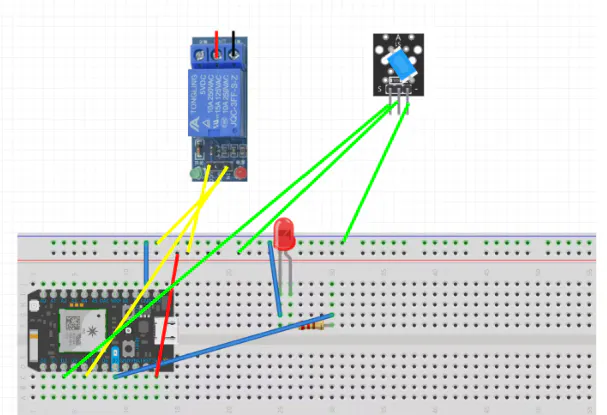
Now I had to integrate the LED Strips and stepper motor to react to my code. This beginning part was easy, I wrote the code I thought would work and wired my components to the breadboard. The LED was one of the most simple parts of the project and the LED simply turned on when the stock was up, and off when the stock was down.
Step 4: Soldering everything together
On paper aka my serial monitor, everything was working perfectly, so I soldered my particle and components to a proto board. I have limited experience with Soldering so this was definitely a learning expiereince.
Step 5: Fixing every error with the Curtain
At this point, I thought I was done, I coded everything soldered the components, I had a few issues as I was working but nothing major. My biggest problems started now.
The overall biggest challenge of this project for me was the curtain, what I thought would be pretty simple was one of the hardest parts of this project; I would run into an error fix it, then run into two more.
My idea for the curtain was to attach a long stick, which would turn counter clockwise or clockwise to wrap or unwrap a curtain. Simple right?
My first biggest issue was I couldn't have the curtain lift up or down twice in a row (if the curtain was already lifted I didn't want it to lift again and vice versa). So easy fix I made a boolean variable curtainLifted to track if the curtain was lifted or not.
Then I realized another critical issue, my particle couldn't save the value of curtainLifted and would reset it to false every time, so if when my project was last running the curtain was lifted, the next time I started it my code would think the curtain was down, but in reality it was up, breaking my code. This problem really stumped me because the stepper motor (which I was using to move the curtain) isn't able to track where it is so there's no way to reset it. I tried to manually reset it but ended up breaking the whole thing off. Then I found a solution, push the value of the boolean into a google sheet to hold the value.
I used two webhooks, curtainState and getcurtainState. Using the curtainState webhook and Apps Script on Google sheets I was able to push "TRUE" or "FALSE" into a google sheet box.
Then using the same method I pulled the value from the Google sheet into a value for my code.
Now I had a google sheet that was able to store the value of curtainLifted!
Just when I thought I fixed everything another issue arose, since setup() and loop() run at the same time, the tax API was being pulled faster than getCurtainState, so my code would respond to the API with the incorrect boolean value for curtainLifted. My solution to this was creating another boolean variable, curtainStateRestored, in order to track if the curtain state had been updated and putting all of my code in loop() in a while loop that was controlled by curtainStateRestored. However the while loop ended up breaking my code, since after the state was restored my code never broke out of the while loop and the tax value was never updated. So instead of using a while loop I used an if statement:
If curtain state hadn't been restored I would run a return function, which would stop the code and restart the if statement, that return loop would run until the state was restored and then my code would function normally after.
My final issue was if my project started with the curtain lifted and the curtainLifted value being true, my lights wouldn't originally turn on. Easy fix I just added an if statement into the function that called my webhook for the curtain state and added a simple if statement to say if the curtain was lifted to turn the lights on.
Now my task was the tedious adjusting how much the stepper motor stepped. This part wasn't an issue, just tedious to keep adjusting how much it stepped to the perfect amount up and down. Also adjusting and cutting the curtain so it wouldn't get caught and roll up weird.
To make it roll up evenly we just had to cut off a lot of the left side of the curtain so it wouldn't get caught on the motor.
Step 6: Done!
Now I had everything working how I intended yay! My lights and curtain was responding how I wanted it to! We added an extra curtain to hide the hardware and the project was done!


Comments