John John
Published © CERN-OHL

Macro-Quantum Interaction Node (MQIN) Module

MQIN Module: Interface unit for the analysis and stabilization of causal entropy in macro-quantum systems with localized resonance.

IntermediateWork in progress20 days93
Macro-Quantum Interaction Node (MQIN) Module

Things used in this project

Story

Read more

Schematics

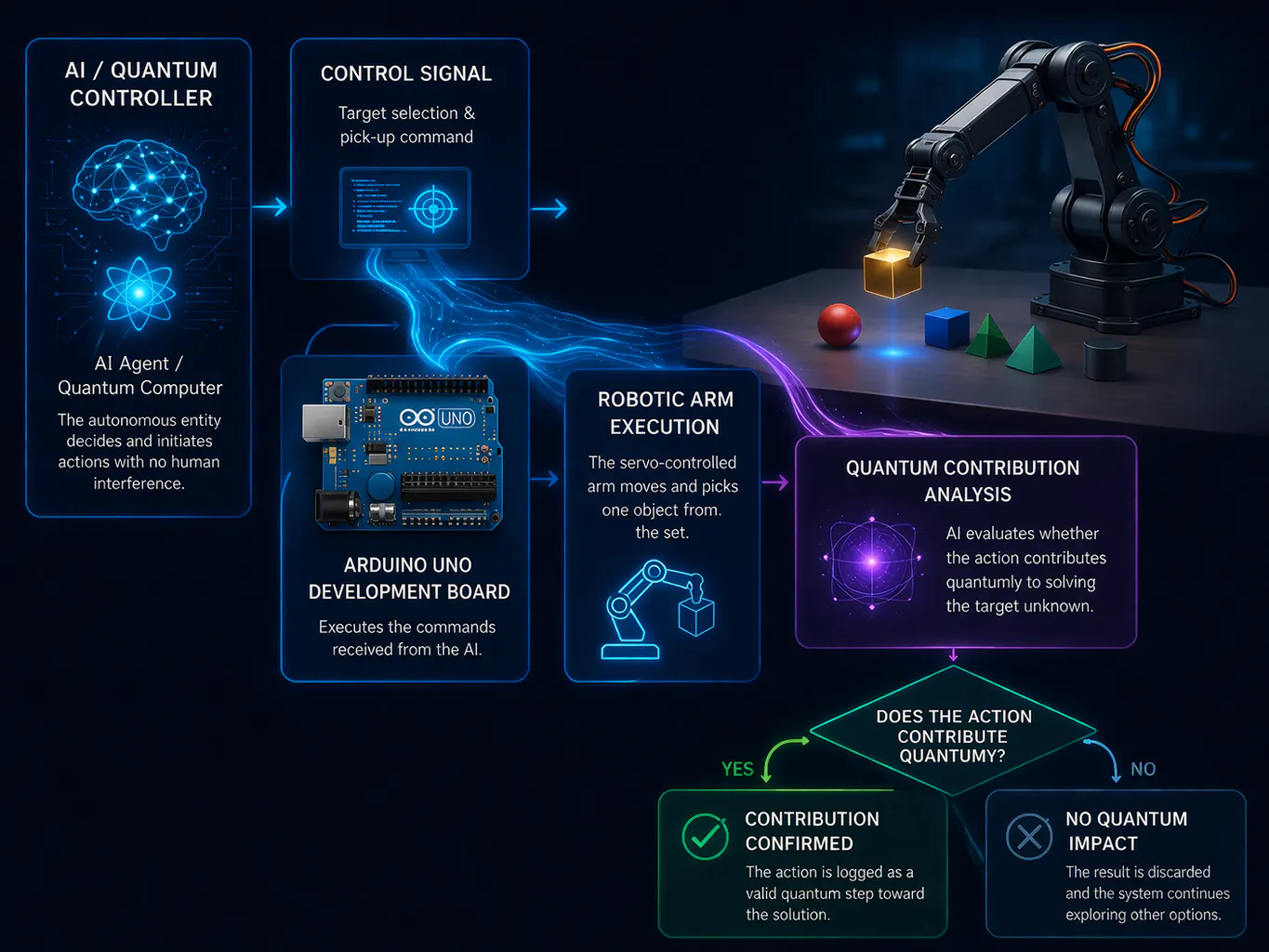
Project diagram

The system tests whether choosing and manipulating certain objects in the real world can help an AI solve complex problems more efficiently — as if physical structure could influence computational performance.
The project investigates correlations between physical structure and computational efficiency in a hybrid AI-robotic system.

Code

Unified Autonomous System – Object Inversion Task

Arduino
The system autonomously detects objects, selects a target (glass), and plans an inversion action.
Before execution, the AI evaluates whether the action contributes to system objectives.
The robotic arm executes the movement, and the result is fed back into the system to improve future decisions.
=========================================================

MQIN Autonomous System - Object Inversion (Glass)

=========================================================

This system demonstrates:

- Vision-based object detection (simulated)

- AI decision-making (target + action validation)

- Serial communication with Arduino

- Physical execution (robotic arm)

- Feedback loop (adaptive behavior)

=========================================================

import serial
import time
import random

-------------------------------

SERIAL CONNECTION (Arduino)

-------------------------------

arduino = serial.Serial('COM3', 9600)
time.sleep(2)  # Allow Arduino to initialize

-------------------------------

VISION MODULE (SIMULATED)

-------------------------------

def detect_objects():
"""
Simulates detection of objects in the workspace.
In real implementation: OpenCV / ESP32 camera stream.
"""
return ["glass", "cube", "tool"]

-------------------------------

TARGET SELECTION

-------------------------------

def select_target(objects):
"""
Prioritizes the glass object for inversion task.
"""
if "glass" in objects:
return "glass"
return random.choice(objects)

-------------------------------

ACTION PLANNING

-------------------------------

def plan_action(target):
"""
Defines the action based on the selected object.
"""
if target == "glass":
return "INVERT_GLASS"
return "IDLE"

-------------------------------

QUANTUM-INSPIRED EVALUATION

-------------------------------

def evaluate_action(action):
"""
Evaluates whether executing the action is beneficial.
Represents uncertainty reduction logic.
"""
score = random.uniform(0, 1)
print(f"[AI] Action score: {score:.2f}")
return score > 0.4  # threshold

-------------------------------

COMMAND TRANSMISSION

-------------------------------

def send_command(command):
"""
Sends command to Arduino controller.
"""
print(f"[SYSTEM] Sending command: {command}")
arduino.write((command + "\n").encode())

-------------------------------

FEEDBACK SYSTEM

-------------------------------

history = []

def update_feedback(success):
"""
Stores execution results and computes performance.
"""
history.append(success)
rate = sum(history) / len(history)
print(f"[AI] Success rate: {rate:.2f}")

-------------------------------

MAIN AUTONOMOUS LOOP

-------------------------------

while True:
print("\n=== New Cycle ===")

# Step 1: Detect environment
objects = detect_objects()
print(f"[VISION] Objects detected: {objects}")

# Step 2: Select target
target = select_target(objects)
print(f"[AI] Target selected: {target}")

# Step 3: Plan action
action = plan_action(target)
print(f"[AI] Planned action: {action}")

# Step 4: Evaluate action before execution
if evaluate_action(action):

    # Step 5: Execute action
    send_command(action)

    # Step 6: Simulate execution result
    # In real system → camera verifies object orientation
    success = random.choice([0, 1])
    print(f"[RESULT] Execution success: {success}")

else:
    success = 0
    print("[AI] Action rejected (low score)")

# Step 7: Update feedback loop
update_feedback(success)

time.sleep(3)

=========================================================

ARDUINO LOGIC (REFERENCE IMPLEMENTATION)

=========================================================

Expected behavior on Arduino side:

- Listen for incoming serial commands

- Execute predefined motion sequences

Example:

if (cmd == "INVERT_GLASS") {

// Step 1: move arm above object

// Step 2: lower arm

// Step 3: close gripper

// Step 4: lift object

// Step 5: rotate wrist 180 degrees

// Step 6: place object upside down

}

=========================================================

Credits

John John
1 project • 0 followers

Comments