John Bradnam
Published © GPL3+

Interfacing a Estardyn 1.3in OLED, Rotary Enc, Switch module

How to 3D print a case for a ESP32-C3 microprocessor and Estardyn 1.3in OLED, Rotary Enc, Switch module for under $15

IntermediateFull instructions provided6 hours21
Interfacing a Estardyn 1.3in OLED, Rotary Enc, Switch module

Things used in this project

Hardware components

Estardyn 1.3in OLED Module
Estardyn 1.3" OLED Module SH1116 Drive / EC11 Encoder | White/Blue Display | I2C Interface | HD Screen for Arduino DIY Projects
×1
ESP32-C3 module
ESP32 C3 Development Board Modules Mini Wifi BT Bluetooth Module 32-Bit Single-Core Processor ESP32 C3 16Pin Type-C
×1

Hand tools and fabrication machines

3D Printer (generic)
Soldering iron (generic)

Story

Read more

Custom parts and enclosures

STL Files

Files for 3D printing

Schematics

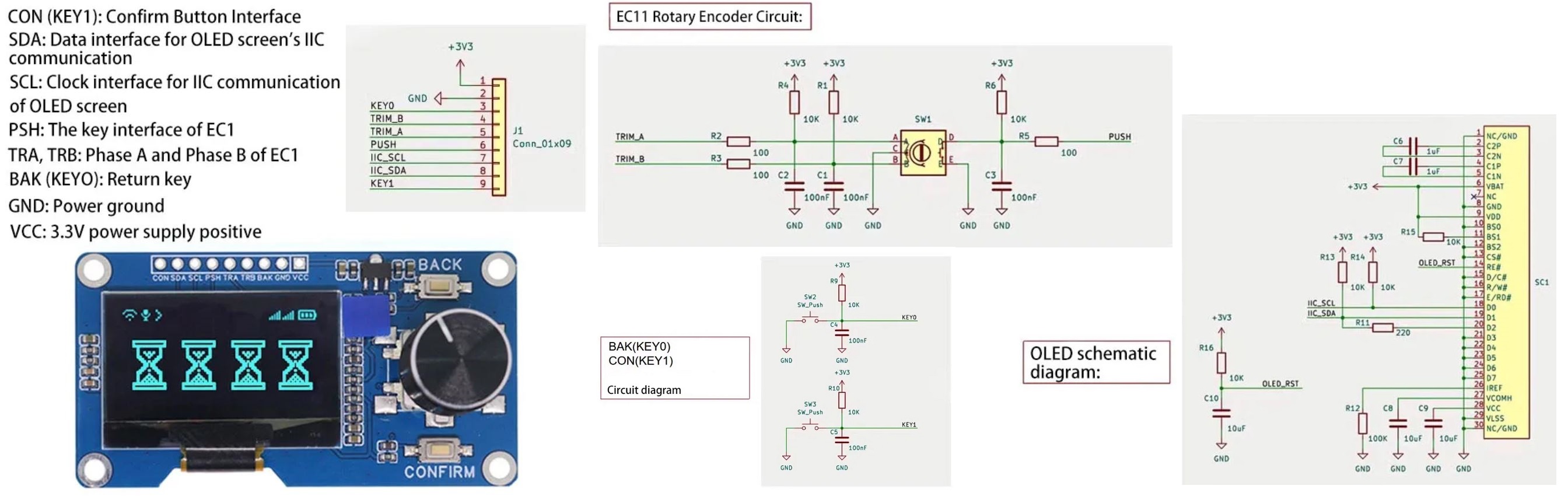
Estardyn Module schematic

Code

EstardynV1.ino

Arduino
/*---------------------------------------------------------------------------------------
    Estaryn 1.3in OLED + EC11 Rotary Encoder + 2 push buttons module test

    Version 1 - jbrad2089@gmail.com
      - Initial code for ESP32-C3 module

   MISO, GPI05 +------\_/------+ 5V
   MOSI, GPIO6 +               + GND
     SS, GPI07 +               + 3V3
    SDA, GPIO8 +   ESP32-C3    + GPIO4, ADC1_4, SCK
    SCL, GPI09 +               + GPIO3, ADC1_3
        GPIO10 +               + GPIO2, ADC1_2
   TXD, GPIO20 +               + GPIO1, ADC1_1
   RXD, GPIO21 +---------------+ GPIO0, ADC1_0

----------------------------------------------------------------------------------------*/

//FOR Serial Monitor on ESP32-C3 enable the setting TOOLS - USB CDC ON BOOT: "Enabled"


#include <Wire.h>
#include <Adafruit_GFX.h>
#include <Adafruit_SH110X.h>

#define ENC_A 0
#define ENC_B 1
#define SW_ENC 2
#define SW_BAK 3
#define SW_CON 4

// OLED Display settings
#define SCREEN_WIDTH 128
#define SCREEN_HEIGHT 64
#define OLED_RESET -1
#define SCREEN_ADDRESS 0x3C

Adafruit_SH1106G display = Adafruit_SH1106G(SCREEN_WIDTH, SCREEN_HEIGHT, &Wire, OLED_RESET);

//Global variables
volatile int8_t rotaryMovement = 0;
volatile bool lastRotA = false;
volatile bool rotarySwitchPressed = false;
volatile int rotaryCounter = 50;
volatile long timeout = 0;
volatile bool backSwitchPressed = false;
volatile bool confirmSwitchPressed = false;
volatile bool update = false;

#define ON_TIMEOUT 500

//---------------------------------------------------------------------
// Setup Hardware
//---------------------------------------------------------------------

void setup() 
{
  Serial.begin(115200);
  delay(1000);

  pinMode(ENC_A,INPUT);
  pinMode(ENC_B,INPUT);
  pinMode(SW_ENC,INPUT);
  pinMode(SW_BAK,INPUT);
  pinMode(SW_CON,INPUT);

  Serial.println("\n\n=== Estaryn ESP32-C3 Test ===");

  // Initialize OLED
  if(!display.begin(SCREEN_ADDRESS, true)) {
    Serial.println(F("SH1106 allocation failed"));
    for(;;);
  }

  attachInterrupt(ENC_A, rotaryInterrupt, CHANGE);
  attachInterrupt(SW_ENC, switchInterrupt, CHANGE);

  display.display();
  delay(2000);
  updateScreen();
}

//---------------------------------------------------------------------
// Rotary encoder has moved
//---------------------------------------------------------------------

void rotaryInterrupt()
{
  if (!digitalRead(ENC_A) && lastRotA)
  {
    rotaryMovement = (digitalRead(ENC_B)) ? -1 : 1;
  }
  lastRotA = digitalRead(ENC_A);
}

//---------------------------------------------------------------------
// Rotary encoder was pressed
//---------------------------------------------------------------------

void switchInterrupt()
{
  rotarySwitchPressed = (digitalRead(SW_ENC) == LOW);
}

//---------------------------------------------------------------------
// Main loop
//---------------------------------------------------------------------

void loop() 
{
  update = false;
  if (rotarySwitchPressed)
  {
    Serial.println("Rotary Switch Pressed");
    update = true;
  }
  if (rotaryMovement != 0)
  {
    Serial.print("Rotary encoder moved ");
    Serial.println((rotaryMovement > 0) ? "left" : "right");
    rotaryCounter += (rotaryMovement > 0) ? -1 : 1;
    rotaryCounter = min(max((int)rotaryCounter, 0), 99);
    rotaryMovement = 0;
    update = true;
  }
  if (buttonPressed(SW_BAK))
  {
    Serial.println("BACK button was pressed and released");
    backSwitchPressed = true;
    update = true;
  }
  if (buttonPressed(SW_CON))
  {
    Serial.println("CONFIRM button was pressed and released");
    confirmSwitchPressed = true;
    update = true;
    Serial.print("update = ");
    Serial.println(update);
  }

  if (update == true)
  {
    Serial.println("Update function entry");
    update = false;
    timeout = millis() + ON_TIMEOUT;
    Serial.print("Timeout entry is ");
    Serial.println(timeout);
    updateScreen();
    rotarySwitchPressed = false;
    backSwitchPressed = false;
    confirmSwitchPressed = false;
    Serial.println("Update function exit");
  }
  if (timeout > 0 && millis() >= timeout)
  {
    Serial.print("Timeout exit is ");
    Serial.println(millis());
    timeout = 0;
    updateScreen();
  }
  //delay(10);
}

void updateScreen(void)
{
  display.clearDisplay();
  display.setTextSize(2);
  display.setTextColor(SH110X_WHITE);
  display.setCursor(0, 0);
  display.print("Count:");
  display.println(rotaryCounter);
  display.print("ENC:");
  display.println(rotarySwitchPressed);
  display.print("CONFIRM:");
  display.println(confirmSwitchPressed);
  display.print("BACK:");
  display.print(backSwitchPressed);
  display.display();
}

bool buttonPressed(int pin)
{
  bool pressed = false;
  if (digitalRead(pin) == LOW)
  {
    delay(10);
    if (digitalRead(pin) == LOW)
    {
      while (digitalRead(pin) == LOW)
      {
        //yield();
      }
      pressed = true;
    }
  }
  return pressed;
}

Credits

John Bradnam
160 projects • 205 followers

Comments