


Based on the feedback gathered from my interviewees two areas that they seemed to have trouble was (1) installing updates on all devices and maintaining the right versions and (2) re-training people once the updates have been completed due to changes in the program(s).
LEGEND: Office (O); Home (H)
1. My first idea revolves around tackling the issue with updates. Its a mobile app that, similar to Google Play and the App Store, uses an e-mail to connect all your accounts/apps on your different devices. (O)
a. What does it do: Allows you to update the apps that require updates, and also informs you of other apps that will be affected/should be updated in order for everything to run seamlessly. This can be done from the mobile device and be carried out for desktops remotely as well.
b. How it works: When an update is rolled out, the user can choose the devices that has the app and that should be updated. The user will also be prompted to update other apps whose functionalities might be affected by an update.
2. The second idea revolves around training people who may be subordinates, about a task that needs to be done. (O)
a. What does it do: Allows you to record you performing the task on your screen and send it to those who need to learn how to conduct this task. This helps a person customize the training to their duties/office.
b. How it works: A small record button is activated on the screen when the app is opened. It records you doing the task, and allows audio input as well. After the recording is complete, they can quickly send it out by e-mail.
3. The third idea from these conversations is regarding the organization of information. As an MBA admissions advisor, one of the people had multiple event invites sent to him through Facebook, Gmail, Outlook and more. (O)
a. What does it do: Allows you to sync all your events on a calendar with ease and keep track of all the events
b. How it works: Tracks invites on your mobile phone from all the different apps and consolidates them into one calendar that reminds him of upcoming events
----------THE NEXT APPS ARE FROM CONVERSATIONS WITH OTHER PEOPLE--------
4. An ingredient scanner to make food (H)
a. What does it do: Allows you to use the leftover items in a fridge to cook up a delicious meal! Avoids wastage and encourages new ideas
b. How it works: Often times we find ourselves with ingredients that might not seem like a good combination for a proper meal. With this app you can input what items you have and the app will suggest a meal that you can make.
5. An app that facilitates room re-arrangement without having to physically move your furniture (H)
a. What does it do: Allows you to try out new designs and room rearrangements without moving your furniture over and over again.
b. How it works: Users can either input the dimensions of their furniture, or scan the barcode on the furniture to add it to the room. They can move things around to see how they fit, and decide what looks good before physically moving objects/
6. Easy exchange of information using mobile devices (O)
a. What does it do: Allows you the user to exchange information with a new person they might have just met using Bluetooth. This is esp useful in the professional setting where one might be meeting people constantly and eliminate the need for business cards
b. How it works: When the user meets a person that they would like to share contact information with, they can connect via Bluetooth and share phone numbers, connect on LinkedIn and find each other easily on Facebook. The app can maintain a list of people that the user has met on a particular day, and even go through and delete people if necessary
7. A new mobile security app that can detect people who are outside the house (H)
a. What does it do: Allows the user to check if people are wandering around their house by tracking any mobile devices that come in the range (specified by user) of the house
b. How it works: The app can collect data from the signal of cell phone devices that are captured around the house and deliver a daily report to the user. This would be helpful in determining if there are people who are trying to either vandalize the house or sneak out of the house late in the night or prevent an attack/burglary by taking preliminary action.
8. A mobile app that notifies users when an alarm goes off (such as the carbon monoxide detector) that isn’t linked to the main security system (H)
a. What does it do: Helps the user be more aware of what is happening in his/her household
b. How it works: In the case that the user is outside the house or busy and doesn’t hear the alarm go off, the app helps the user by sending him/her an alert text message notifying them of the warning
9. A prescription app (O) & (H)
a. What does it do: Eliminates the use of paper and bad doctor’s handwriting
b. How it works: When the user is
prescribed some medicine by a doctor, the doctor can enter the prescription
into an app that is then synced with the user. The user can then take the
authorized prescription to their pharmacy, scan the barcode and have their medicine
ready to go!
10. Finding the cheapest products (H)
a. What does it do: Allows users on a tight budget determine where the cheapest products are available in their neighborhood (such as milk, cereal, etc)
b. How it works: Users can specify what they might be looking for, and the app can go through the prices at stores in a specified radius to find the cheapest prices. This way is milk at Safeway is cheaper than milk at Trader Joe’s, then the user can make a well informed decision about where to buy their milk.
11. Efficiently logging hours (O)
a. What does it do: Allows employees to log their hours efficiently and limit errors and over charges
b. How it works: Users can use the app to set a start/end time, and the app prompts them at the start/end times to see if they have started/ended work. It could also use GPS technology to check if the employee has left the building for more precision in logging hours
12. Deriving spending habits and patterns for young adults (H)
a. What does it do: Helps users become more financially independent by tracking their spending habits and helping them maintain budgets
b. How it works: when a user makes a purchase, he/she could either scan the receipt and enter the amount under a category (eg: food, recreation, membership etc.) or sync their credit card to parse the statements and add them to the app. This could help the user determine if he/she is going over his/her spending budget and help them become more responsible adults.
My favorite idea is the cheap shopper app (#10) because I think that a lot of people try and guess where the cheapest produce might be while shopping, but this would help clarify the problem and provide an optimal solution. Additionally, I think that its an app that would help single mothers, college students and other people one tight budgets.
HOW THE APP WORKS (MORE DEETS): {numbers in brackets are the screen numbers from the app}
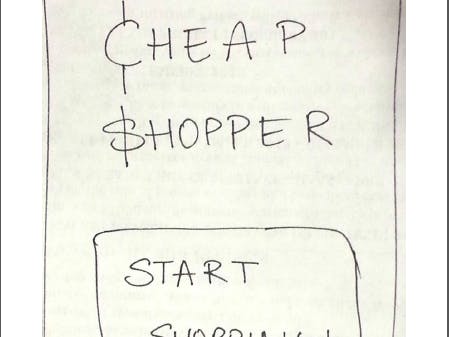
(1) The app opens with the user screen that begins their shopping experience.
(2) The app then prompts the user to enter their zip code to help scout nearby stores. This screen also lists the nearby stores that the user can choose to check from
(3) The app then prompts the user to select the products he/she wants to buy and offers an alphabetical list
(4) The next step is listing the specifics for the app such as quantity and weight for user to enter those amounts based on how much they want to buy
(5) Then, the user continues to the next screen where he/she has two options
a. Look at the total from lowest price from one store (if they plan to go to just one store and save time) OR
b. Look at the lowest price for each product from each store and construct their shopping list in that fashion
(6) IF THE USER CHOOSES OPTION B: the next screen details the prices and how they are broken up at each store. A check box is listed near each option so that the user can customize his/her list appropriately to get the lowest possible price
(7) Then, the next screen configures the shopping list that has been constructed for the user from the options listed in the previous screen in addition to the grand total (including tax)
(8) IF THE USER CHOOSES OPTION A: the next screen details the cost of buying all the items (at the lowest price) in each store and warnings if a particular product is not available any of the selected stores
(9) The next screen is the shopping list for the user that they can use when they go shopping to their store of choice along with the total listed at the bottom
INSIGHTS:
I tested my app with a mom in the super market (Safeway) who said that one feature she would incorporate is more detail in the specifics. For example, she wanted to buy a specific type of apple, and hence she should be able to specify that, as the prices are different for various types.
Additionally, she also mentioned that popular products could be on the screen before specifics as people are quite likely to buy things such as milk, bread, eggs etc. and searching for them using the alphabetical list might be a bit cumbersome.

Comments