jafarsalim
Published © GPL3+

Smart training kit the first in the world

Project provides training kit to help the student on four axes:- 1- Check 2- Measurement 3- Run 4- test all types of electronics

AdvancedProtip842
Smart training kit the first in the world

Things used in this project

Hardware components

Arduino Nano R3
Arduino Nano R3
×9
Arduino UNO
Arduino UNO
×1
Enclosure for Raspberry Pi 3 Model B
×1
Male/Female Jumper Wires
×1
Board-To-Board Connector, 2 mm
×1
Solderless Breadboard Half Size
×6
Axial Fan, 12 VDC
Axial Fan, 12 VDC
×4
Alphanumeric LCD, 16 x 2
×2
Alphanumeric LCD, 20 x 4
×1
Monitor, LCD
Monitor, LCD
×1
Toggle Switch, SPDT
Toggle Switch, SPDT
×5
Slide Switch
Slide Switch
×7
relay 1 channal
×2
ESC 30A
×1
7 segment
×1
l 298n dc motor driver
×1
HC-05 Bluetooth Module
×1
HC-12
×2
AC to DC converter
×1
AC current sensor
×1
DC current sensor
×1
DC voltage sensor
×2
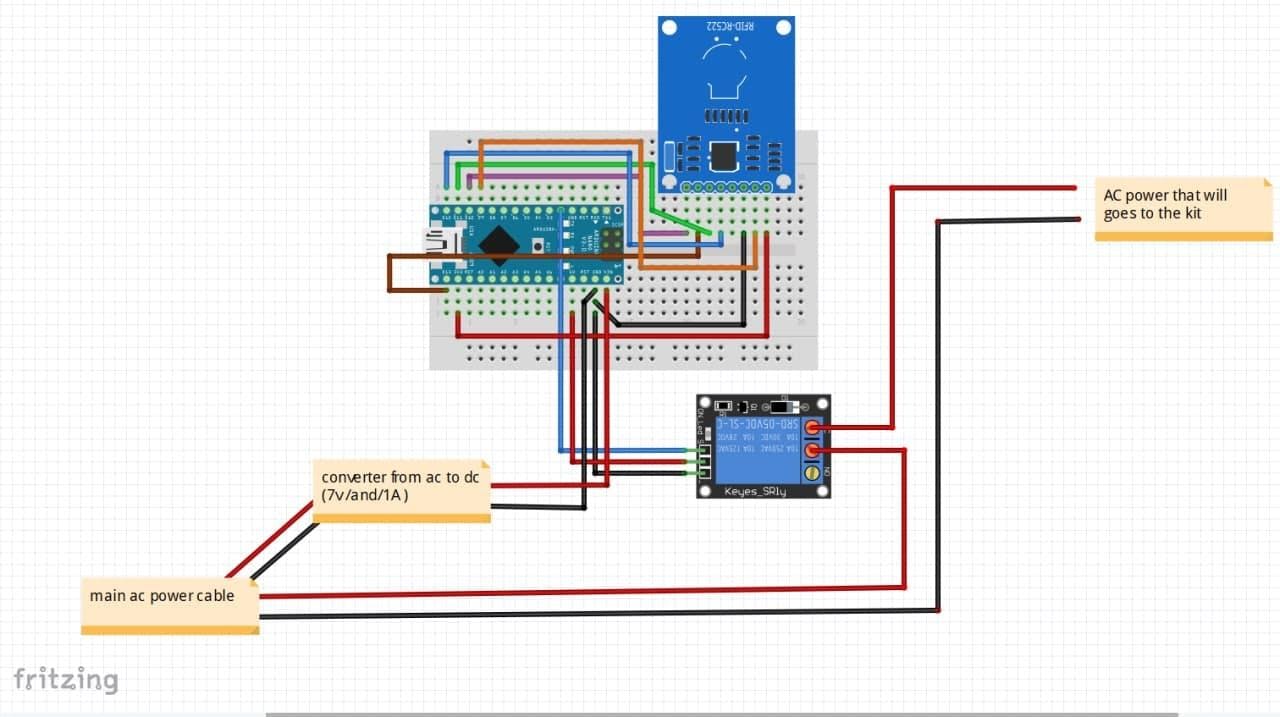
RFID-RC522
×1
Rechargeable Battery, Lithium Ion
×1
3.7V 7800mAh Rechargeable Lithium Battery Red
×1

Software apps and online services

Arduino IDE
Arduino IDE
circuito.io
circuito.io

Hand tools and fabrication machines

Soldering iron (generic)
Solder Wire, Lead Free

Story

Read more

Schematics

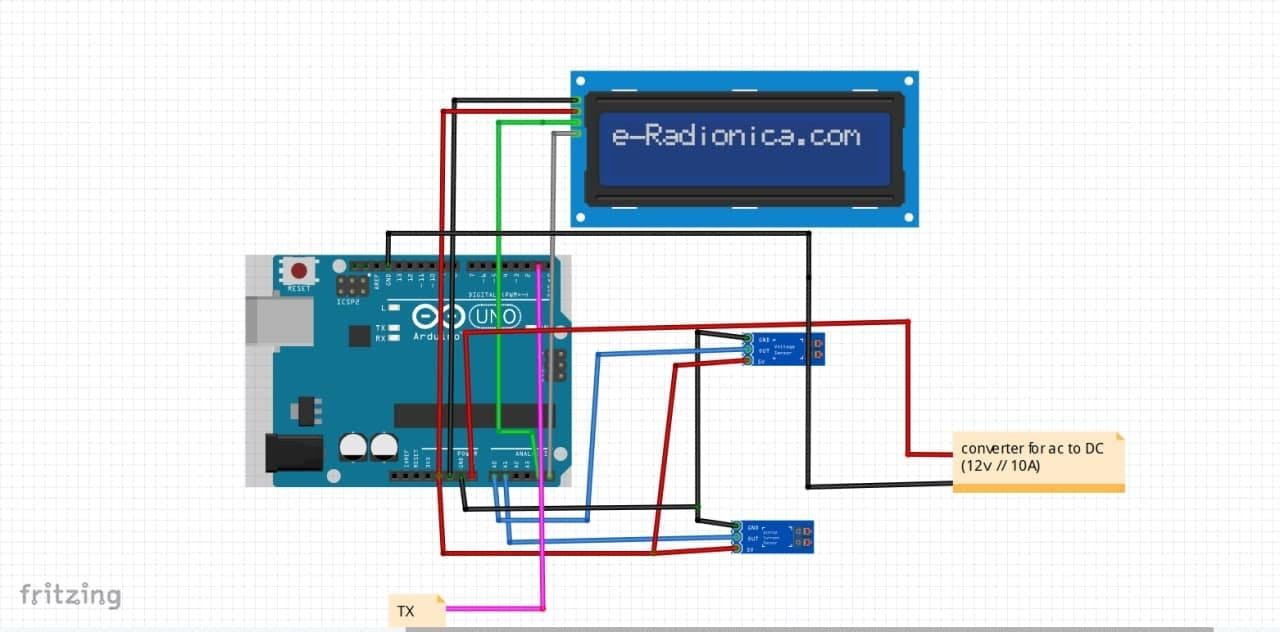
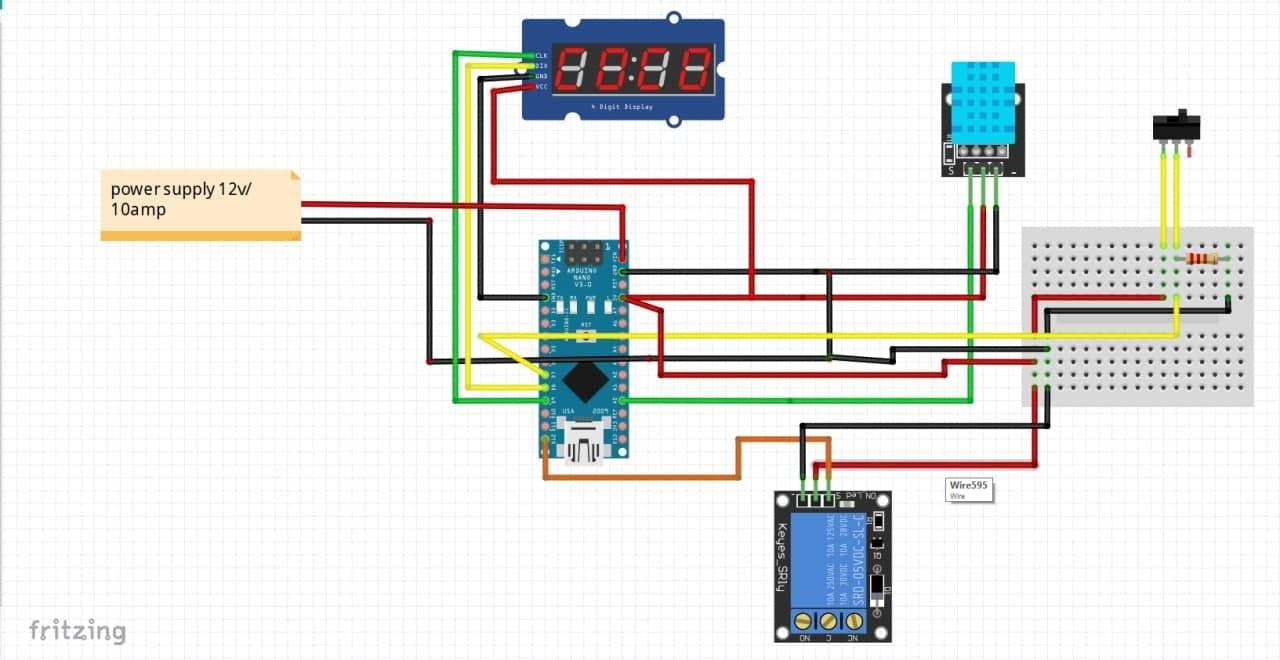
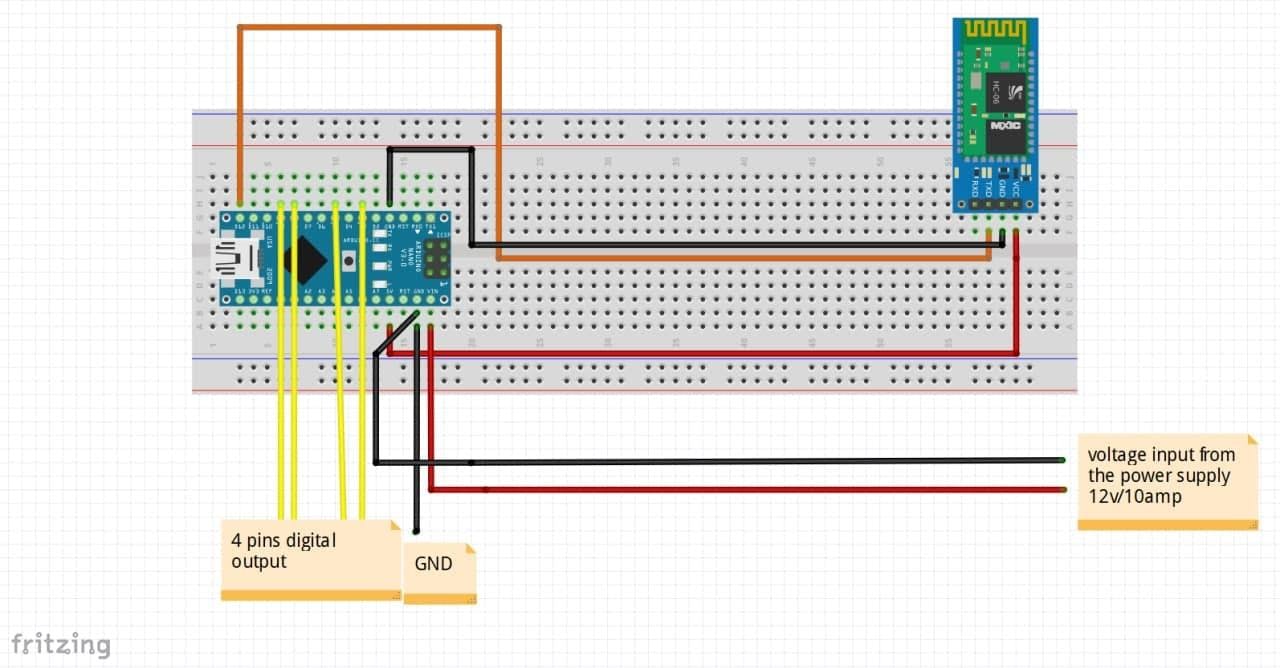
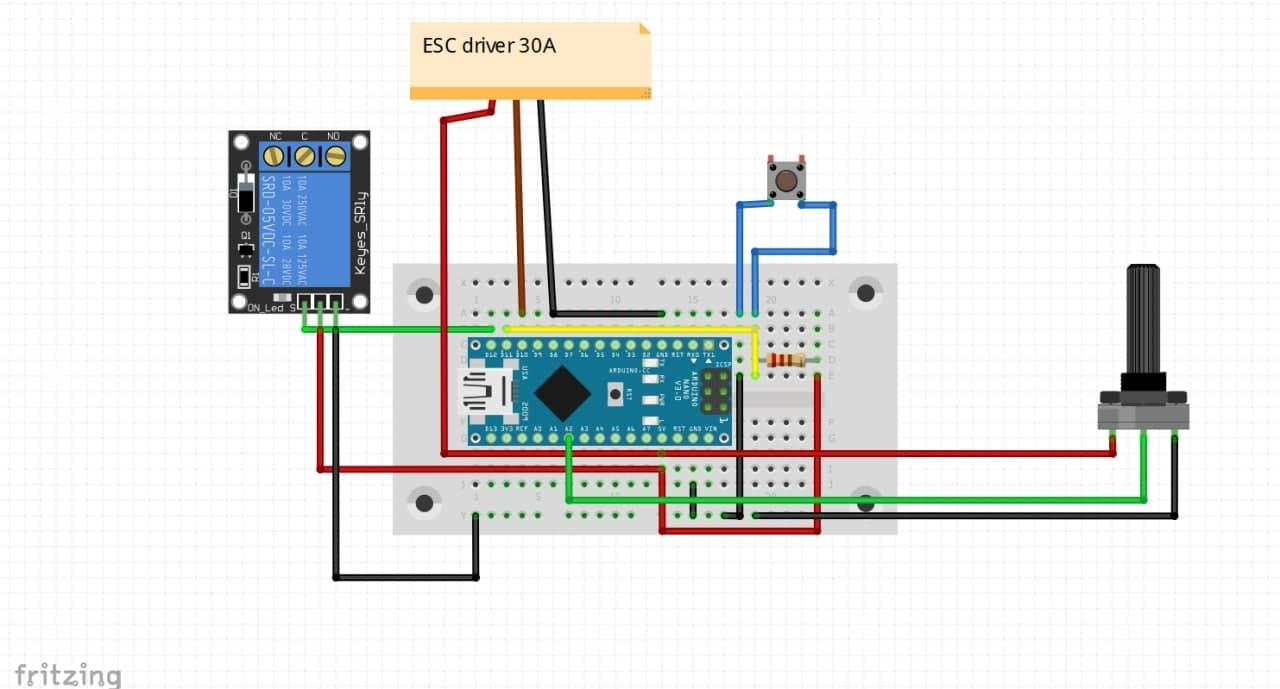
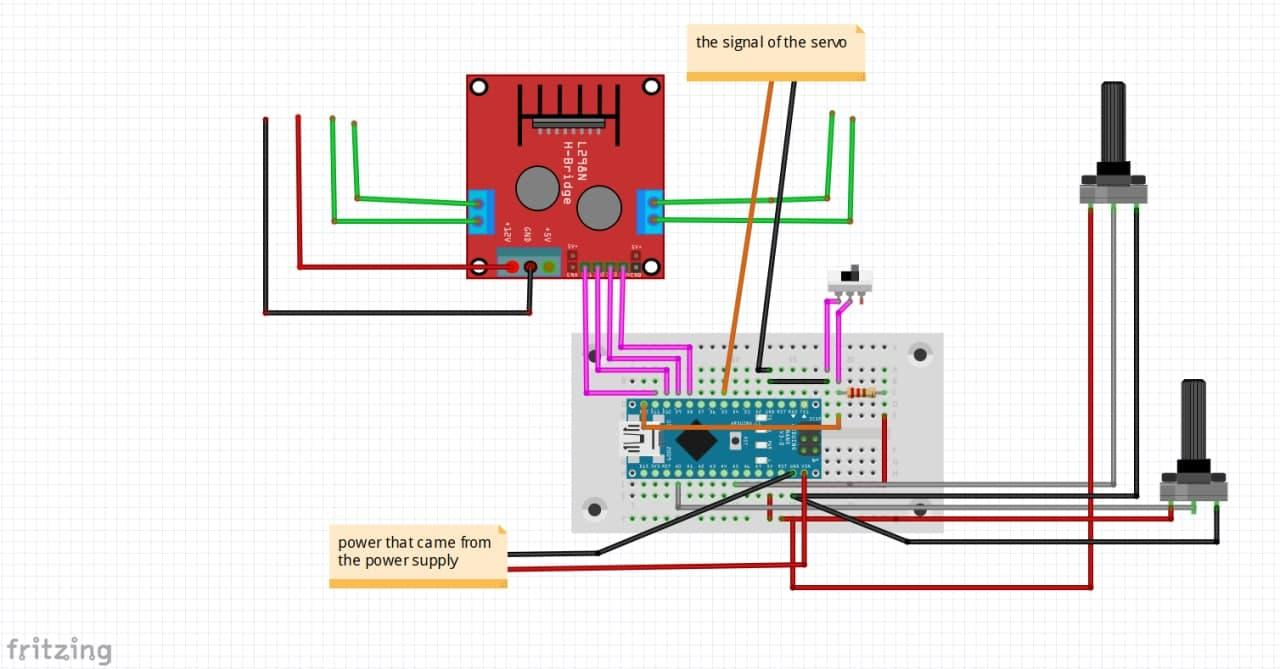
1_wCoNcoqHZH.png

this part1

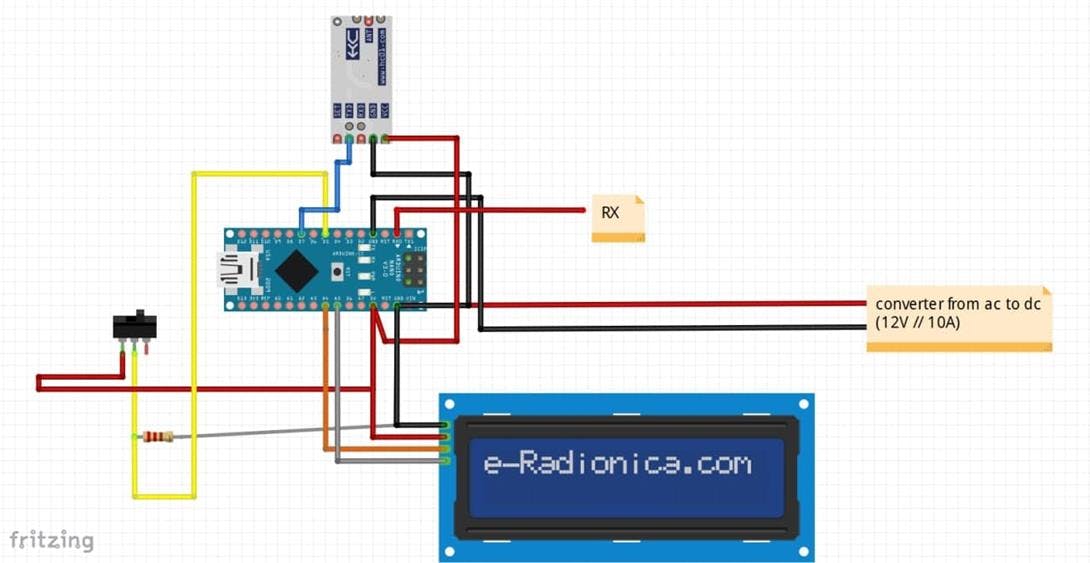
2_9nO8I2Nfbg.png

this is part2

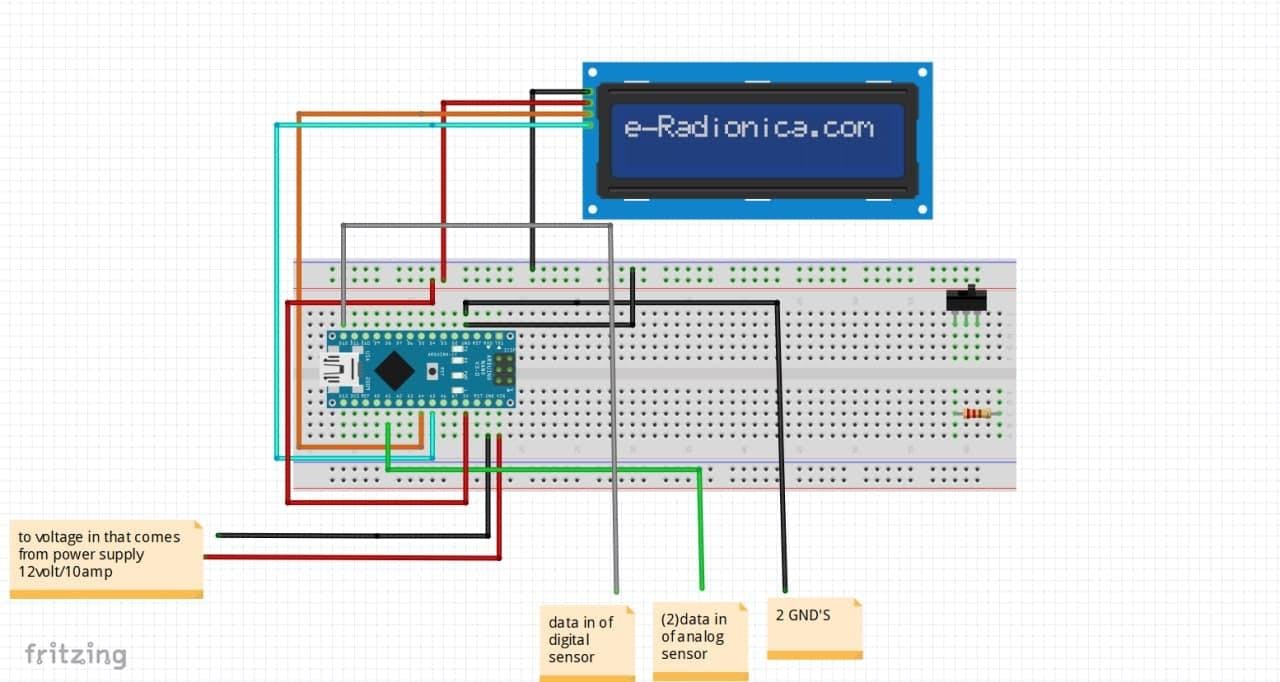
3_PevujUoveR.png

this part3

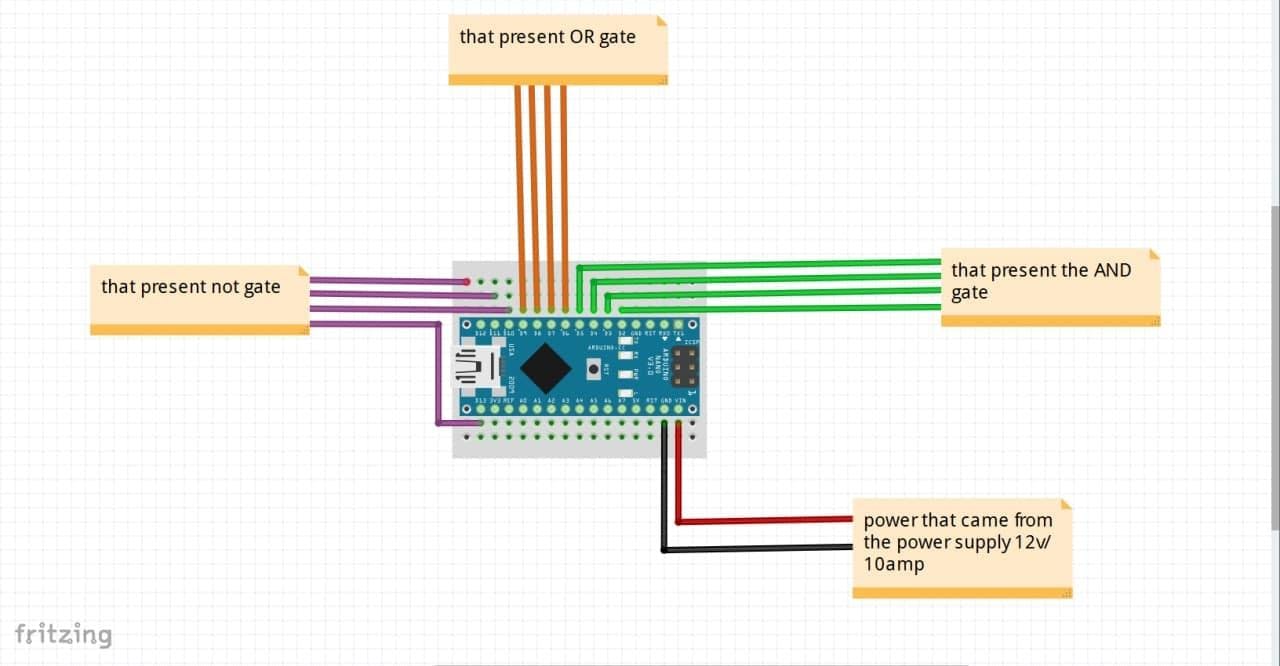
5_vc5WxOczl6.png

this part4

6_dhGy3Zt14N.png

this part5

7_yxhClKhTIh.png

this part6

8_q3zUim7lEY.png

this part7

9_XcYTSV4EVZ.png

this part8

10_nAL05194OT.png

this part9

Code

part1

Arduino
#include <LiquidCrystal_I2C.h>
LiquidCrystal_I2C lcd(0x27,16,2); 
const int voltageSensor = A0;
const int currentPin = A1;
float vOUT = 0.0;
float vIN = 0.0;
float R1 = 30000.0;
float R2 = 7500.0;
int value = 0;
//********************************
#define VIN A1 // define the Arduino pin A0 as voltage input (V in)
const float VCC = 5.0;// supply voltage is from 4.5 to 5.5V. Normally 5V.
const int model = 2; // enter the model number (see below)
float cutOffLimit = 1.01;// set the current which below that value, doesn't matter. Or set 0.5
float sensitivity[] ={
 0.185,// for ACS712ELCTR-05B-T
 0.100,// for ACS712ELCTR-20A-T
 0.066// for ACS712ELCTR-30A-T
 }; 
const float QOV = 0.5 * VCC;// set quiescent Output voltage of 0.5V
float voltage;// internal variable for voltage
//*************************************
void setup() {
 Serial.begin(9600);
 lcd.init(); 
 lcd.backlight();
 pinMode(7,OUTPUT);
}
void loop() {
//voltagepin=analogRead(0);
/* adcValue = analogRead(currentPin);
 adcVoltage = (adcValue / 1024.0) * 5000;
 currentValue = ((adcVoltage - offsetVoltage) / sensitivity);
 Serial.print("Raw Sensor Value = " );
 Serial.print(adcValue);*/
 float voltage_raw = (5.0 / 1023.0)* analogRead(VIN);// Read the voltage from sensor
 voltage = voltage_raw - QOV + 0.012 ;// 0.000 is a value to make voltage zero when there is no current
 float current = voltage / sensitivity[model];
float cur=current*0.1;
 if(abs(current) > cutOffLimit ){
 lcd.setCursor(0,0);
lcd.print("Amp:");
lcd.setCursor(5,0);
lcd.print(cur,2);
lcd.setCursor(12,0);
lcd.print("mA");
 }else{
 /* lcd.setCursor(0,0);
 lcd.print("No Current");*/
 }
 //*************************************************
 value = analogRead(voltageSensor);
 vOUT = (value * 5.0) / 1024.0;

 vIN = vOUT / (R2/(R1+R2));
lcd.setCursor(0,1);
lcd.print("volt:");
lcd.setCursor(6,1);
lcd.print(vIN);
lcd.setCursor(12,1);
lcd.print("VOLT");
}

part2

Arduino
#include <LiquidCrystal_I2C.h>
#include <Wire.h> 
#include <SoftwareSerial.h>
SoftwareSerial hc12(5,4); // RX, TX
LiquidCrystal_I2C lcd(0x27, 20, 4); 
int button;
float arr[3];
float res;
float power;
float ACres;
float ACpowW;
float showpower;
//*************************************
void setup() {
 hc12.begin(9600);
 Serial.begin(9600);
 lcd.init(); 
 lcd.backlight();
 pinMode(12,INPUT);
}
void loop() {
 button=digitalRead(12);
 /*lcd.setCursor(0,0);
 lcd.print("Hello, world!");
 lcd.setCursor(0,1);
 lcd.print("Hello, world!");
 lcd.setCursor(0,2);
 lcd.print("Hello, world!");
 lcd.setCursor(0,3);
 lcd.print("Hello, world!");
button=digitalRead(12);*/
/*lcd.setCursor(0,0);
lcd.print("steps:-");
lcd.setCursor(0,8);
lcd.print(s);
*/
//Serial.println(button);
//**********************************************************
if(button == 1){
 if (hc12.available()) {
 //int curr=hc12.read();
 Serial.print(hc12.read());
 ACres=220/curr;
 ACpowW=220*curr*0.9;
 showpower=220*curr;
lcd.setCursor(0,0);
 lcd.print("AC-current=");
 lcd.setCursor(0,12);
 lcd.print(curr);
 lcd.setCursor(0,1);
 lcd.print("AC-resistance="); 
 lcd.setCursor(14,1);
 lcd.print(ACres);
 lcd.setCursor(0,2);
 lcd.print("AC-power=");
 lcd.setCursor(9,2);
 lcd.print(ACpowW);
 lcd.setCursor(0,3);
 lcd.print("Ac-S.power=");
 lcd.setCursor(11,3);
 lcd.print(showpower);
 
 
 }}
//**********************************************************
else{
 if (Serial.available()) {
 for (int i=0; i<=3; i++){
 arr[i] = Serial.parseFloat();
 }
 
// char to_char[16];
// itoa(arr, to_char, 10);
 }
 float cur=arr[1];
 float volt=arr[3];*/
 Serial.println(cur);
 Serial.println('\n');
 Serial.println(volt);*/
 res=cur/volt;
 power=cur*volt;
 lcd.setCursor(0,0);
 lcd.print("Current=");
 lcd.setCursor(9,0);
 lcd.print(cur);
 lcd.setCursor(0,1);
 lcd.print("Voltage=");
 lcd.setCursor(9,1);
 lcd.print(volt);
 lcd.setCursor(0,2);
 lcd.print("Power=");
 lcd.setCursor(7,2);
 lcd.print(power);
 lcd.setCursor(0,3);
 lcd.print("Resistance=");
 lcd.setCursor(12,3);
 lcd.print(res);
}}

part3

Arduino
#include <LiquidCrystal_I2C.h>
LiquidCrystal_I2C lcd(0x27,16,2); 
float analog;
int digital;
//int analog1;
//int sw;
void setup() {
 // put your setup code here, to run once:
 Serial.begin(9600);
 lcd.init(); 
 lcd.backlight();
 //lcd.init(); 
 /*pinMode(11,INPUT);
 pinMode(2,INPUT);*/
 pinMode(12,INPUT);
}
void loop() {
 // put your main code here, to run repeatedly:
 delay(500);
analog=analogRead(1);
digital=digitalRead(12);
Serial.println(analog);
//analog1=digitalRead(1);
//sw=digitalRead(12);
lcd.setCursor(0,0);
lcd.print("analog:");
lcd.setCursor(8,0);
lcd.print(analog,3);
lcd.setCursor(0,1);
lcd.print("digital:");
lcd.setCursor(9,1);
lcd.print(digital);

part4

Arduino
int pin2,pin3,pin6,pin7,pin10,pin11;
//...................................................................................
void setup() {
 //and
pinMode(2,INPUT);
pinMode(3,INPUT);
pinMode(4,OUTPUT);
pinMode(5,OUTPUT);
//or
pinMode(6,INPUT);
pinMode(7,INPUT);
pinMode(8,OUTPUT);
pinMode(9,OUTPUT);
//not
pinMode(10,INPUT);
pinMode(11,INPUT);
pinMode(12,OUTPUT);
pinMode(13,OUTPUT);
}
//...........................................................................................
void loop() {
 // AND
pin2=digitalRead(2);
pin3=digitalRead(3);
//OR
pin6=digitalRead(6);
pin7=digitalRead(7);
//NOT
pin10=digitalRead(10);
pin11=digitalRead(11);
//........................................................................................
//THE AND GATE
if(pin2==0 && pin3==0){
 digitalWrite(4,0); 
 digitalWrite(5,0); 
}
else if(pin2==1 && pin3==0){
 digitalWrite(4,0); 
 digitalWrite(5,0); 
}
else if(pin2==0 && pin3==1){
 digitalWrite(4,0); 
 digitalWrite(5,0); 
}
else if(pin2==1 && pin3==1){
 digitalWrite(4,1); 
 digitalWrite(5,1); 
}
else{
 digitalWrite(4,0); 
 digitalWrite(5,0); 
}
//...............................................................................
//THE OR GATE
if(pin6==0 || pin7==0){
 digitalWrite(8,0); 
 digitalWrite(9,0); 
}
else if(pin6==1 || pin7==0){
 digitalWrite(8,1); 
 digitalWrite(9,1); 
}
else if(pin6==0 || pin7==1){
 digitalWrite(8,1); 
 digitalWrite(9,1); 
}
else if(pin6==1 || pin7==1){
 digitalWrite(8,1); 
 digitalWrite(9,1); 
}
else{
 digitalWrite(8,0); 
 digitalWrite(9,0); 
}
//.....................................................................................
//THE NOT GATE
if(pin10==0){
 digitalWrite(12,1); 
}
else{
 digitalWrite(12,0); 
}
if(pin11==0){
 digitalWrite(13,1); 
}
else{
 digitalWrite(13,0); 
}}

part5

Arduino
#include <TM1637Display.h>
#include "dht.h" 
#include <Wire.h> 
#define dht_apin A0
const int CLK = 9; //Set the CLK pin connection to the display
const int DIO = 8; //Set the DIO pin connection to the display
TM1637Display display(CLK, DIO); //set up the 4-Digit Display.
int s;
dht DHT;
//***************************************************************************
void setup() {
 display.setBrightness(0x0a);
 Serial.begin(9600);//set the diplay to maximum brightness 
 pinMode(7,INPUT);
 pinMode(12,OUTPUT);
}
void loop() {
 // put your main code here, to run repeatedly:
 Serial.print("temperature =");
 Serial.print("\n");
 Serial.print(DHT.temperature); 
 //Serial.println(s); 
DHT.read11(dht_apin);
s=digitalRead(7);
display.showNumberDec( DHT.temperature);
if(s == 1){
 digitalWrite(12,1);
}
else{
 digitalWrite(12,0); 
}}

part6

Arduino
#include <SoftwareSerial.h>
SoftwareSerial mySerial(12, 13); // RX, TX
char x;
void setup() {
 // Open serial communications and wait for port to open:
 Serial.begin(9600);
 //Serial.println("Goodnight moon!");
 mySerial.begin(9600);
// mySerial.println("Hello, world?");
}
void loop() { // run over and over
 if (mySerial.available()) {
 x=mySerial.read();
 Serial.write(x);
 }
 if(x == 'a'){
 Serial.println("LED1 off");
}
49
 else if(x == 'A'){
 Serial.println("LED1 on");
}
 else if(x =='b'){
 Serial.println("LED2 off");
}
 else if(x == 'B'){
 Serial.println("LED2 on");
}
 else if(x == 'c'){
 Serial.println("LED3 on");
}
 else if(x == 'C'){
 Serial.println("LED3 off");
}

part8

Arduino
#include <Servo.h>
Servo ESC; // create servo object to control the ESC
int potValue; // value from the analog pin
int button;
void setup() {
 // Attach the ESC on pin 9
ESC.attach(9,1000,2000);// (pin, min pulse width, max pulse width in microseconds) 
Serial.begin(9600);
pinMode(11,INPUT);//button
pinMode(12,OUTPUT);//relay
}
void loop() {
button= digitalRead(11);
 potValue = analogRead(A2); // reads the value of the potentiometer (value between 0 and 1023)
 potValue = map(potValue, 0, 1023, 0, 180); // scale it to use it with the servo library (value between 0 and 180)
 ESC.write(potValue); // Send the signal to the ESC
if(button == 1){
 digitalWrite(12,0);
}
 else{
 digitalWrite(12,1);
 }}

part9

Arduino
#include <Stepper.h>
#include <Servo.h>
Servo myservo; 
const int stepsPerRevolution = 200; 
int val;
int button;
Stepper myStepper(stepsPerRevolution, 8, 9, 10, 11);
int changeres;
int stepCount = 0; 
//....................................................................
void setup() {
 // nothing to do inside the setup
 pinMode(11,INPUT);
 myservo.attach(5);
}
void loop() {
 changeres=analogRead(5);
 if(button == 1){
 int sensorReading = analogRead(A0);
 int motorSpeed = map(sensorReading, 0, 1023, 0, 100);
 if (motorSpeed > 0) {
 myStepper.setSpeed(motorSpeed);
 myStepper.step(stepsPerRevolution / 100);
 }
 }
 else{
 myStepper.step(1);
 Serial.print("steps:");
 Serial.println(stepCount);
 stepCount++;
 delay(500);
 }
 val = map(changeres, 0, 1023, 0, 180); // scale it to use it with the servo (value between 0 and 180)
 myservo.write(val);
}

part10

Arduino
#include <Wire.h>
#include <SoftwareSerial.h>
SoftwareSerial hc12(5,4); // RX,TX
const int currentPin = A0;
int sensitivity = 66;
int adcValue= 0;
int offsetVoltage = 2500;
double adcVoltage = 0;
double currentValue = 0;
void setup() 
{
 Serial.begin(9600);
 hc12.begin(9600); 
}
void loop()
{
 adcValue = analogRead(currentPin);
 adcVoltage = (adcValue / 1024.0) * 5000;
 currentValue = ((adcVoltage - offsetVoltage) / sensitivity);
 Serial.print("\t Current = ");
 Serial.println(currentValue,3);
 /*lcd.setCursor(0,0);
 lcd.print("Current = ");
 lcd.setCursor(10,0);
 lcd.print(currentValue,2);
 lcd.setCursor(14,0);
 lcd.print("A");
 delay(2500);*/
 hc12.println(currentValue);
}

part11

Arduino
#include <SPI.h>
#include <MFRC522.h>
#define SS_PIN 10
#define RST_PIN 9
MFRC522 mfrc522(SS_PIN, RST_PIN); // Create MFRC522 instance.
void setup() 
{

 Serial.begin(9600); // Initiate a serial communication
 SPI.begin(); // Initiate SPI bus
 mfrc522.PCD_Init(); // Initiate MFRC522
 //Serial.println("Approximate your card to the reader...");
 //Serial.println();
 pinMode(3,OUTPUT);
}
void loop() 
{
 // Look for new cards
 if ( ! mfrc522.PICC_IsNewCardPresent()) 
 {
 return;
 }
 // Select one of the cards
 if ( ! mfrc522.PICC_ReadCardSerial()) 
 {
 return;
 }
 //Show UID on serial monitor
// Serial.print("UID tag :");
 String content= "";
 byte letter;
 for (byte i = 0; i < mfrc522.uid.size; i++) 
 {
 Serial.print(mfrc522.uid.uidByte[i] < 0x10 ? " 0" : " ");
 Serial.print(mfrc522.uid.uidByte[i], HEX);
 content.concat(String(mfrc522.uid.uidByte[i] < 0x10 ? " 0" : " "));
 content.concat(String(mfrc522.uid.uidByte[i], HEX));
 }
 Serial.println();
 //Serial.print("Message : ");
 content.toUpperCase();
 if (content.substring(1) == "5B C6 01 22") //change here the UID of the card/cards that you want to give access
 {
 Serial.println("hatm");
 digitalWrite(3,1);
 
 }
else{
 digitalWrite(3,0);
}
 if (content.substring(1) == "5B 4E FA 21") //change here the UID of the card/cards that you want to give access
 {
 Serial.println("jafar");
 digitalWrite(3,1);
 }
else{
 digitalWrite(3,0);
}}

Credits

jafarsalim
0 projects • 2 followers

Comments