


Hardware components | ||||||
| × | 1 | ||||
| × | 1 | ||||
| × | 1 | ||||
Software apps and online services | ||||||
 |
| |||||
 |
| |||||
The FlySky FS-CT6B has been a legendary budget radio in the RC community for years, but its control board is showing its age. Changing basic parameters like channel reversing, sub-trims, or dual rates requires a proprietary USB-TTL cable and an obsolete Windows utility (T6Config) that modern operating systems refuse to run without driver acrobatics.
Opening the cover of the transmitter reveals that all the actual RF transmission—frequency hopping, packetization, and the 2.4 GHz power amplification—is housed on a compact, independent daughterboard: the FS-HF030A-V3.3.
SolutionInstead of throwing away working silicon, this project strips the module down to its essentials and bridges it to an
Arduino Nano ESP32 (ESP32-S3)
. While the primary demonstration uses a mobile-optimized
RadioMaster TX16S / EdgeTX-inspired web interface
over WebSockets, the architecture is fully modular, allowing you to attach physical gimbals, displays, and switches to build a standalone, dedicated handheld radio.
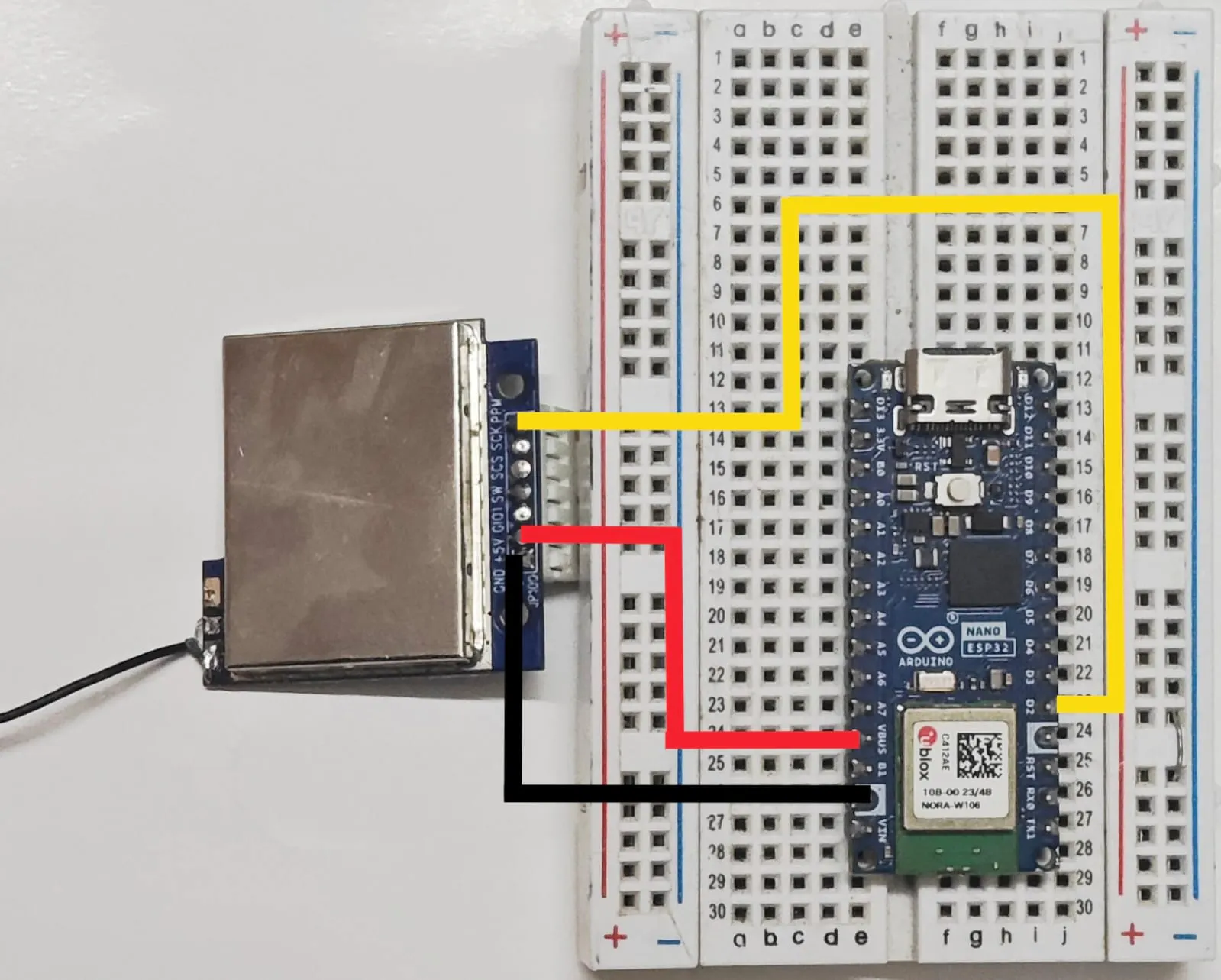
Reverse Engineering the FS-HF030A-V3.3The module acts as a PPM-to-AFHDS bridge. It takes a standard multi-channel Pulse Position Modulation (PPM) stream and broadcasts it using FlySky's first-generation AFHDS protocol, making it natively compatible with standard receivers like the FS-R6B and FS-GR3E. In this project, I will be using FS-R6B.
Pinout MappingRF Module ESP32 S3 Connection
- +5V 5V/Vbus
- GND GND
- PPM D2(gpio 5)
- SW Push Button to GND
Operating an RF transmitter without an impedance-matched antenna causes radiated power to reflect straight back into the module's power amplifier (high VSWR), causing thermal breakdown within seconds.
To rebuild the broken factory antenna, a salvaged 50ohm micro-coaxial cable from an old smartphone was repurposed:
- Board Termination: The micro-coax was stripped at the base. The delicate center conductor soldered directly to the board's
ANTpad, while the outer braided shielding soldered to the adjacent PCB ground blob. (Note: Multimeters will read 0-1 ohms DC continuity between ANT and GND due to the module's internal ESD shunt inductor; at 2.44 GHz, this acts as a high-impedance matching choke). - Quarter-Wave Resonant Tip: At the far end of the coaxial cable, exactly 31 mm (λ/4 at 2.44 GHz) of the outer black jacket and ground shield were stripped away, leaving only the insulated inner core exposed. The shielded cable routes RF energy without radiating inside the enclosure, while the 31 mm tip acts as a clean quarter-wave whip antenna delivering full outdoor line-of-sight range.
Standard microcontrollers running software delays or heavy web servers introduce timing jitter that causes RC servos to twitch. To eliminate this, the firmware uses a dual-pipeline design on the ESP32-S3:
- Touchscreen Interface: A mobile HTML5/CSS3 interface styled after the RadioMaster TX16S color touchscreen, complete with Mode-2 virtual sticks (self-centering cyclic/rudder and free-floating throttle) and auxiliary switches.
- Low-Latency Transport: Touch coordinates are translated into standard RC pulse widths (1000–2000 µs) and transmitted via WebSockets every 20 ms.
- Hardware Timer PPM: The PPM generation is handled completely in the background via the ESP-IDF high-resolution timer (
esp_timer), generating the 22.5 ms multi-channel PPM frame entirely through hardware interrupts without CPU-blocking delays.
+----------------------------------------------------------+
|                    SMARTPHONE TOUCHSCREEN                |
|         (HTML5 / JS Virtual Gimbals & Channel Toggles)   |
+----------------------------------------------------------+

                                     |
                                     |  Low-Latency WebSockets (~10ms)
                                     v
+-----------------------------------------------------+
|                       ESP32-S3 CORE 0               |
|           (Wi-Fi SoftAP & WebSocket Event Loop)     |
+---------------------------------------------------- +
                                     |
                                     |  Direct Variable Update
                                     v
+--------------------------------------------------+
|                    SHARED VOLATILE ARRAY         |
|                volatile uint16_t channels[6]     |
|                  (1000us - 2000us values)        |
+--------------------------------------------------+
                                    |
                                    |  Zero-Delay Read in ISR
                                    v
+--------------------------------------------------------+
|                       ESP32-S3 CORE 1                  |
|       (High-Resolution Hardware Timer / esp_timer ISR) |
+--------------------------------------------------------+
                                     |
                                     |  Microsecond-Accurate PPM Stream
                                     v
+---------------------------------------------------+
|                 FLYSKY FS-HF030A RF MODULE        |
|            (2.4GHz AFHDS Frequency-Hopping Tx)    |
+---------------------------------------------------+
                                     |
                                     |  2.4GHz Over-The-Air Broadcast
                                     v
+--------------------------------------------------------+
|                 FLYSKY FS-R6B RECEIVER                 |
|           (Drives Servos, ESCs, or Flight Controller)  |
+--------------------------------------------------------+While this project is configured to run via a zero-hardware phone interface over Wi-Fi, the core firmware is designed to be easily modified for real physical controls:
- Physical Gimbals & Joysticks: You can swap the WebSocket input loop for standard analog readings. Connect two dual-axis potentiometer gimbals or hall-effect gimbals (like FrSky or RadioMaster replacements) directly to the ESP32-S3 ADC pins (
A0–A3). The firmware simply maps the 12-bit ADC readings (0–4095) directly to the1000–2000 µschannel array. - OLED Display & Onboard Configuration: By wiring a cheap 0.96" or 1.3" I2C OLED display (SSD1306/SH1106) via the ESP32's
SDAandSCLpins, you can build an on-device menu system. Using a rotary encoder or navigational buttons, you can adjust channel endpoints, trims, expo curves, and model memory directly on the transmitter without needing a phone or PC connected.
This build proves that the FlySky RF hardware still holds up when liberated from legacy software bottlenecks. While this demonstration highlights a zero-component touchscreen interface running directly through your phone's browser, the foundation is completely flexible.
You can easily adapt the firmware to read physical analog potentiometers or Hall-effect gimbals via the ESP32-S3 ADC channels (A0–A3), add physical toggle switches, wire an I2C OLED screen for on-the-fly model configuration, or design a custom 3D-printed ergonomic radio shell.
If you build an iteration with physical sticks, add multi-model EEPROM storage, or integrate telemetry feedback, share your build logs and modifications in the comments below!
Web Controller Screenshot
Upload this sketch to the Arduino Nano ESP32 using the Arduino IDE with the WebSockets by Markus Sattler library installed, after uploading, connect to the SSID and visit 192.168.4.1 ip address for joystick controls.
Code:
#include <WiFi.h>
#include <WebServer.h>
#include <WebSocketsServer.h>
#include "esp_timer.h"

// ------------------- Wi-Fi Configuration -------------------
const char *SSID_NAME = "FlySky Custom TX";
const char *SSID_PASS = "12345678";

// ------------------- Hardware Pinout -----------------------
#define PPM_PIN D2          // PPM signal output to Yellow wire (GPIO 5)
#define NUM_CHANNELS 6      // 6-Channel FlySky AFHDS

// ------------------- PPM Timing Constants ------------------
#define PPM_FRAME_LENGTH 22500  // Standard 22.5 ms total frame time
#define PPM_PULSE_LEN    400    // 400 µs sync pulse width
#define MIN_PULSE        1000   // 1000 µs min
#define MID_PULSE        1500   // 1500 µs center
#define MAX_PULSE        2000   // 2000 µs max

// Channel Values: [CH1: Roll, CH2: Pitch, CH3: Throttle, CH4: Yaw, CH5: AUX1, CH6: AUX2]
volatile uint16_t channels[NUM_CHANNELS] = {MID_PULSE, MID_PULSE, MIN_PULSE, MID_PULSE, MIN_PULSE, MIN_PULSE};

// ------------------- Servers -------------------------------
WebServer server(80);
WebSocketsServer webSocket = WebSocketsServer(81);

// ------------------- Zero-Jitter Hardware PPM ISR ----------
esp_timer_handle_t ppm_timer;
volatile uint8_t ppm_state = 0;
volatile uint8_t cur_channel = 0;
volatile uint32_t elapsed_frame_time = 0;

void IRAM_ATTR onPpmTimer(void* arg) {
    if (ppm_state == 0) { // Start of Low sync pulse
        digitalWrite(PPM_PIN, LOW);
        esp_timer_start_once(ppm_timer, PPM_PULSE_LEN);
        ppm_state = 1;
    } else { // High pulse section
        digitalWrite(PPM_PIN, HIGH);
        if (cur_channel < NUM_CHANNELS) {
            uint16_t ch_val = channels[cur_channel];
            uint32_t high_duration = ch_val - PPM_PULSE_LEN;
            elapsed_frame_time += ch_val;
            cur_channel++;
            esp_timer_start_once(ppm_timer, high_duration);
            ppm_state = 0;
        } else { // Trailing frame space (sync blanking)
            uint32_t remaining = (PPM_FRAME_LENGTH > elapsed_frame_time) ? (PPM_FRAME_LENGTH - elapsed_frame_time) : 4000;
            cur_channel = 0;
            elapsed_frame_time = 0;
            esp_timer_start_once(ppm_timer, remaining);
            ppm_state = 0;
        }
    }
}

// ------------------- Web GUI -------------------------------
const char INDEX_HTML[] PROGMEM = R"rawliteral(
<!DOCTYPE html>
<html lang="en">
<head>
<meta charset="UTF-8">
<meta name="viewport" content="width=device-width, initial-scale=1.0, maximum-scale=1.0, user-scalable=no">
<title>FlySky Custom TX</title>
<style>
  * { box-sizing: border-box; -webkit-touch-callout: none; -webkit-user-select: none; user-select: none; }
  body {
    margin: 0; padding: 0; background: #11141a; color: #eee; font-family: 'Segoe UI', Roboto, sans-serif;
    touch-action: none; overflow: hidden; height: 100vh; display: flex; flex-direction: column;
  }
  header {
    background: linear-gradient(180deg, #1f242d 0%, #15181f 100%);
    padding: 8px 16px; display: flex; justify-content: space-between; align-items: center;
    border-bottom: 2px solid #00f0ff; box-shadow: 0 4px 10px rgba(0,240,255,0.15);
  }
  .brand { font-size: 1.1rem; font-weight: 800; color: #fff; letter-spacing: 1px; }
  .brand span { color: #00f0ff; }
  .badge { background: #00f0ff22; color: #00f0ff; border: 1px solid #00f0ff; padding: 2px 8px; border-radius: 4px; font-size: 0.75rem; font-weight: bold; }

  .dashboard { display: flex; flex-wrap: wrap; justify-content: space-around; background: #181c24; padding: 6px; font-size: 0.75rem; border-bottom: 1px solid #2a313d; }
  .ch-val { color: #00f0ff; font-weight: bold; }

  .sticks-container {
    flex: 1; display: flex; justify-content: space-around; align-items: center; padding: 10px; gap: 10px;
  }
  .stick-card {
    background: radial-gradient(circle, #1d222c 0%, #101318 100%);
    border: 2px solid #2b3342; border-radius: 50%; width: 44vw; height: 44vw; max-width: 250px; max-height: 250px;
    position: relative; box-shadow: inset 0 0 20px #000, 0 8px 15px rgba(0,0,0,0.5);
  }
  .stick-knob {
    width: 60px; height: 60px; border-radius: 50%; background: linear-gradient(145deg, #2a3240, #14181f);
    border: 2px solid #00f0ff; position: absolute; top: 50%; left: 50%; transform: translate(-50%, -50%);
    box-shadow: 0 0 15px rgba(0,240,255,0.4);
  }
  .crosshair { position: absolute; background: rgba(255,255,255,0.05); }
  .ch-h { width: 100%; height: 1px; top: 50%; left: 0; }
  .ch-v { height: 100%; width: 1px; left: 50%; top: 0; }

  .aux-panel {
    background: #15181f; padding: 12px; display: flex; justify-content: space-around; align-items: center;
    border-top: 1px solid #2a313d;
  }
  .switch-btn {
    background: #212732; border: 1px solid #3a4556; color: #fff; padding: 10px 18px; border-radius: 6px;
    font-weight: bold; font-size: 0.85rem; cursor: pointer; transition: 0.2s;
  }
  .switch-btn.active { background: #00f0ff; color: #000; box-shadow: 0 0 10px #00f0ff; }
</style>
</head>
<body>

<header>
  <div class="brand">FLYSKY <span>CUSTOM TX</span></div>
  <div class="badge" id="connStatus">DISCONNECTED</div>
</header>

<div class="dashboard">
  <div>CH1(AIL): <span class="ch-val" id="v1">1500</span></div>
  <div>CH2(ELE): <span class="ch-val" id="v2">1500</span></div>
  <div>CH3(THR): <span class="ch-val" id="v3">1000</span></div>
  <div>CH4(RUD): <span class="ch-val" id="v4">1500</span></div>
  <div>CH5(SA): <span class="ch-val" id="v5">1000</span></div>
  <div>CH6(SB): <span class="ch-val" id="v6">1000</span></div>
</div>

<div class="sticks-container">
  <!-- Left Stick: Throttle (CH3 - Free Float) & Rudder (CH4 - Auto-center) -->
  <div class="stick-card" id="leftZone">
    <div class="crosshair ch-h"></div>
    <div class="crosshair ch-v"></div>
    <div class="stick-knob" id="leftKnob"></div>
  </div>

  <!-- Right Stick: Elevator (CH2 - Auto-center) & Aileron (CH1 - Auto-center) -->
  <div class="stick-card" id="rightZone">
    <div class="crosshair ch-h"></div>
    <div class="crosshair ch-v"></div>
    <div class="stick-knob" id="rightKnob"></div>
  </div>
</div>

<div class="aux-panel">
  <button class="switch-btn" id="btnCH5" onclick="toggleSwitch(5)">ARM (CH5): OFF</button>
  <button class="switch-btn" id="btnCH6" onclick="toggleSwitch(6)">MODE (CH6): 1000</button>
</div>

<script>
  let ws;
  let ch = [1500, 1500, 1000, 1500, 1000, 1000];

  function initWebSocket() {
    ws = new WebSocket('ws://' + window.location.hostname + ':81/');
    ws.onopen = () => {
      document.getElementById('connStatus').innerText = "CONNECTED";
      document.getElementById('connStatus').style.color = "#00ff66";
      document.getElementById('connStatus').style.borderColor = "#00ff66";
    };
    ws.onclose = () => {
      document.getElementById('connStatus').innerText = "LOST LINK";
      document.getElementById('connStatus').style.color = "#ff3333";
      document.getElementById('connStatus').style.borderColor = "#ff3333";
      setTimeout(initWebSocket, 2000);
    };
  }

  function sendChannels() {
    if (ws && ws.readyState === WebSocket.OPEN) {
      ws.send(JSON.stringify({c: ch}));
    }
    for(let i=0; i<6; i++) {
      document.getElementById('v' + (i+1)).innerText = ch[i];
    }
  }

  function setupJoystick(zoneId, knobId, isLeft) {
    const zone = document.getElementById(zoneId);
    const knob = document.getElementById(knobId);
    let rect, touchId = null;

    function handleStart(e) {
      for (let t of e.changedTouches) {
        if (touchId === null) {
          touchId = t.identifier;
          rect = zone.getBoundingClientRect();
          handleMove(e);
        }
      }
    }

    function handleMove(e) {
      for (let t of e.changedTouches) {
        if (t.identifier === touchId) {
          let x = t.clientX - rect.left - (rect.width / 2);
          let y = t.clientY - rect.top - (rect.height / 2);
          let maxR = rect.width / 2;

          let clampedX = Math.max(-maxR, Math.min(maxR, x));
          let clampedY = Math.max(-maxR, Math.min(maxR, y));

          knob.style.transform = `translate(calc(-50% + ${clampedX}px), calc(-50% + ${clampedY}px))`;

          let normX = Math.round(1500 + (clampedX / maxR) * 500);
          let normY = Math.round(1500 - (clampedY / maxR) * 500);

          if (isLeft) {
            ch[3] = normX; // Yaw / Rudder
            ch[2] = normY; // Throttle
          } else {
            ch[0] = normX; // Roll / Aileron
            ch[1] = normY; // Pitch / Elevator
          }
          sendChannels();
        }
      }
    }

    function handleEnd(e) {
      for (let t of e.changedTouches) {
        if (t.identifier === touchId) {
          touchId = null;
          rect = zone.getBoundingClientRect();
          let maxR = rect.width / 2;

          if (isLeft) {
            ch[3] = 1500;
            let currentThrottleY = -((ch[2] - 1500) / 500) * maxR;
            knob.style.transform = `translate(-50%, calc(-50% + ${currentThrottleY}px))`;
          } else {
            ch[0] = 1500;
            ch[1] = 1500;
            knob.style.transform = 'translate(-50%, -50%)';
          }
          sendChannels();
        }
      }
    }

    zone.addEventListener('touchstart', handleStart, {passive: false});
    zone.addEventListener('touchmove', handleMove, {passive: false});
    zone.addEventListener('touchend', handleEnd, {passive: false});
    zone.addEventListener('touchcancel', handleEnd, {passive: false});
  }

  function toggleSwitch(num) {
    if (num === 5) {
      ch[4] = (ch[4] === 1000) ? 2000 : 1000;
      let btn = document.getElementById('btnCH5');
      btn.innerText = "ARM (CH5): " + (ch[4] === 2000 ? "ON" : "OFF");
      btn.classList.toggle('active', ch[4] === 2000);
    } else if (num === 6) {
      if (ch[5] === 1000) ch[5] = 1500;
      else if (ch[5] === 1500) ch[5] = 2000;
      else ch[5] = 1000;
      document.getElementById('btnCH6').innerText = "MODE (CH6): " + ch[5];
    }
    sendChannels();
  }

  window.onload = () => {
    initWebSocket();
    setupJoystick('leftZone', 'leftKnob', true);
    setupJoystick('rightZone', 'rightKnob', false);
  };
</script>
</body>
</html>
)rawliteral";

// ------------------- WebSocket Event Handler ----------------
void onWebSocketEvent(uint8_t num, WStype_t type, uint8_t * payload, size_t length) {
    if (type == WStype_TEXT) {
        char* str = (char*)payload;
        char* ptr = strstr(str, "[");
        if (ptr) {
            ptr++;
            for (int i = 0; i < NUM_CHANNELS; i++) {
                int val = atoi(ptr);
                if (val >= 900 && val <= 2100) {
                    channels[i] = val;
                }
                ptr = strchr(ptr, ',');
                if (!ptr) break;
                ptr++;
            }
        }
    }
}

// ------------------- Setup & Loop ---------------------------
void setup() {
    Serial.begin(115200);

    pinMode(PPM_PIN, OUTPUT);
    digitalWrite(PPM_PIN, HIGH);

    WiFi.mode(WIFI_AP);
    WiFi.setTxPower(WIFI_POWER_8_5dBm);
    WiFi.softAP(SSID_NAME, SSID_PASS);

    server.on("/", HTTP_GET, []() {
        server.send_P(200, "text/html", INDEX_HTML);
    });
    server.begin();

    webSocket.begin();
    webSocket.onEvent(onWebSocketEvent);

    const esp_timer_create_args_t timer_args = {
        .callback = &onPpmTimer,
        .name = "ppm_generator"
    };
    esp_timer_create(&timer_args, &ppm_timer);
    esp_timer_start_once(ppm_timer, PPM_PULSE_LEN);
}

void loop() {
    server.handleClient();
    webSocket.loop();
}


Comments