



Hardware components | ||||||
 |
| × | 1 | |||
 |
| × | 1 | |||
| × | 1 | ||||
Tesselcam
Take pictures with a Tessel! Press a button on Tessel to take a picture and upload it to your computer.
UPDATE: Now also includes code to automatically upload the photo taken to Twitter over Tessel's wifi, all with the press of a button!
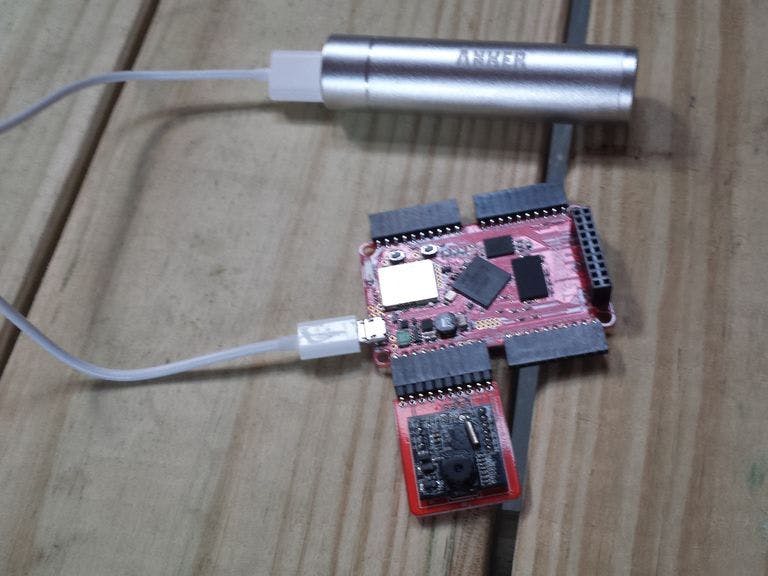
This setup uses:
- Tessel
- Camera module
- Battery (optional - if you want to disconnect from your computer to use it)
Plug in the camera module to Port A on the Tessel, and then plug the Tessel in to the USB port of your computer.
To take a picture every time you press the config button on Tessel:
Use the code in the 'index.js' file:
// Require libraries
var tessel = require('tessel');
var camera = require('camera-vc0706').use(tessel.port['A']);

// Set up an LED to notify when we're taking a picture
var notificationLED = tessel.led[3];

// When the camera is ready, print a message in the console.
camera.on('ready', function () {
  console.log('Press the config button to take a picture!');
});

// When we press a button...
tessel.button.on('press', function() {
  notificationLED.high();
  // Take the picture
  camera.takePicture(function(err, image) {
    if (err) {
      console.log('error taking image', err);
    } else {
      notificationLED.low();
      // Name the image
      var name = 'picture-' + Math.floor(Date.now()*1000) + '.jpg';
      // Save the image
      console.log('Picture saving as', name, '...');
      process.sendfile(name, image);
      console.log('Picture saved.');
    }
  });
});

// If there is an error, report it.
camera.on('error', function(err) {
  console.error(err);
});- Clone the repo
- Run
npm install tesselif you don't already have Tessel installed globally. - Run
npm installto install dependencies. - Now run
tessel run index.js --upload-dir .. The upload-dir flag lets you specify where the photos are saved. - Take pictures!
Twitter Tesselcam
If you want to take it a step further, this code (twittercam.js) will make it automatically post the picture it just took to Twitter as @TesselTweet:
var location = 'San Francisco'; // Write where you're tweeting from!

// Node requires
var fs = require('fs');
var https = require('https');
var crypto = require('crypto');

// Set up to Tweet
var bound = require('crypto').pseudoRandomBytes(16).toString('hex');
var ctype = 'multipart/form-data; boundary=' + bound;

// Tweeting as @TesselTweet
var oauth_consumer_key = "O7oc0pvsZn4xjgcuHuYdX4FaC";
var oauth_consumer_secret = "iJYuHFz2sD46Nvk3mcwzX8uih14aEAMgVWdWoR59nx8v6Zl7ZX";
var oauth_access_token = "2529232909-luARGU89K4CKFMvfzBjCgG6ubefzDkdDWkSB85i";
var oauth_access_secret = "GXQfuzvGdjLEs3t1HEYfhQ9x9bdBcSBVXjBkbRgwYlOE0";

// Get time
var curtime = parseInt(process.env.DEPLOY_TIMESTAMP || Date.now());

// Set up OAuth
var oauth_data = {
    oauth_consumer_key: oauth_consumer_key,
    oauth_nonce: require('crypto').pseudoRandomBytes(32).toString('hex'),
    oauth_signature_method: 'HMAC-SHA1',
    oauth_timestamp: Math.floor(curtime / 1000),
    oauth_token: oauth_access_token,
    oauth_version: '1.0'
};

var out = [].concat(
    ['POST', 'https://api.twitter.com/1.1/statuses/update_with_media.json'],
    (Object.keys(oauth_data).sort().map(function (k) {
        return encodeURIComponent(k) + '=' + encodeURIComponent(oauth_data[k]);
    }).join('&'))
).map(encodeURIComponent).join('&');

oauth_data.oauth_signature = crypto
  .createHmac('sha1', [oauth_consumer_secret, oauth_access_secret].join('&'))
  .update(out)
  .digest('base64');

var auth_header = 'OAuth ' + Object.keys(oauth_data).sort().map(function (key) {
    return key + '="' + encodeURIComponent(oauth_data[key]) + '"';
}).join(', ');

function post (status, file) {
    var req = https.request({
        port: 443,
        method: 'POST',
        hostname: 'api.twitter.com',
        path: '/1.1/statuses/update_with_media.json',
        headers: {
            Host: 'api.twitter.com',
            'Accept': '*/*',
            "User-Agent": "tessel",
            'Authorization': auth_header,
            'Content-Type': ctype,
            'Connection': 'keep-alive'
        }
    }, function (res) {
      console.log("statusCode: ", res.statusCode);
      console.log("headers: ", res.headers);

      res.on('data', function(d) {
        console.log(' ');
        console.log(' ');
        console.log(String(d));
      });
    });

    req.write('--' + bound + '\r\n');
    req.write('Content-Disposition: form-data; name="status"\r\n');
    req.write('\r\n');
    req.write(status + '\r\n');
    req.write('--' + bound + '\r\n');
    req.write('Content-Type: application/octet-stream\r\n');
    req.write('Content-Disposition: form-data; name="media[]"; filename="test.jpg"\r\n');
    req.write('\r\n');
    req.write(file);
    req.write('\r\n');
    req.write('--' + bound + '--\r\n');
    req.end();

    req.on('error', function(e) {
      console.error(e);
    });
}

var tessel = require('tessel');
console.log('Connecting camera...');
var camera = require('camera-vc0706').use(tessel.port['A']);


camera.on('ready', function(err) {
  if (err) return console.log('not ok - error on ready:', err);
  console.log('Camera connected. Setting resolution...');

  camera.setResolution('vga', function(err) {
    if (err) return console.log('not ok - error setting resolution:', err);
    console.log('Resolution set. Setting compression...');

    camera.setCompression(100, function(err) {
      if (err) return console.log('not ok - error setting compression:', err);
      console.log('Compression set.');

      console.log('Camera ready. Press Config button to take a picture.');

      tessel.led[1].high();
      tessel.button.on('press', function () {
        console.log('Taking picture...');
        tessel.led[3].high();
        camera.setCompression(100, function(err) {
          camera.takePicture(function(err, image) {
            if (err) return console.log('Error taking Picture:', err);
            console.log('Picture taken. Posting...');

            post('Tweeting from @technicalhumans #tesselcam! @nodebotsday ' + location, image);
            tessel.led[3].low();
          });
      });
      });
    });
  });
});

camera.on('error', function (err) {
  console.log('Error: ', err);
});- Clone the repo
- Run
npm install tesselif you don't already have Tessel installed globally. - Run
npm installto install dependencies. - Connect Tessel to wifi: run
tessel wifi -n <network> -p <password> - Now run
tessel run twittercam.js. - Take pictures! Check out the results on the @TesselTweet twitter page.
Other things you could (trivially) do with this hardware setup:
Post the photos to a website using Tessel's wifi and tiny-router. Control the Tesselcam remotely from a website (using Tessel's wifi and tiny-router)



Comments