romayEVAPARRAMON
Published © CC BY-ND

Tocadiscos Binario IesLaEstrella

A project from CTC España 2019.

AdvancedProtip649
Tocadiscos Binario IesLaEstrella

Things used in this project

Hardware components

Arduino 101
Arduino 101
×1
Escudo de Educación
×1
piezo speaker
×1
IR ARRAY
×1
Jumper wires (generic)
×1
Binary LP kit
×1

Hand tools and fabrication machines

Scissor, Electrician
Tape, Electrical
Tape, Electrical
PRINTER

Story

Read more

Custom parts and enclosures

Binary LP

Sketch from the project website

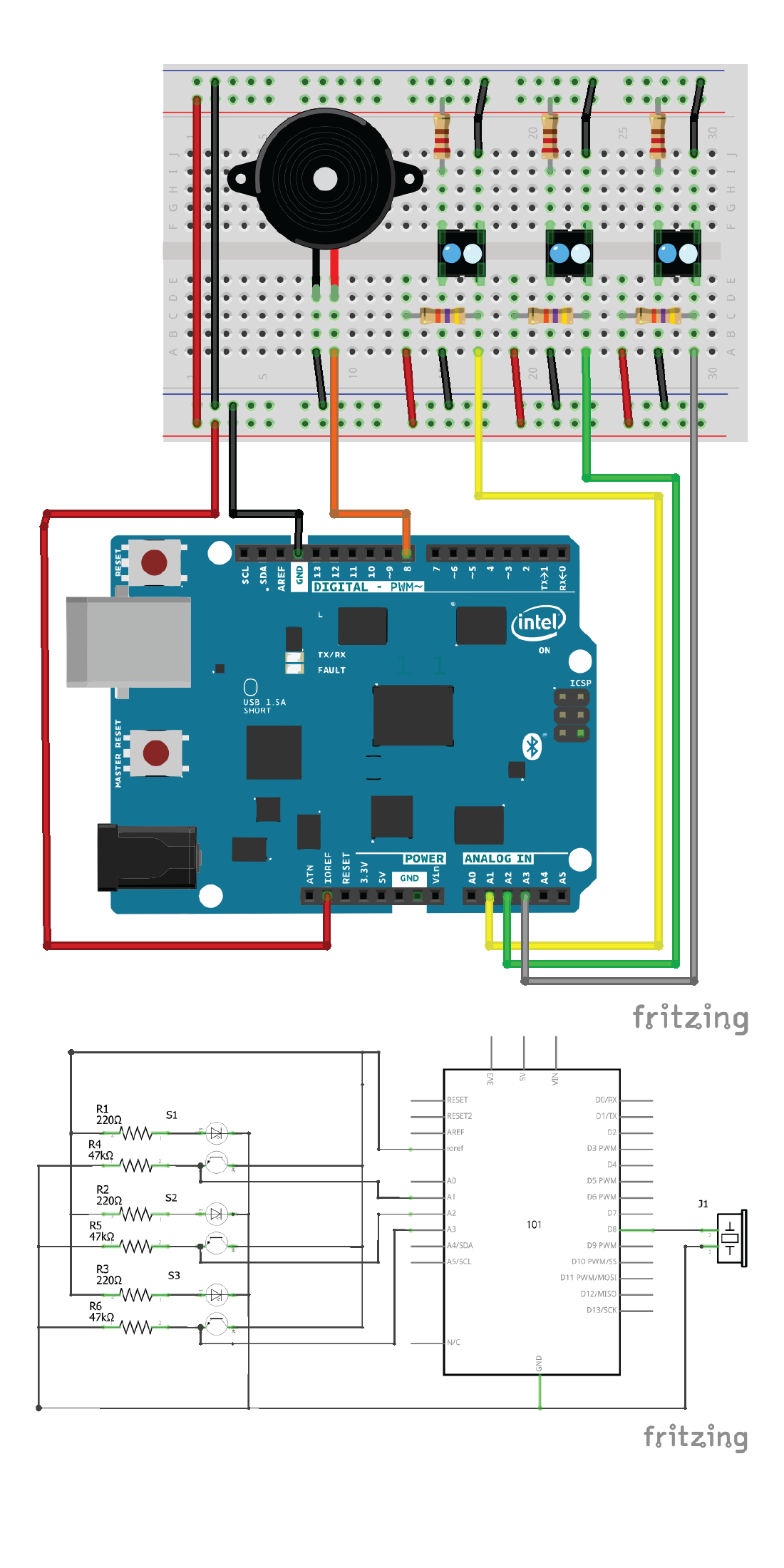
Schematics

binary LP

This sort of works as an LP player. The difference is that instead of using a needle on a plastic disc, you use three IR sensors in a column to read a pattern from a paper disc. If you are both musically and digitally inclined, you will have lots of fun creating melodies with this.

Code

BINARY LP

Arduino
This sort of works as an LP player. The difference is that instead of using a needle on a plastic disc, you use three IR sensors in a column to read a pattern from a paper disc. If you are both musically and digitally inclined, you will have lots of fun creating melodies with this.
/*
* BinaryLP
* 
* This sort of works as an LP player. The difference is 
* that instead of using a needle on a plastic disc, 
* we use three IR sensors in a row to read a pattern from 
* a paper disc. 
* 
* If you are both musically and digitally inclined, 
* you will have lots of fun creating melodies with this.
*
* (c) 2013-2016 Arduino LLC.
*/


#include <EducationShield.h>
#include "pitches.h"

//IRArray(left, middle, right);
IRArray ir = IRArray(A1, A2, A3);

int piezo = 8; //Piezo pin
int lastReading = 0; 

void setup(){
  pinMode(piezo, OUTPUT);
  
  //Use this line to set the threshold of the IR sensors. 
  //If you are using the Uno board, set the threshold to 380,if you're using the 101 board, set it to 530.
  //Use ir.test() to check the values of each sensor in the loop()
  ir.setThreshold(530);
  
  Serial.begin(9600);
}

void loop(){
  //Use this line to check the values from each IR sensor
  //ir.test();
  
  //Read the binary pattern and get a number from 0 to 7
  int reading = ir.readBinary(); 
  
  //Play a note depending on the read value
  playNote(reading);

}

void playNote(int r){
  //If the last note we played is the same as the new note
  //we make a short break so that two notes are distinguished
  if(lastReading==r){
    noTone(piezo);
    delay(20);
  }
  
  //Play a different note depending on the value of b.
  //Check pitches.h to see which notes you can use.
  //In this case the scale is C Major.
  switch (r){
    case 0:
      break;
    case 1:
      tone(piezo, NOTE_C4);
      break;
    case 2:
      tone(piezo, NOTE_D4);
      break;
    case 3:
      tone(piezo, NOTE_E4);
      break;
    case 4:
      tone(piezo, NOTE_F4);
      break;
    case 5:
      tone(piezo, NOTE_G4);
      break;
    case 6:
      tone(piezo, NOTE_A4);
      break;
    case 7:
      tone(piezo, NOTE_B4);
      break;   
  }
  
  //If r is more than 0 we save that value to lastByte
  if(r>0)lastReading = r;
}

Credits

romay
2 projects • 0 followers
EVAPARRAMON
1 project • 0 followers

Comments