


Hardware components | ||||||
 |
| × | 1 | |||
 |
| × | 1 | |||
 |
| × | 3 | |||
 |
| × | 1 | |||
| × | 1 | ||||
Software apps and online services | ||||||
 |
| |||||
 |
| |||||
 |
| |||||
| ||||||
| ||||||
This alert system has the main purpose to send an alert SMS when the temperature crosses the max set limit. As we see in current scenario, in industries there is lots of temperature sensitive machinery that required to maintain a suitable temperature. so what happen if temperature crosses limits. in this case this system can be helpful to resist these type of situations.
in another situation this system can be helpful to monitor temperature of plant and crops as the high temperature can cause damage to the growth of plants. in that situation this system will also be a lifesaving option for plants.
2. DEMONSTRATION3. HARDWARE CONFIGURATION3.1 Bolt wi fi module :
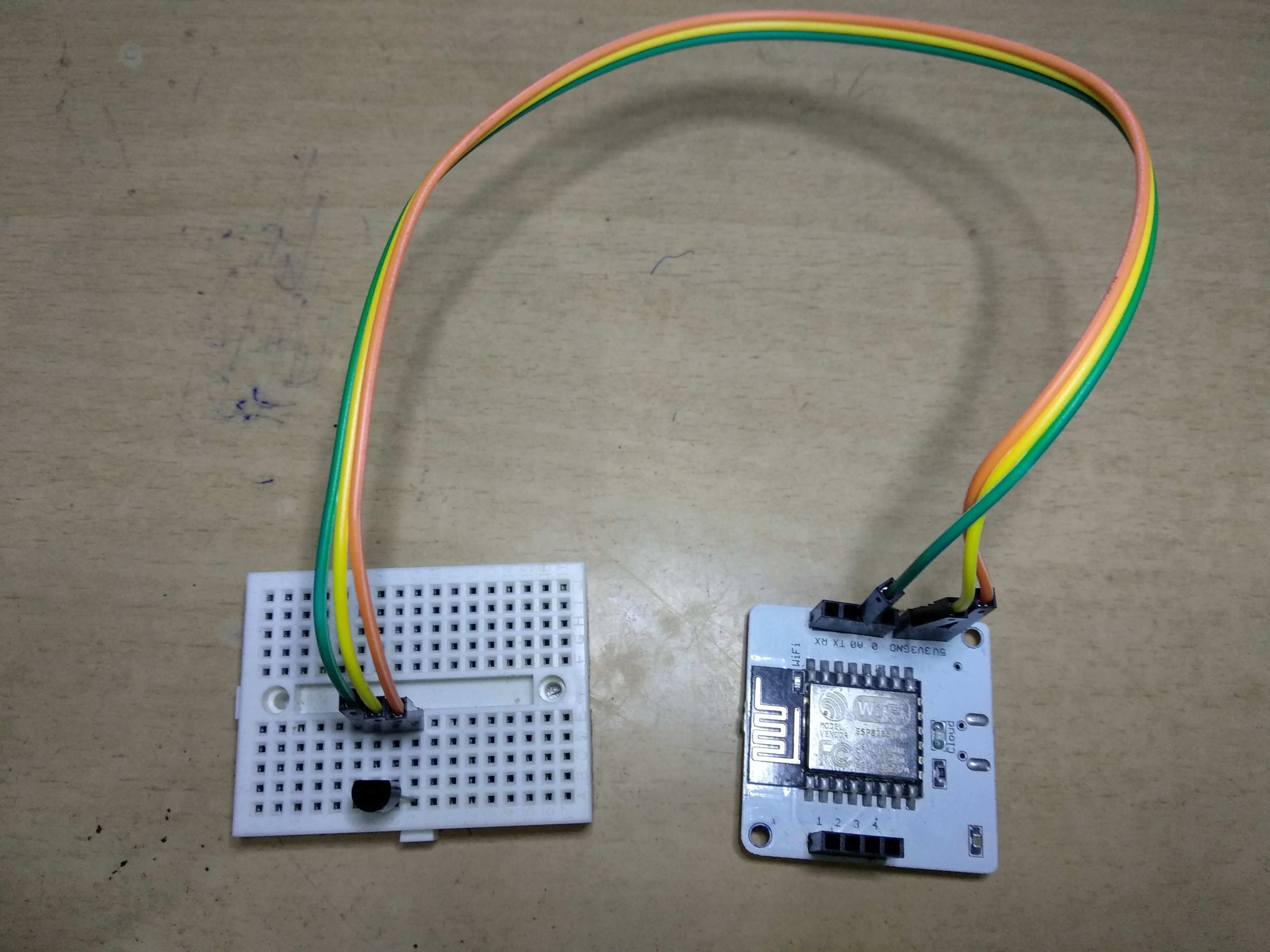
it is device with wi fi chip installed on it. that can be used for work of iot. This module can be powered with any mobile charger of 5V o/p. It has GPIO pins, VCC pins, ground pin and other pins which can be used to connect other i/p - o/p devices to it.
3.2 LM35 analog temperature sensor:it takes temperature as input and works on fact that whenever temperature alters current flows through it.
temperature is directly proportional to the voltage.
so when temperature changes vcc pin goes high and output pin sends the data, otherwise gnd pin remains high.
- vcc pin of lm35 connected to 5V of bolt.
- o/p pin of lm35 is connected to the A0 of GPIO of bolt.
- GND pin of lm35 is connected to the GND of bolt.
visit https://www.boltiot.com/ then sign in using your e-mail id and follow further steps :
this is the part where all coding and software process will be done to send SMS alerts. follow the further steps.
6.1 creating an account on digital ocean :this is an ubuntu based cloud server. it is required to have a cloud service to send or receive data as an IOT project.
here we create droplets and get access to ubuntu cloud service. since it is a paid service, so we can chose the plans according to our needs.
this is the link to digital ocean https://www.digitalocean.com/
Twilio allows software developers to programmatically make and receive phone calls, send and receive text messages, and perform other communication functions using its web service APIs.
here is the link to Twilio https://www.twilio.com/
we can setup twilio account after that we are able to receive sms on our mobile no. a trial no. is provided for this purpose.
6.3 Coding and instructions part.till now we accessed the above service. now its time for coding. which to be done by using linux based emulator. for this purpose 'PuTTy' will be used.
PuTTY is a free and open-source terminal emulator, serial console and network file transfer application. It supports several network protocols, including SCP, SSH, Telnet, rlogin, and raw socket connection.
download link : https://www.chiark.greenend.org.uk/~sgtatham/putty/latest.html
6.3.1 getting started with ubuntu server:- Open putty application.
copy the IP address of DigitalOcean droplet in the box "host name" & click ok.
- in next window login as 'root' and enter password of droplet.
- download packages
sudo apt-get update- upgrade packages
sudo apt-get upgrade- Install python3 pip3
sudo apt install python3-pip- Installing boltiot library using pip
sudo pip3 install boltiot- create new folder
sudo mkdir temp_alert- move into folder
cd temp_alert- create configuration file in next window and save it.
sudo nano conf.pyin command window these are the configurations :
SID = 'You can find SID in your Twilio Dashboard' AUTH_TOKEN = 'You can find on your Twilio Dashboard' FROM_NUMBER = 'This is the no. generated by Twilio. You can find this on your Twilio Dashboard'TO_NUMBER = 'This is your number. Make sure you are adding +91 in beginning'API_KEY = 'This is your Bolt Cloud accout API key'DEVICE_ID = 'This is the ID of your Bolt device'
- create program file
this the file to enter program code
sudo nano temp_sms.pythis command create a new file named "temp_sms". then write this code in the file.
import conf
from boltiot import Sms, Bolt
import json, time

minimum_limit = 300
maximum_limit = 350


mybolt = Bolt(conf.API_KEY, conf.DEVICE_ID)
sms = Sms(conf.SID, conf.AUTH_TOKEN, conf.TO_NUMBER, conf.FROM_NUMBER)


while True:
    print ("Reading sensor value")
    response = mybolt.analogRead('A0')
    data = json.loads(response)
    print("Sensor value is: " + str(data['value']))
    try:
        sens_value = int(data['value'])
        if sensor_value > maximum_limit or sens_value < minimum_limit:
            print("Making request to Twilio to send a SMS")
            temperature = (100 * sens_value) / 1024
            response = sms.send_sms("Alert! temperature crossed the threshold value, The Current temperature is " +str(temperature))
            print("Response received from Twilio is: " + str(response))
            print("Status of SMS at Twilio is :" + str(response.status))
    except Exception as e:
        print ("Error occured: Below are the details")
        print (e)
    time.sleep(10)
save this file.
Since we want to continuously monitor the temperature reading, we will enclose our logic to fetch, compare and send the SMS inside an infinite loop using the `while True:` statement. An infinite loop is a special loop which executes its code continuously since its exit condition is never going to be valid. To exit the loop, we will need to forcibly exit the code by holding CTRL + C.
To change the value in degree Celsius this formula is used
temperature = (100 * sens_value) / 1024
- To run program
sudo python3 temp_sms.pyAfter execution outputs will be seen as following :
Alert by SMS :


Comments