


Hardware components | ||||||
 |
| × | 1 | |||
 |
| × | 1 | |||
 |
| × | 1 | |||
 |
| × | 1 | |||
 |
| × | 1 | |||
Software apps and online services | ||||||
 |
| |||||
 |
| |||||
Temperature and humidity monitoring is important in homes, classrooms, offices, laboratories, and other environments.
In this project, I developed an IoT-based temperature and humidity monitoring system using an ESP8266 NodeMCU and a DHT11 sensor.
The DHT11 sensor collects temperature and humidity readings. The ESP8266 connects to Wi-Fi and sends the collected data to the KiwisIoT Dashboard, where users can monitor the readings remotely.
Project OverviewThis project uses an ESP8266 NodeMCU to collect environmental data from a DHT11 sensor and transmit it to the KiwisIoT platform.
The dashboard displays two separate readings:
- Temperature in degrees Celsius (°C).
- Humidity in percentage (%).
The readings are updated approximately every 2 seconds.
Components RequiredESP8266 NodeMCU – 1
- DHT11 Temperature and Humidity Sensor – 1
- Jumper Wires – As required
- USB Cable – 1
- Computer – 1
- ESP8266 Board Package
- KiwisIoT Arduino Library
- DHT Sensor Library
Adafruit Unified Sensor Library
- KiwisIoT Account
Wi-Fi Connection
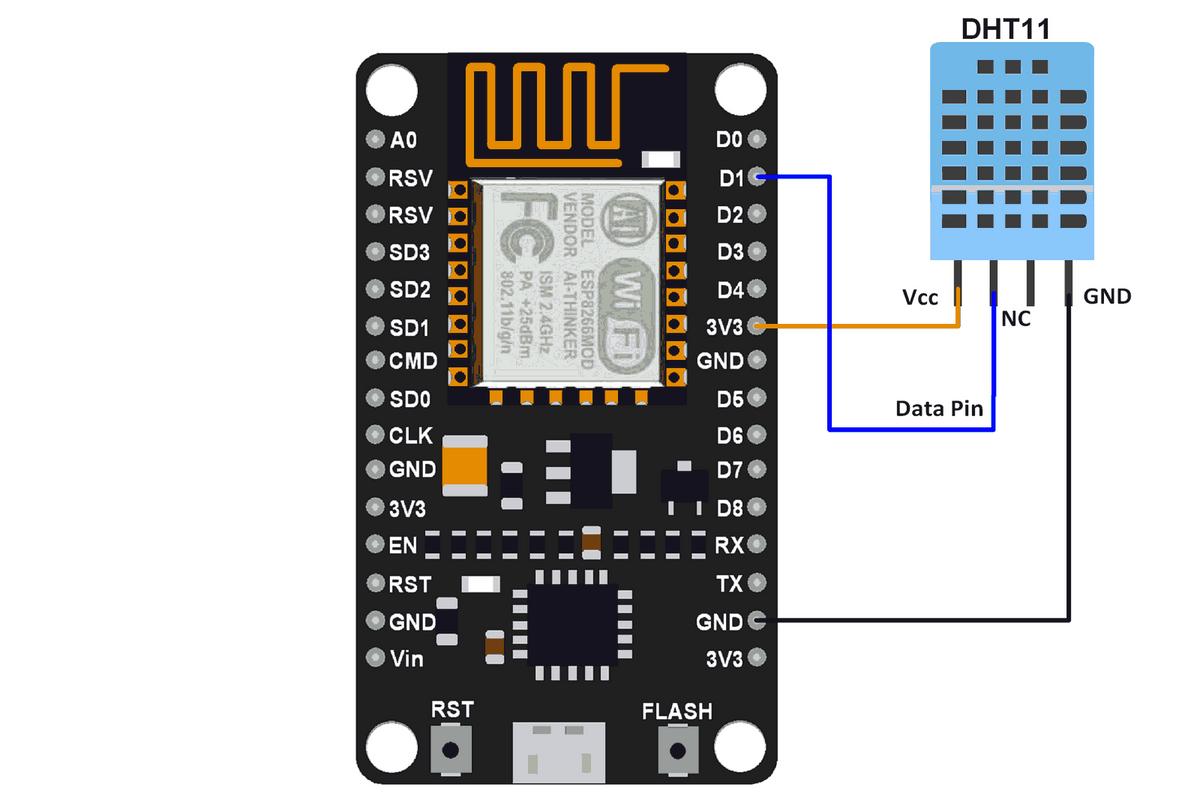
Circuit ConnectionsThe DHT11 sensor is connected to the ESP8266 NodeMCU using jumper wires.
DHT11 Sensor
ESP8266 NodeMCU
VCC 3.3V
DATA D5
GND GND
The sensor module is connected directly to the ESP8266.
Working PrincipleThe DHT11 sensor measures the surrounding temperature and humidity.
The ESP8266 NodeMCU reads the sensor values and connects to the internet through Wi-Fi. It then sends the collected readings to the KiwisIoT platform.
The KiwisIoT Dashboard receives the data and displays it using separate temperature and humidity widgets.
System Data FlowDHT11 Sensor → ESP8266 NodeMCU → Wi-Fi → KiwisIoT Platform → Dashboard
KiwisIoT Dashboard ConfigurationThe KiwisIoT Dashboard is used to monitor the temperature and humidity readings remotely.
The dashboard is configured with two channels:
Channel
Sensor Data
Unit Channel 0 Temperature°C
Channel 1 Humidity%
Two dashboard widgets are created:
- Temperature Widget: Displays the temperature reading from Channel 0.
- Humidity Widget: Displays the humidity reading from Channel 1.
After configuring the dashboard and connecting the ESP8266, the sensor readings are sent to the corresponding channels.
Dashboard MonitoringThe KiwisIoT Dashboard displays the sensor readings in a simple and understandable format.
The dashboard demonstration shows:
Temperature: 28.5 °C
Humidity: 72.3
These values are example readings displayed in the dashboard demonstration. Actual readings may vary depending on the surrounding environment.
Testing and ResultsAfter connecting the DHT11 sensor to the ESP8266 NodeMCU, the system is powered through a USB cable.
The ESP8266 reads the temperature and humidity values from the sensor and sends them to the KiwisIoT platform through Wi-Fi.
The received readings are displayed on the KiwisIoT Dashboard using the configured widgets.
The system is designed to update the readings approximately every 2 seconds, allowing users to monitor environmental conditions remotely.
Applications- Home temperature and humidity monitoring.
- Classroom environment monitoring.
- Office environment monitoring.
- Laboratory monitoring.
- Greenhouse monitoring.
- Smart building applications.
.
- Add notifications when temperature or humidity exceeds a selected limit.
- Store historical sensor readings.
- Monitor multiple locations using additional sensors.
- Add more environmental sensors.
- Improve the dashboard with additional monitoring features.
This project demonstrates a simple IoT-based temperature and humidity monitoring system using ESP8266 NodeMCU and a DHT11 sensor.
By integrating the ESP8266 with the KiwisIoT platform, temperature and humidity readings can be monitored remotely through an online dashboard.
This project provides practical experience in sensor interfacing, Wi-Fi communication, and IoT-based monitoring.
Technologies UsedESP8266 NodeMCU
DHT11 Temperature and Humidity Sensor
Arduino IDE
Wi-Fi Communication
KiwisIoT Dashboard
IoT Technology
TagsESP8266, DHT11, IoT, KiwisIoT, Temperature Monitoring, Humidity Monitoring, NodeMCU, Arduino, IoT Dashboard


Comments