



Hardware components | ||||||
 |
| × | 7 | |||
 |
| × | 7 | |||
Software apps and online services | ||||||
 |
| |||||
Have you ever wondered whether the opinions you see online are anything like the opinions of the people you actually meet?
BubbleWalk began with that question. Instead of trying to measure everyone, it gives each person a small device that remembers only the other BubbleWalk devices it meets. Because everyone takes a different route, everyone ends up with a different little picture of the opinions around them.
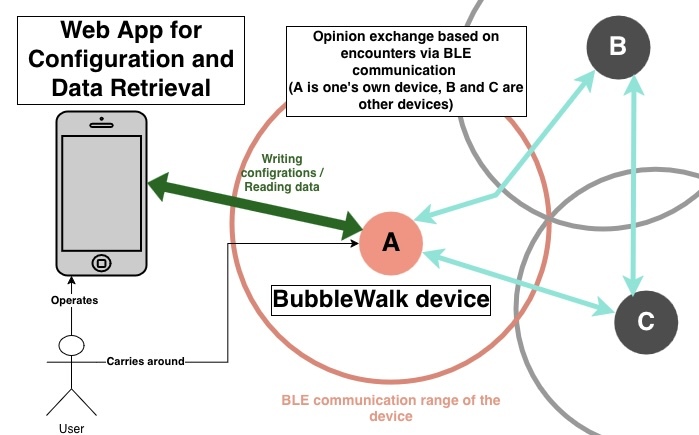
Take it for a walkEach person carries a BubbleWalk device made from an M5Stack NanoH2 Dev Kit and a NeoHEX 37 RGB LED board. First, choose a topic and your opinion on a phone. Pick the colours you want to use, then send them to the NanoH2 over Web Bluetooth.
Now walk around. When two BubbleWalk devices meet, they exchange short Bluetooth Low Energy (BLE) advertisements directly. A new colour appears on the NeoHEX ring, so you can see the encounter happen. The centre LED keeps your own colour visible.
At the end, reconnect the phone to see the colours collected along the way. It is not a poll and it is not trying to speak for a whole city or community. It is simply a playful view of the people your own device happened to meet.
Why M5Stack?NanoH2 and NeoHEX made it possible to turn the whole idea into one small, bright device. NanoH2 handles Web Bluetooth, BLE advertising and scanning, and the local encounter memory. NeoHEX has 37 RGB LEDs, which is just right for keeping the owner's colour in the centre and letting encountered colours spread across the surrounding rings.
The modular connection was also a big help. I could build seven matching devices for a group demo without starting with a custom circuit board. That meant more time for the fun part: making the devices notice one another and deciding how an encounter should look.
How to use it- Open the BubbleWalk Web App in a Web Bluetooth-capable browser.
- Choose a topic and move the opinion slider.
- Briefly press the NanoH2
G9button and synchronise the device. - Give a few devices different colours and bring them together.
- Watch the encountered colours appear on the NeoHEX rings.
- Reconnect with the Web App to see the collected result.
The phone is only needed for setup and readout. While people are walking around, the encounter exchange happens directly between the M5Stack devices. There is no fixed gateway and no always-on phone-to-phone connection.
HardwareI built seven identical sets. Each set uses one M5Stack NanoH2 Dev Kit, one M5Stack NeoHEX 37 RGB LED board, one Grove-compatible HY2.0-4P cable, and USB or another suitable portable power source. NanoH2 and NeoHEX are connected directly by that cable, with no additional circuit between them. The enclosure is an off-the-shelf plastic case, so no custom enclosure fabrication or CAD is required. A phone or computer with a Web Bluetooth-capable browser is used for topic setup, opinion setup, and result readout.
Inside BubbleWalkFirmwareThe PlatformIO firmware runs on NanoH2. It opens the synchronisation window, sends and receives the BubbleWalk BLE payload, keeps a local encounter histogram, and updates NeoHEX.
The same participant binary can be flashed to every device. At startup, a device derives its runtime identifier from its own hardware address; the repository does not contain device-specific MAC addresses.
The TypeScript/Vite Web App provides topic and opinion selection, colour mapping, Web Bluetooth synchronisation, device status, and result readout. The repository also includes tests for the BLE payload, topic and colour logic, local storage, and exports.
The Web Bluetooth API requires HTTPS or localhost and a compatible browser. On platforms without Web Bluetooth in the default browser, a compatible browser must be used.
Build and runBuild and flash the firmwaregit clone https://github.com/gomadoufu/bubblewalk-m5stack-contest-2026.git
cd bubblewalk-m5stack-contest-2026/firmware
pio run
pio device list
pio run -e participant -t upload --upload-port /dev/cu.usbmodemXXXXReplace the upload port with the port reported on your machine. Flash the same participant environment to two or more NanoH2 devices.
cd bubblewalk-m5stack-contest-2026/web-app
corepack pnpm install --frozen-lockfile
corepack pnpm run test
corepack pnpm run dev
Open the localhost URL printed by Vite. Briefly press G9 on the NanoH2, choose the BW-participant-* device in the browser picker, and synchronise the topic and opinion.
- Power four or more NanoH2 + NeoHEX devices. Two devices are enough to demonstrate the ring response, but the current topic requires three observed peers before showing a result histogram.
- Give the devices different opinion values through the Web App.
- Bring the devices near one another.
- Observe the encountered colours on the NeoHEX rings.
- Reconnect and read the locally observed distribution after one device has observed at least three peers.
BubbleWalk does not give everyone the same answer. Each device builds its own result from its own path through the group. When two devices meet, the change is visible immediately as a new colour on the LEDs. Later, the same device shows the small collection it built along the way.
That is the heart of BubbleWalk: a direct BLE encounter becomes a tiny physical moment first, and a personal collection of colours afterwards.
Complete firmware, Web App, build instructions, and tests:github.com/gomadoufu/bubblewalk-m5stack-contest-2026


Comments