


Hardware components | ||||||
 |
| × | 1 | |||
 |
| × | 1 | |||
 |
| × | 1 | |||
Hand tools and fabrication machines | ||||||
 |
| |||||
Now Playing Display is a small USB-powered desk gadget that mirrors whatever music playing on your Mac (album art, track title, artist, and a progress bar) on a 240×240 round touchscreen. Tap the buttons play/pause or skip tracks.
Just plug it into a USB-C port and a menu bar app auto detects the device, pushes the current media, and processes playback commands.
The hardware is intentionally off-the-shelf so anyone can build one in an afternoon:
- Seeed XIAO ESP32-C6 (pre-soldered pin headers to make life easier).
- Seeed Round Display for XIAO (GC9A01A 240×240 + CHSC6X capacitive touch)
- Any USB-C data cable
- A 3D-printed snap-fit case (STLs here on Thingiverse)
I wanted a glanceable "what's playing" indicator that didn't live behind another keyboard shortcut, browser tab, or menu bar dropdown.
The Mac already knows what's playing. Apple Music, Spotify, Music apps, Podcasts, even Safari/YouTube tabs all surface metadata to the system's MediaRemote service, so the display just had to be an extension of that.
Seeed Studio's XIAO ESP32-C6 + Round Display combo is cheap, tiny, and renders album art beautifully.
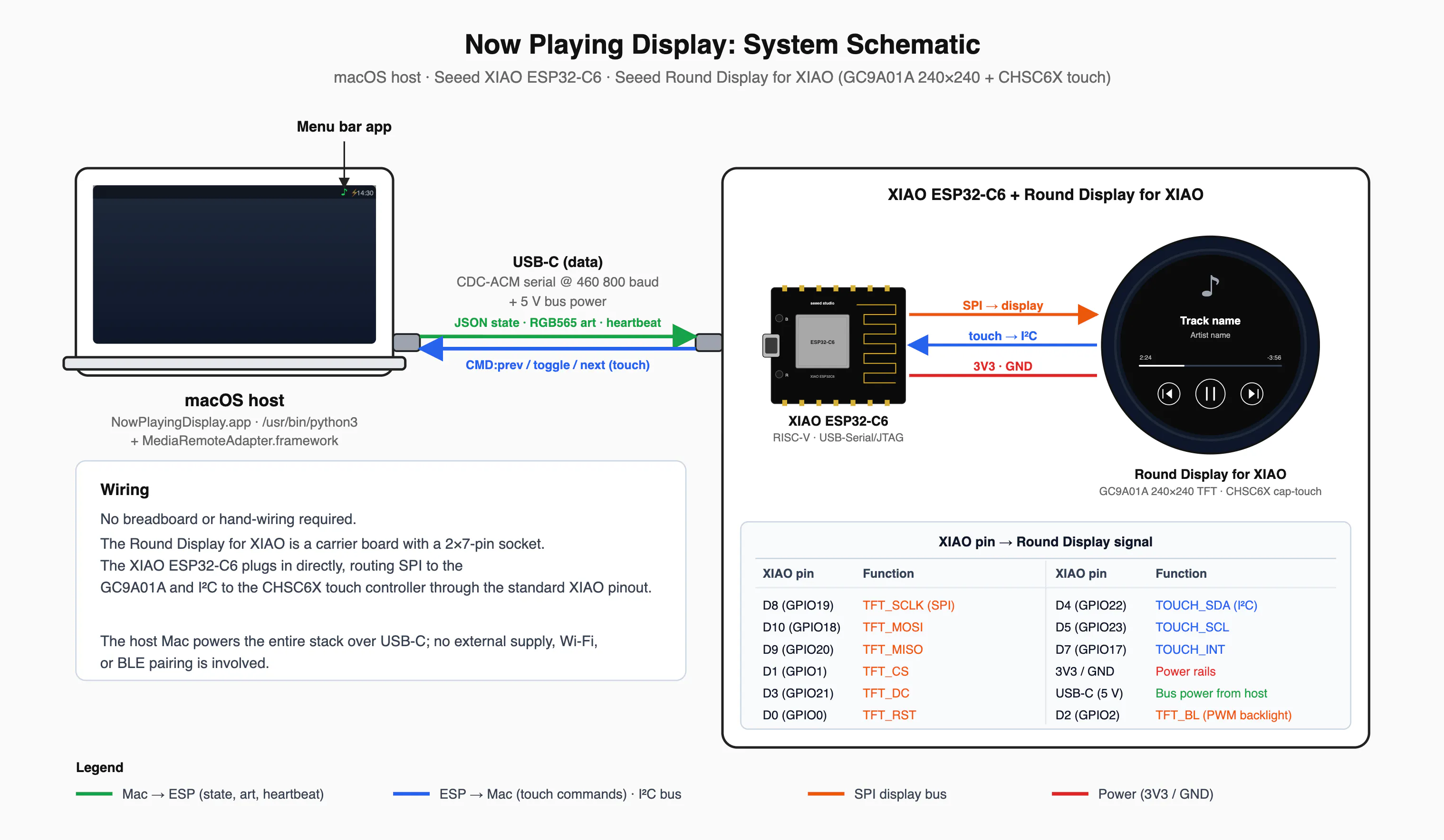
How it worksThe device works with a custom ESP-IDF firmware and companion MacOS app:
1. The ESP32 firmware (built with ESP-IDF on FreeRTOS, using LVGL for the UI) listens for a tiny binary protocol over USB serial
The Mac decodes the album artwork, downscales it to 240×240, converts it to RGB565 (the display's native format, so the ESP32 doesn't have to do any image work), and ships the ~115 KB frame across the wire. Track metadata is just JSON. Touches on the screen go the other way and become AppleScript media-key events on the host.
On first boot, before the Mac app connects, the display shows a QR code pointing at the project page.
2. The Mac menu bar app is a Python app packaged with py2app. It lives in the menu bar with a "Launch at login" toggle and silently watches for the device to appear on USB. When it shows up, it begins polling Apple's private MediaRemote framework for now-playing metadata.
SetupAfter purchasing the hardware, the screen needs to be connected to the ESP32 as shown below:
Now, the firmware will need to be flashed using esptool CLI or ESP web tool in Chrome.
- Download firmware.bin
- Plug in the XIAO ESP32-C6 over USB-C with CLI (shown below) or ESP web tool:
esptool.py --chip esp32c6 --port /dev/cu.usbmodem* write_flash 0x0 firmware.bin- Download and install the MacOS companion app
To have it start automatically on log in, click the menu bar icon and toggle "Launch at login". MacOS will list it under System Settings -> General -> Login Items where it can be disabled at any time.
Links- Full setup instructions: https://www.gxlabs.co/now-playing/
- Source code (GPL v3): https://github.com/gxlabs/now-playing-device
- Thanks to @ungive for mediaremote-adapter - without the Apple-signed bridge, none of this would work on modern macOS.
- Hardware shoutout to Seeed Studio for the XIAO + Round Display combo.


Comments