



Hardware components | ||||||
 |
| × | 1 | |||
 |
| × | 1 | |||
 |
| × | 1 | |||
Software apps and online services | ||||||
 |
| |||||
Hand tools and fabrication machines | ||||||
| ||||||
This project demonstrates how to send automated email alerts using an ESP32 without relying on complex backend servers. Instead of directly handling SMTP on the microcontroller, the ESP32 communicates with a cloud service that triggers the email delivery.
The goal is to create a reliable notification system that can be reused for IoT alerts such as temperature warnings, motion detection, or system status updates.
- How to connect ESP32 to Wi-Fi and send HTTP requests
- Triggering cloud-based email services from embedded devices
- Structuring a simple IoT alert system
- Making your project scalable without heavy firmware complexity
- ESP32 development board
- USB cable for programming
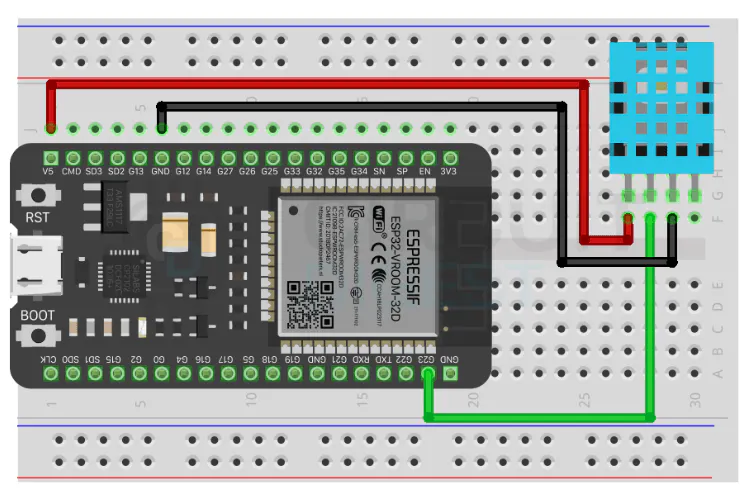
- Optional sensor (temperature, motion, etc.)
- Arduino IDE or PlatformIO
- ESP32 board support package
- A cloud automation service capable of handling webhooks and email delivery
The ESP32 does not send emails directly. Instead, it sends a web request to a cloud endpoint. That endpoint processes the request and sends the email on behalf of the device.
Flow:
- ESP32 connects to Wi-Fi
- A condition is triggered (button press, sensor value, etc.)
- ESP32 sends an HTTP request to a cloud webhook
- Cloud service processes the request
- Email is sent to the recipient
This approach improves reliability and avoids authentication limitations often faced with embedded SMTP implementations.
Start by configuring your Wi-Fi credentials in the code. Once connected, verify the ESP32 can make outbound HTTP requests.
You’ll define a webhook URL provided by your cloud service. This URL acts as the bridge between your hardware and the email system.
You can trigger the email in multiple ways:
- Button press
- Sensor threshold exceeded
- Timed interval
- External API event
Inside the firmware, this simply translates to sending a GET or POST request when the condition is met.
Most cloud services allow you to:
- Set email subject dynamically
- Include sensor values in the message
- Add multiple recipients
- Format messages for better readability
This makes the system flexible for different IoT applications.
- Upload the code to ESP32
- Open Serial Monitor to confirm Wi-Fi connection
- Trigger the event manually
- Check if the email is received
If the email does not arrive:
- Verify webhook URL
- Check Wi-Fi connection
- Confirm cloud workflow is active
- Home automation alerts
- Industrial monitoring systems
- Security notifications
- Environmental data warnings
- Device status reporting
- Add retry logic for failed requests
- Use debounce logic for physical triggers
- Avoid sending too many requests in a short time
- Log responses for debugging
This ESP32 Send Email Notifications project keeps the ESP32 firmware simple while leveraging cloud services for heavy tasks like email delivery. The result is a clean, scalable solution suitable for real-world IoT deployments.


Comments