


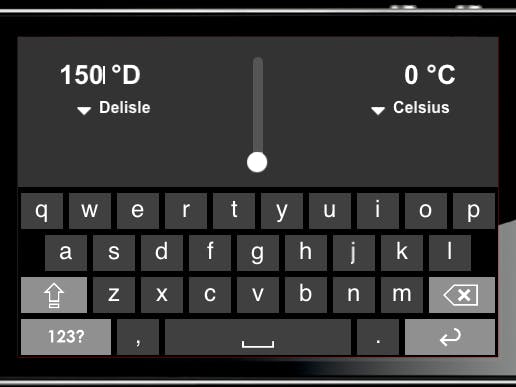
This is a simple temperature converter. Two text inputs each describe a temperature. Below them is a menu that displays the active temperature scale for each input, in addition to allowing the user to select from various temperature scales. A vertical slider lies between the two text fields. Moving the slider, manually changing the text field, or selecting a different temperature scale automatically propagates changes to the other inputs.
In addition, I've built a separate WebView-based prototype to showcase my original design: scalar data input via inertial scrolling. This design is more representative of the interaction I wanted to implement. This proved far too difficult to build in Kinoma, so I spent a half hour prototyping this with static HTML & JS to prove its viability.
The motivation for this interaction was the difficulty of operating a slider input. When a user lifts her finger off of a slider, often the slider moves away from the desired value in the process. Inertial scrolling provides coarse input manipulation via flicks, and fine inputs via precise dragging. Every smartphone user is familiar (and hopefully comfortable) with the concept of inertial scrolling, so it makes sense to attempt to utilize it as an alternate input method.
You can see the scrolling interaction in the video. The dashed background provides context in the form of temperature data (color represents how "hot" the temperature is) and position (the bars scroll with the data input).
Extra credit attempts:
- Alternate temperature scales: Delisle, Rankine, Réaumur.
- Visualization of temperature (especially in the alternate prototype)
- Responsive layout
- Input and output "tied together".
Comments: I could have made the inputs look more appropriately tappable. However, I did not want to attempt to build all of the UI elements from scratch. It's also unclear how one would go about slicing images, or designing custom touch behaviors.

Comments