



Hardware components | ||||||
| × | 1 | ||||
 |
| × | 1 | |||
| × | 1 | ||||
 |
| × | 1 | |||
| × | 1 | ||||
Software apps and online services | ||||||
| ||||||
| ||||||
First off, I am building a 3 DoF (Degrees of Freedom) arm that I am planning to complete. It is not as easy as I figured but the BeagleY-AI and Maestro Servo Controller make it a bit easier to handle since the SBC and Servo Control are already completed and I can attentively pay my wants towards the source code control.
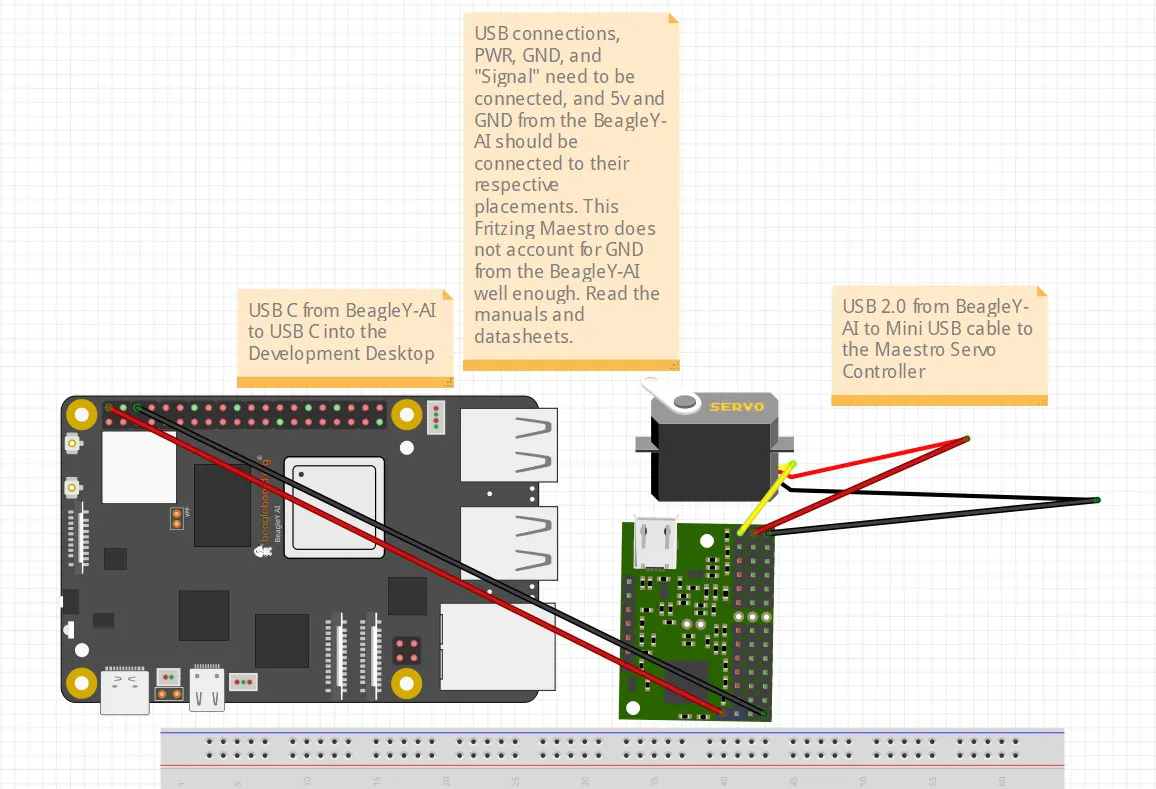
That is the board in a Fritzing caption along with servo and control for the servo motor.
I will be adding in the software later so that people can test it out with their BeagleY-AI board(s).
It would be good to read the Fritzing posted notes I listed, i.e. as the Maestro Controller is not 100% together for now. I picked it up online via the Pololu forums and it was not completed. The GND for the PWR (5v) is not populated to the headers of the Maestro for now. I will try to find time to work on it but I doubt I will get to it...
So far, with the source code provided, one can go left and right or positive so many movements while then in the next move, return to negative moves backwards as far back as the Servo will allow you.
Here is a starter source code set up script to handle left/right or positive/negative movements.
#!/usr/bin/python3

import sys
import usb.core      # sudo apt install pyusb python3-usb
import usb.util
from protocol import *
import numpy as np
import os


# Constant definitions mimicking the C++ implementation
VENDOR_ID = 0x1FFB
PRODUCT_IDS = [0x0089, 0x008A, 0x008B, 0x008C]
REQUEST_SET_TARGET = 0x85  # The standard Pololu Maestro native USB request ID


def find_maestro_device():
    """Loops through known product IDs to find the Pololu Maestro device."""
    for pid in PRODUCT_IDS:
        device = usb.core.find(idVendor=VENDOR_ID, idProduct=pid)
        if device is not None:
            return device
    return None


def set_target(device, position, servo=0):
    """Sends the target position to a specific servo channel using a control transfer."""
    # bmRequestType = 0x40 (Vendor-defined request, host-to-device direction)
    bm_request_type = 0x40
    b_request = REQUEST_SET_TARGET

    # Value parameter requires position in quarter-microseconds (input * 4)
    w_value = int(position * 4)
    w_index = int(servo)

    try:
        # usb.core.Device.ctrl_transfer(bmRequestType, bRequest, wValue, wIndex, data_or_wLength, timeout)
        device.ctrl_transfer(
            bm_request_type, b_request, w_value, w_index, data_or_wLength=0, timeout=5000
        )
    except usb.core.USBError as e:
        print(f"USB Transfer failed: {e}", file=sys.stderr)

def create_3dof_matrix(x, y, theta_rad):
    """
    Creates a 3 DoF homogeneous transformation matrix (3x3).

    Parameters:
    x, y      : Translation along X and Y axes
    theta_rad : Rotation angle in radians
    """
    cos_t = np.cos(theta_rad)
    sin_t = np.sin(theta_rad)

    # Define the 3x3 transformation matrix
    matrix = np.array([
        [cos_t, -sin_t, x],
        [sin_t,  cos_t, y],
        [0,      0,     1]
    ])

    return matrix

# 1. Define transformation parameters (Move 5 units X, 2 units Y, Rotate 45 degrees)
angle = np.radians(45)
T_a_to_b = create_3dof_matrix(5.0, 2.0, angle)

print("Transformation Matrix (Frame A to B):")
print(T_a_to_b)

# 2. Define a point in Frame B: [X, Y, 1] for homogeneous coordinates
point_in_b = np.array([1.0, 0.0, 1.0])

# 3. Transform the point to Frame A using matrix multiplication
point_in_a = np.dot(T_a_to_b, point_in_b)

print("\nTransformed Point in Frame A:")
print(point_in_a[:2]) # Extract just the X and Y coordinates


def main():
    print("Searching for Pololu Maestro device...")
    device = find_maestro_device()

    if device is None:
        print("Error: Maestro device not found. Check physical connections or permissions.")
        sys.exit(1)

    print("Device found and initialized successfully.")
    servo_channel = 0

    try:
        while True:
            user_input = input("Enter position (or 'q' to quit): ").strip()
            if user_input.lower() == "q":
                break

            try:
                position = int(user_input)
                set_target(device, position, servo_channel)
            except ValueError:
                print("Invalid input. Please enter an integer number.")

    except KeyboardInterrupt:
        print("\nExiting program.")
    finally:
        # PyUSB handles closing the device and recycling handles implicitly on exit,
        # but clearing configurations ensures safe detachment.
        usb.util.dispose_resources(device)


if __name__ == "__main__":
    main()
Here is the latest imaging source code for you and your OS from beagleboard.org:
Release 1.0.7 · beagleboard/bb-imager-rs
That above source code should print out many ideas but there are some ideas in the code that need changing. I hope you can find the changes that need to take place and make your estimates accordingly. Most of the source code prints matrices while some of it is useful for the connection from the Fritzing diagram.
Enjoy!
If you want to ask anything or chat with me, let me know.


Comments