Let’s be real: a lot of DIY smart home setups overcomplicate things. They often require third-party servers, confusing cloud configurations, or constant internet access just to turn on a light. I wanted to build something much leaner, entirely private, and lightning-fast, without sacrificing a clean, modern UI/UX.
The result is this project: a room device control panel that runs 100% on a local network. That entire sleek, dark-mode dashboard with the glowing neon toggles you see in the interface design? It’s stored and served straight from the ESP32’s flash memory. There is no separate backend server, no Raspberry Pi middleman, and no complex deployment—everything is neatly packed into a single .ino file.
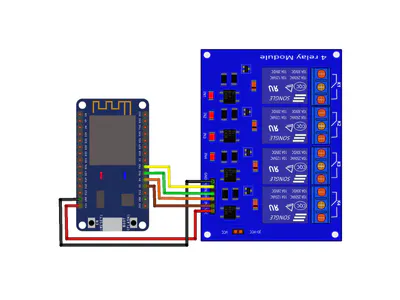
Once the ESP32 boots up and connects to the house Wi-Fi, I just open its local IP address on my phone or laptop browser, and the interactive dashboard is instantly ready. When a toggle is flipped, the web page sends a lightning-fast HTTP request over the local network to the ESP32, instantly triggering the relay module to power up my gaming PC, monitors, main power, or audio system.
This build is my way of proving that with a bit of code optimization, you can serve a premium, responsive web interface right out of a tiny microcontroller. It’s the perfect DIY setup for anyone who values privacy, zero latency, and an interface that actually looks good on a screen!






Comments