#include <WiFi.h>
#include <WebServer.h>
// #include "DHT.h"

// --- WIFI CONFIGURATION ---
const char* ssid = "***";
const char* password = "***";

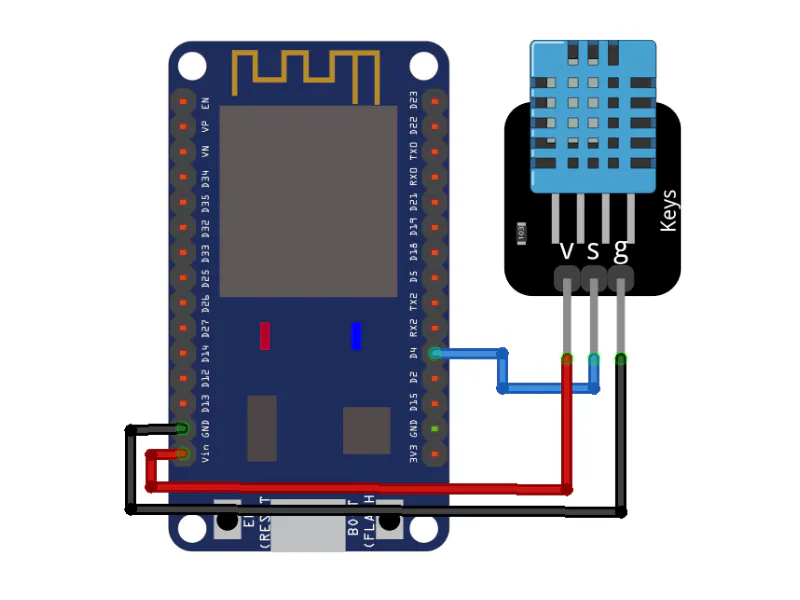
// --- DHT SENSOR CONFIGURATION (TEMPORARILY DISABLED - USING DUMMY DATA) ---
// Adjust to the pin you are using
// #define DHTPIN 4
// Choose DHT type: DHT11, DHT22, or DHT21
// #define DHTTYPE DHT11

// DHT dht(DHTPIN, DHTTYPE);
WebServer server(80);

// --- MAIN HTML PAGE ---
// Web UI will be served directly from ESP32 memory.
// Using ECharts library via CDN to create a modern and attractive Gauge Chart.
const char index_html[] PROGMEM = R"rawliteral(
<!DOCTYPE html>
<html lang="en">
<head>
    <meta charset="UTF-8">
    <meta name="viewport" content="width=device-width, initial-scale=1.0">
    <title>ESP32 Local Monitoring</title>
    <!-- ECharts CDN -->
    <script src="https://cdn.jsdelivr.net/npm/echarts@5.5.0/dist/echarts.min.js"></script>
    <style>
        * {
            box-sizing: border-box;
            margin: 0;
            padding: 0;
        }
        body {
            font-family: 'Segoe UI', Tahoma, Geneva, Verdana, sans-serif;
            background-color: #121212; /* Dark Mode */
            color: #ffffff;
            display: flex;
            flex-direction: column;
            align-items: center;
            justify-content: center;
            min-height: 100vh;
            padding: 20px;
        }
        h1 {
            font-weight: 600;
            margin-bottom: 40px;
            text-align: center;
            letter-spacing: 1px;
            text-shadow: 0 2px 4px rgba(0,0,0,0.5);
        }
        .dashboard {
            display: flex;
            flex-wrap: wrap;
            gap: 30px;
            justify-content: center;
            width: 100%;
            max-width: 900px;
        }
        .card {
            background: #1e1e1e;
            border-radius: 16px;
            box-shadow: 0 10px 20px rgba(0,0,0,0.3);
            padding: 30px;
            width: 100%;
            max-width: 400px;
            height: 380px;
            display: flex;
            flex-direction: column;
            align-items: center;
            border: 1px solid #333;
            transition: transform 0.3s ease, box-shadow 0.3s ease;
        }
        .card:hover {
            transform: translateY(-5px);
            box-shadow: 0 15px 30px rgba(0,0,0,0.5);
        }
        .gauge-container {
            width: 100%;
            height: 100%;
        }
        .status {
            margin-top: 20px;
            font-size: 14px;
            color: #888;
        }
        #last-update {
            font-weight: bold;
            color: #bbb;
        }
    </style>
</head>
<body>

    <h1>ESP32 Environment Dashboard</h1>

    <div class="dashboard">
        <!-- Temperature Card -->
        <div class="card">
            <div id="tempGauge" class="gauge-container"></div>
        </div>
        <!-- Humidity Card -->
        <div class="card">
            <div id="humGauge" class="gauge-container"></div>
        </div>
    </div>

    <div class="status">
        Last updated: <span id="last-update">-</span>
    </div>

    <script>
        // ECharts Gauge configuration imitating the "Half - Needle" style from reference
        function createGaugeOption(name, min, max, unit, colors) {
            return {
                series: [
                    {
                        type: 'gauge',
                        center: ['50%', '60%'], // Move it down slightly
                        radius: '80%', // Adjust so numbers outside aren't cut off
                        startAngle: 180,
                        endAngle: 0,
                        min: min,
                        max: max,
                        splitNumber: 4,
                        itemStyle: {
                            color: '#ffffff', // Needle color
                            shadowColor: 'rgba(0,0,0,0.4)',
                            shadowBlur: 10,
                            shadowOffsetX: 2,
                            shadowOffsetY: 2
                        },
                        progress: {
                            show: false // Zone background is handled by axisLine
                        },
                        pointer: {
                            show: true,
                            icon: 'path://M12.8,0.7l12,40.1H0.7L12.8,0.7z',
                            length: '75%',
                            width: 12,
                            offsetCenter: [0, '0%'] // Place needle base right at the center point
                        },
                        axisLine: {
                            lineStyle: {
                                width: 35,
                                color: colors // Zone colors
                            }
                        },
                        axisTick: {
                            show: false
                        },
                        splitLine: {
                            show: true,
                            length: 35,
                            lineStyle: { color: '#1e1e1e', width: 4 } // Black/dark separator lines
                        },
                        axisLabel: {
                            distance: -65, // Larger negative value so it is completely OUTSIDE (above) the color band
                            color: '#fff',
                            fontSize: 14,
                            fontWeight: 'bold'
                        },
                        title: {
                            show: true,
                            offsetCenter: [0, '55%'], // 'Temperature' text moved far down
                            fontSize: 20,
                            color: '#ccc'
                        },
                        detail: {
                            valueAnimation: true,
                            fontSize: 42,
                            fontWeight: 'bold',
                            color: '#fff',
                            offsetCenter: [0, '25%'], // '25 °C' text moved below the needle pivot point
                            formatter: '{value}' + unit
                        },
                        data: [{ value: 0, name: name }]
                    }
                ]
            };
        }

        var tempChart = echarts.init(document.getElementById('tempGauge'));
        var humChart = echarts.init(document.getElementById('humGauge'));

        // Temperature Color Zones: Green -> Yellow -> Red
        var tempColors = [
            [0.4, '#58D9F9'], // 0 - 20C (Blue - Cold)
            [0.6, '#7CFFB2'], // 20 - 30C (Green - Cool)
            [0.8, '#FDDD60'], // 30 - 40C (Yellow - Warm)
            [1.0, '#FF6E76']  // 40 - 50C (Red - Hot)
        ];

        // Humidity Color Zones: Red (Dry) -> Green (Normal) -> Blue (Very Humid)
        var humColors = [
            [0.3, '#FF6E76'], // 0 - 30% (Dry)
            [0.7, '#7CFFB2'], // 30 - 70% (Comfortable)
            [1.0, '#58D9F9']  // 70 - 100% (Too Humid)
        ];

        tempChart.setOption(createGaugeOption('Temperature', 0, 50, ' °C', tempColors));
        humChart.setOption(createGaugeOption('Humidity', 0, 100, ' %', humColors));

        function fetchData() {
            fetch('/data')
                .then(response => response.json())
                .then(data => {
                    tempChart.setOption({
                        series: [{ data: [{ value: data.temperature, name: 'Temperature' }] }]
                    });
                    humChart.setOption({
                        series: [{ data: [{ value: data.humidity, name: 'Humidity' }] }]
                    });

                    // Update clock
                    const now = new Date();
                    document.getElementById('last-update').innerText = now.toLocaleTimeString();
                })
                .catch(error => console.error('Failed to fetch data from ESP32:', error));
        }

        // Fetch initial data, then repeat every 3 seconds
        fetchData();
        setInterval(fetchData, 3000);

        // Responsive handling
        window.addEventListener('resize', function() {
            tempChart.resize();
            humChart.resize();
        });
    </script>
</body>
</html>
)rawliteral";

void handleRoot() {
  server.send(200, "text/html", index_html);
}

void handleData() {
  // --- USING DUMMY DATA ---
  // Generate random values for simulation
  float h = random(40, 80) + (random(0, 10) / 10.0); // Dummy humidity 40.0 - 80.9
  float t = random(25, 35) + (random(0, 10) / 10.0); // Dummy temperature 25.0 - 35.9

  // Original sensor code disabled
  /*
  float h = dht.readHumidity();
  float t = dht.readTemperature();
  if (isnan(h) || isnan(t)) {
    Serial.println("Failed to read from DHT sensor!");
    h = 0; t = 0;
  }
  */

  // Create JSON string manually
  String json = "{";
  json += "\"temperature\":";
  json += String(t, 1); // 1 decimal place
  json += ", \"humidity\":";
  json += String(h, 1);
  json += "}";

  // To allow access from local HTML files during testing
  server.sendHeader("Access-Control-Allow-Origin", "*");
  server.send(200, "application/json", json);
}

void setup() {
  Serial.begin(115200);

  // Initialize DHT sensor (Disabled)
  // dht.begin();

  // Start WiFi connection
  WiFi.begin(ssid, password);
  Serial.print("Connecting to WiFi");

  // Wait for connection
  while (WiFi.status() != WL_CONNECTED) {
    delay(500);
    Serial.print(".");
  }

  Serial.println("\n");
  Serial.println("=== WiFi Connected ===");
  Serial.print("ESP32 IP Address: ");
  Serial.println(WiFi.localIP());
  Serial.println("Open this IP Address in your browser!");
  Serial.println("======================");

  // Endpoint Routing
  server.on("/", HTTP_GET, handleRoot);
  server.on("/data", HTTP_GET, handleData);

  // Start the server
  server.begin();
}

void loop() {
  // Handle HTTP request
  server.handleClient();

  // Avoid using long delay() in the loop
  // so server.handleClient() is not blocked.
}






Comments