



🚀 Features
⚙️ Configuration & Setup
Read more- Dual-Sensor Monitoring:
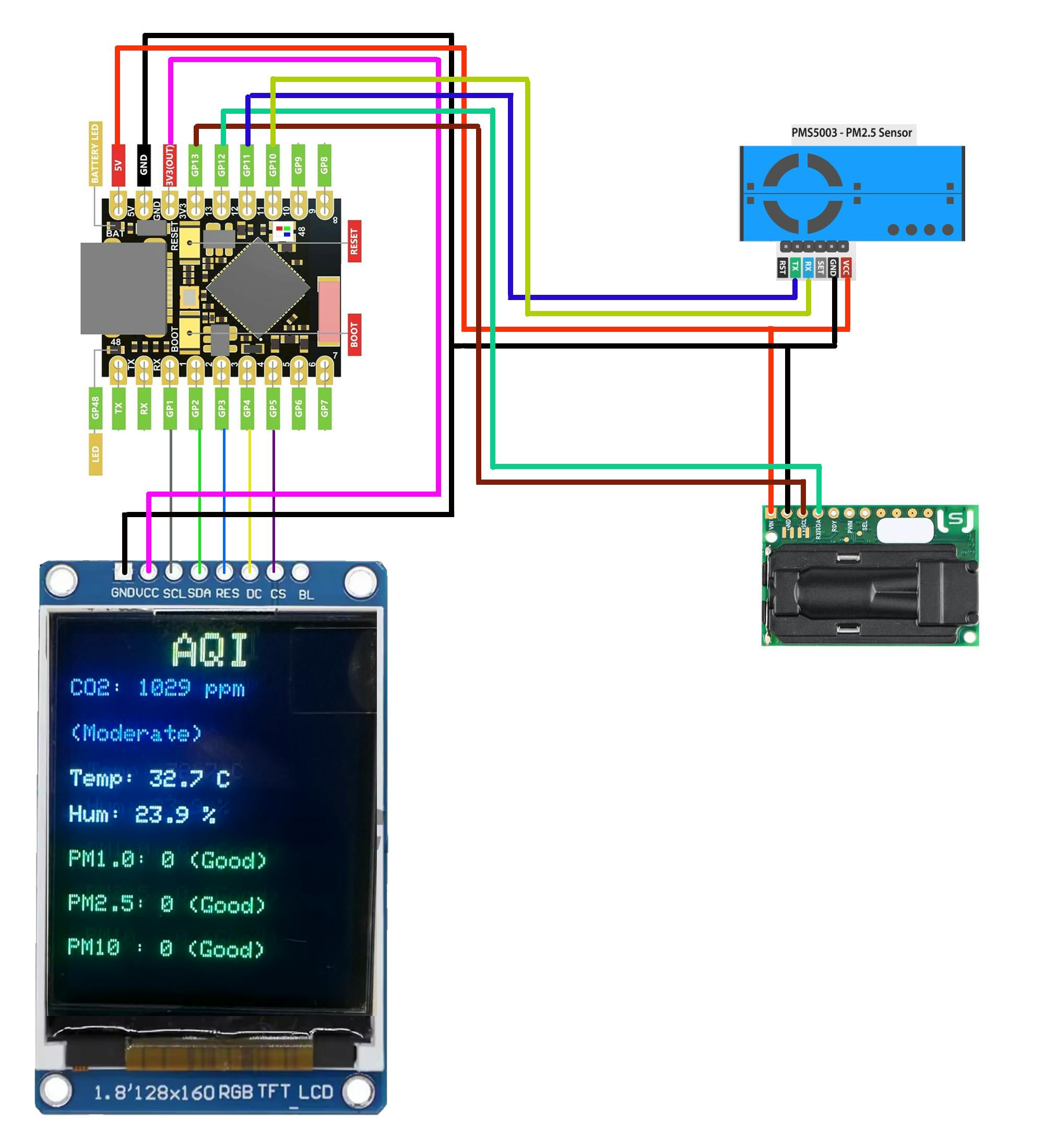
CO₂, Temperature, and Humidity: via Sensirion SCD30 (NDIR technology for laboratory-grade precision).
Particulate Matter (PM1.0, PM2.5, PM10): via Plantower PMS5003 (Laser scattering). - Advanced Display UI (ST7735):
Real-time CO₂ Graph: 30-minute visual history with auto-scaling.
Persistent Clock: Smart RTC logic that continues to show time even if Wi-Fi connection is lost (after initial sync).
Uptime Tracker: Automatically switches to system uptime if NTP time is not yet available.
Smooth Progress Bar: Visual refresh-rate indicator for data updates.
System Diagnostics: Detailed splash screen showing sensor and network status on boot. - Smart Connectivity & Logic:
Multi-WiFi Support: Remembers up to 5 networks and connects to the strongest available.
Automatic AP Mode: Enters Access Point mode (192.168.4.1) for configuration if no saved Wi-Fi is found.
MQTT Integration: Pro-level data streaming to Home Assistant, OpenHAB, or Node-RED in JSON format with status indicators (M:OK/M:ERR). - Web-Based Settings Manager (V1.12):
On-the-fly Config: Change Wi-Fi credentials, MQTT broker details, GMT offset, and DST (Daylight Saving Time) directly from your browser.
Network Scanner: Built-in WiFi scanner in the web interface for easy setup. - Reliability:
Non-Volatile Memory: All settings are securely saved in ESP32 Flash (Preferences).
Internal RTC Persistence: Enhanced time-keeping stability without constant internet polling.
📊 Interpretation Levels
The device uses universal color-coding for both the Web UI and the TFT Display:
- Upload:
Download theAirMonitor_v2.0directory.
OpenAirMonitor_v2.0.inoin your Arduino IDE.
Note: Ensure all project files (.ino, .h, .cpp) remain in this folder for the project to compile correctly.
Select ESP32-S3 Dev Module and flash the sketch to your device. - First Boot:
The device will create a temporary Wi-Fi network:AIR-SCAN-CONFIG(Password:12345678). - Web Portal:
Connect your phone or PC to this network and navigate tohttp://192.168.4.1in your browser. - Settings:
Scan for your local Wi-Fi network and enter the credentials.
Enter your MQTT Broker details (optional).
Click Save & Restart. - Operation:
After rebooting, the device will display its new local IP address on the screen.
Enter this IP in your browser to access the real-time monitoring dashboard.
The device publishes a JSON string to the topic air/status every 10 seconds:
{
  "co2": 650,
  "pm1": 5,
  "pm25": 12,
  "pm10": 15,
  "t": 24.5,
  "h": 45
}


Comments