fiona
Published

Automated Plant Lights

Adaptive purple LEDs that effortlessly provide a source of nutrients for indoor plants without hassle of turning on / off these LEDs.

BeginnerShowcase (no instructions)73
Automated Plant Lights

Things used in this project

Hardware components

Photon
Particle Photon
×1
Photo resistor
Photo resistor
×1
LED Strip, NeoPixel Digital RGB
×1
Resistor 10k ohm
Resistor 10k ohm
×1
Jumper wires (generic)
×1
Breadboard (generic)
×1
Male and Female Pin Header Connectors
×1

Software apps and online services

Particle Build Web IDE

Hand tools and fabrication machines

Soldering iron (generic)
Solder Wire, Lead Free
Plier, Cutting
Plier, Cutting

Story

Read more

Custom parts and enclosures

Structural Component

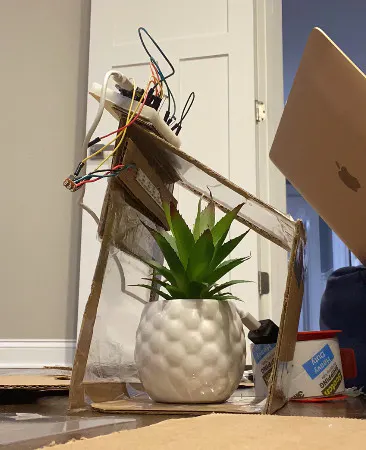
Built with cardboard, polycarbonate sheets, and tape. Designed to sustain the weight of the hardware with the NeoPixel LEDs attached on the inside as the light source. Replicates a greenhouse structure.

Code

Home Automation Project: Automated Plant Lights Code

C/C++
Setting up a function as callTime
Using the time class, it will find the current hour and current minute
Converts everything to minutes and returns the minute value.

Loop calls for the analog return value from the photoresistor.
Uses that same value to checks it through the conditionals set
450 is the brightness value, values under 450 will turn on the LEDs.
Values above 450 will require program to check for current time to check if the source of light is from the sunlight or from our synthetic room lights.
// This #include statement was automatically added by the Particle IDE.
#include <neopixel.h>

// global variables - avoid as much as possible
int led = 4;
int val= 0; 
int analogPin= A5; 
int currHour=0; 
int currMin=0; 
int currTime= 0; 
int sunset= 1110; 
int timeResult=0; 

SYSTEM_MODE(AUTOMATIC);

// IMPORTANT: Set pixel COUNT, PIN and TYPE
#if (PLATFORM_ID == 32)
// MOSI pin MO
#define PIXEL_PIN SPI
// MOSI pin D2
// #define PIXEL_PIN SPI1
#else // #if (PLATFORM_ID == 32)
#define PIXEL_PIN D2
#endif
#define PIXEL_COUNT 8
#define PIXEL_TYPE WS2812B

Adafruit_NeoPixel strip(PIXEL_COUNT, PIXEL_PIN, PIXEL_TYPE);

void setup() {
  pinMode(led, OUTPUT);
  Time.zone(-5); 
  strip.begin();
  strip.show(); 
}

int callTime(){ 
currHour= Time.hour()*60; 
currMin= Time.minute(); 
currTime = currHour + currMin;
return currTime; 
}

void turnPurple(uint8_t wait){ 
     uint16_t i, j;
     
    for(i=0; i<strip.numPixels(); i++) {
      strip.setPixelColor(i, 255, 0, 255);
    }
    strip.show();
    delay(wait);
}

void turnOff(uint8_t wait){ 
     uint16_t i, j;
     
    for(i=0; i<strip.numPixels(); i++) {
      strip.setPixelColor(i, 0, 0, 0);
    }
    strip.show();
    delay(wait);
}
   
    
void loop() {
val= analogRead(analogPin); 

 if (val >450){
     timeResult = callTime(); 
     if (timeResult > sunset){ 
      turnPurple(0); 
 }else{ 
     turnOff(0); 
 }
}else{ 
   turnPurple(0); 
    }
}

Credits

fiona
1 project • 0 followers

Comments