


Hardware components | ||||||
 |
| × | 1 | |||
 |
| × | 1 | |||
 |
| × | 2 | |||
 |
| × | 2 | |||
 |
| × | 1 | |||
 |
| × | 1 | |||
 |
| × | 4 | |||
 |
| × | 4 | |||
 |
| × | 1 | |||
Software apps and online services | ||||||
 |
| |||||
 |
| |||||
Hand tools and fabrication machines | ||||||
 |
| |||||
 |
| |||||
 |
| |||||
1. What is the project about?
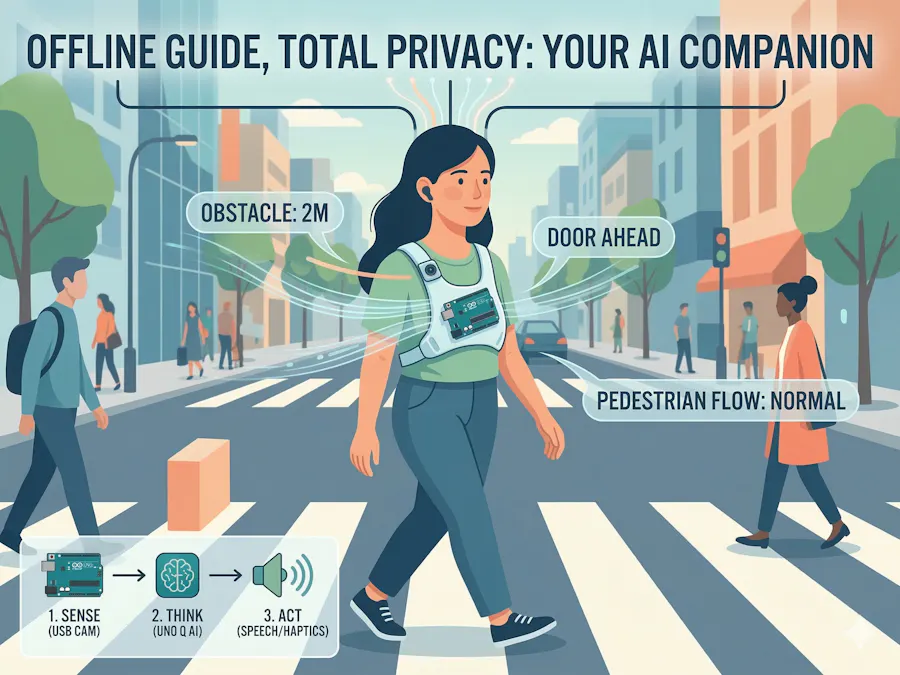
The AI Mobility Companion is a privacy-first, wearable spatial awareness tool designed for the visually impaired. Unlike traditional aids that rely on tactile feedback alone, this device uses Edge AI to "see" the world. It identifies obstacles, recognizes common objects (like doors, chairs, or stairs), and provides the user with two layers of feedback: high-priority haptic (vibration) alerts for immediate danger and descriptive audio "whispers" via Bluetooth for environmental context.
2. Why did I decide to make it?
Navigation for the visually impaired often faces a "Connectivity Gap." Many existing AI assistants require a constant internet connection to process video in the cloud, leading to dangerous latency and significant privacy concerns regarding the user's surroundings.
I built this project to prove that with the Arduino UNO Q, we can move complex Computer Vision out of the cloud and directly onto a wearable device. By processing everything locally, we ensure:
Speed: No lag when detecting a sudden obstacle.
- Speed: No lag when detecting a sudden obstacle.
Privacy: No video data ever leaves the device.
- Privacy: No video data ever leaves the device.
Reliability: It works in subways, rural areas, or anywhere without Wi-Fi.
- Reliability: It works in subways, rural areas, or anywhere without Wi-Fi.
3. How does it work?
The project utilizes the Symmetry Architecture of the UNO Q—balancing the Linux "Brain" with the Arduino "Body."
The Vision (Sense): A chest-mounted USB camera streams frames to the Qualcomm Dragonwing microprocessor.
- The Vision (Sense): A chest-mounted USB camera streams frames to the Qualcomm Dragonwing microprocessor.
The AI (Think): Using an Edge Impulse object detection model running within the App Lab environment, the board analyzes the stream. It categorizes objects and calculates their approximate distance and position.
- The AI (Think): Using an Edge Impulse object detection model running within the App Lab environment, the board analyzes the stream. It categorizes objects and calculates their approximate distance and position.
The Feedback (Act): * Logic Bridge: The Linux side sends a signal to the STM32 microcontroller side via the internal communication bridge.
Haptics: The microcontroller triggers the DRV2605L driver to vibrate the left or right haptic motor, depending on where an obstacle is.
- Haptics: The microcontroller triggers the DRV2605L driver to vibrate the left or right haptic motor, depending on where an obstacle is.
Audio: Simultaneously, the Linux side uses a Python text-to-speech library to announce the object through Bluetooth earbuds.
- Audio: Simultaneously, the Linux side uses a Python text-to-speech library to announce the object through Bluetooth earbuds.
- The Feedback (Act): * Logic Bridge: The Linux side sends a signal to the STM32 microcontroller side via the internal communication bridge.Haptics: The microcontroller triggers the DRV2605L driver to vibrate the left or right haptic motor, depending on where an obstacle is.Audio: Simultaneously, the Linux side uses a Python text-to-speech library to announce the object through Bluetooth earbuds.


_3u05Tpwasz.png?auto=compress%2Cformat&w=40&h=40&fit=fillmax&bg=fff&dpr=2)


Comments